

Non-custodial stablecoin wallet. No KYC. No gas tokens needed. Your keys. Your control. 📲 Download on the App Store & Google Play.
- Tweets174
- Following374
- Followers2.9K
- Likes232





ALT FG Wallet card on a dark background with a blue glow. Headline: No KYC to start. Nothing to wait for. Three rows: email or phone number, crossed out, not asked; waiting for approval, crossed out, none; to start, with USDT and USDC logos: passcode plus 12 words. On the right, a phone shows the FG Wallet start screen, Your wallet starts here, with Create wallet and Import wallet buttons.

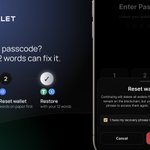
ALT FG Wallet post: forgot your passcode? Only your 12 words can fix it. Three steps: tap Forgot on the unlock screen, reset the wallet once your 12 words are on paper, restore with your 12 words. Phone shows the FG Wallet Reset wallet screen.

ALT FG Wallet card with a green glow. Headline: Who paid you this month? Tap Received in History. Three rows: Received, only what came in, with USDT and USDC logos; Pending, not landed yet; Done, landed, count it. A phone shows the FG Wallet History screen with the Received tab open, listing incoming USDT and USDC payments, one of them Pending.

ALT FG Wallet card: paying a host abroad in USDT on TRON in three steps (host asks for 120 USDT, send in FG to the host's address, confirm: fee 1.95 USDT or 3 TRX), next to a phone showing the Confirm Transaction screen: 120.00 USDT, network fee 1.95 USDT, total 121.95 USDT.

ALT FG Wallet post: No ETH for gas? We pay it. You just send. Three tiles: 0 ETH in your wallet (Ethereum logo), 640 USDT sent anyway (USDT logo), $0 network fee (USDT, USDC and BNB Chain logos). On the right, the FG Wallet transaction screen: minus 640 USDT on Ethereum (ERC20), status Success.

ALT FG Wallet card on a dark background with green glows. Headline: 'Friend on another wallet? Just match the network.' Two tiles: Wallet app, doesn't have to match; Network, must match, with TRON, Ethereum and BNB Chain logos. Below, with USDT and USDC logos: USDT on TRON, Ethereum, BNB Chain. USDC on Ethereum, BNB Chain. A phone shows the FG Wallet Send screen with a pasted 0x address and USDT ERC20 selected.

ALT FG Wallet card on a dark background with red, blue and yellow glows. Headline: 'No exchange account. Your keys sign the swap.' Three steps: Pick USDT or USDC; Check the final amount; Sign on your phone, with a key icon. Below: USDT on TRON, Ethereum, BNB Chain. USDC on Ethereum, BNB Chain. A phone shows the FG Wallet swap confirmation: pay 800 USDT on TRON, receive 799.6 USDC on BNB Chain, swap fee 0.05% (0.4 USDT), network fee about 1.5 USDT, total paid 801.5 USDT, Confirm swap button.

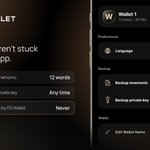
ALT FG Wallet card on a dark copper background. Headline: 'Your keys aren't stuck inside our app.' Three rows: Backup mnemonic, 12 words; Backup private key, any time; Keys seen by FG Wallet, never, with USDT and USDC logos. A phone shows the FG Wallet Settings screen with Backup mnemonic and Backup private key.

ALT FG Wallet card on a dark background with a green glow. Headline: 'The dollar value moves. Your coins don't.' Two bars: 1,000 USDT, $999.70; 1,000 USDC, $1,000.10. Large '$1' with USDT and USDC logos: the price USDT and USDC track, usually within a cent.

ALT FG Wallet card on a dark background with blue glow. Headline: 'Owe a friend stablecoins? Set up their wallet first.' Three tiles: Create a wallet, with USDT and USDC logos; 12 words on paper first; Receive, same network, with TRON, Ethereum and BNB Chain logos. Below: USDT on TRON, Ethereum and BNB Chain; USDC on Ethereum and BNB Chain. A phone shows the FG Wallet Receive screen with TRON, ETH and BSC tabs, a QR code and a demo address.

ALT FG Wallet card: Paying in person? Scan it, don't type it. Rows: ask which network they use first (TRON, Ethereum or BNB Chain); scan their wallet's QR; the address fills in, every character (USDT and USDC). The phone shows FG Wallet's Send screen with a scanned TRON address marked Valid TRC20 address.

ALT FG Wallet card with a large 24/7 sign: blockchains never close. Tiles: Sat, Sun, USDT and USDC still move; 2 a.m., no cut-off time.


ALT FG Wallet weekly giveaway card: "Weekly giveaway. Show us FG on your phone." Tiles show 100 USDC pool, 10 winners, 10 USDC each, with USDC and Ethereum logos. On the right, an iPhone with the FG Wallet home screen showing a total balance of $100.00 and USDC on Ethereum (ERC20).

ALT FG Wallet weekly giveaway card: "Weekly giveaway. Show us FG on your phone." Tiles show 100 USDC pool, 10 winners, 10 USDC each, with USDC and Ethereum logos. On the right, an iPhone with the FG Wallet home screen showing a total balance of $100.00 and USDC on Ethereum (ERC20).

ALT FG Wallet card on a dark copper background: headline 'New FG Wallet. Faster. Cleaner.', a checklist (faster, smoother app; new home screen; all wallets in one sheet), and two phones: the FG Wallet home screen with a total balance, Swap, AML, Receive and Send buttons and USDT assets, and the wallets sheet listing five wallets with a total balance.