

🇸🇰 ✧ PC Tweaker ✧ worked w/ @matys_cs2 @HiggsFortnite @chimperatie @fpsvein @PhonyFPS @StayNaughtyy and many more! ✧ Working with @ParagonTweaks ✧
Slovenská republika
Joined January 2020
- Tweets1.1K
- Following265
- Followers4.4K
- Likes3.6K


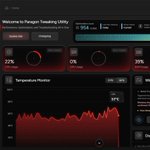

Most people are still on stock settings and wondering why their games feel inconsistent. We just rebuilt everything to fix that.

Your Computer Is Capable Of So Much More
Introducing the final form of PC Gaming Optimization for Windows, accessible globally, created by industry leaders.
Experience true exclusive performance for free below.
5
248
Stock Windows 11 is running AI features and extra services that eat resources while you play and stream. Fix it.
Only do this if you want more stable frames and lower input delay.
Windows 11 is putting AI and Bloat deep into your PC
Do these settings to cut Background usage and Overhead while your Gaming and Streaming
(Low Background Usage + Higher FPS) More info Below!
2
14
2,453
Stock Windows is running tracking + Copilot overhead in the background while you play. That’s FPS drops. Fix it.
Only do this if you want more stable frames and lower input delay.
Use Code "BIOS" for 30% off any Plan!
Download PTU here!
paragontweaks.net/utilities
✅Custom Bios Tweaking Feature
✅Competitive Game Profiles with Nvidia/AMD Specific Settings
✅Nvidia Performance Profiles for Multiple Games
Try PTU for Free!

1
556
Windows is allowed to shut off your USB hubs to save power
That’s random disconnects, polling drops, and stutters
Turn that off for better stability
AMD X3D CPU on Windows 10/11? Do this right now to reduce your Lag
Install Proper Chipset Drivers, Adjust AMD GPU Power Settings and Tune BIOS
(Increased FPS + Lower Latency while Gaming)
More info Below! @ParagonTweaks
Download PTU Today! paragontweaks.net/utilities
✅Custom Bios Tweaking Feature
✅Competitive Game Profiles with Nvidia/AMD Specific Settings
✅Nvidia Performance Profiles for Multiple Games
Try PTU for Free!


4
1,227
Most Gamers dont even use Xbox Overlay yet its Tanking Performance Silently, Turn it off ASAP
Only do this if you want more stable FPS and less input lag

Windows is using AI and Other Settings to decrease your PC Performance while Gaming and Streaming
Do these Settings to Disable and Improve System Usage on Windows 10/11 Computers
(Increased FPS + Reduced Latency) Info Below! @ParagonTweaks
Download PTU Today! paragontweaks.net/utilities
✅Custom Bios Tweaking Feature
✅Competitive Game Profiles with Nvidia/AMD Specific Settings
✅Nvidia Performance Profiles for Multiple Games
Try PTU for Free!


Lagging with a AMD CPU in CS2? That’s drivers, power settings, Chipset Drivers and BIOS
Only do this if you want more stable frames and lower input delay

CS2 feels delayed on default Windows even when your FPS looks fine. That’s input lag, not the game. Fix it.
Only do this if you want more stable frames and lower input delay.
Windows is collecting data and eating performance in the background while you play.
You need to Fix that.
Only do this if you want more stable frames and lower input delay
Use Code "PTU" for 30% for Apex Plan!
Download PTU and Win a Free Gaming PC Today! paragontweaks.net/utilities
✅Custom Bios Tweaking Feature
✅Competitive Game Profiles with Nvidia/AMD Specific Settings
✅Nvidia Performance Profiles for Multiple Games
Try PTU for Free!


3
836
If you have Chrome, Brave, Edge, or Opera, you're dealing with a MAJOR Performance Decrease
Do these Settings to optimize your browser on Windows 10/11 while Gaming and Streaming
(Increased FPS + Reduced Latency).
More Info Below! @ParagonTweaks
Fully Optimize your Gaming PC and Browsers With PTU!
paragontweaks.net/utilities
Use Code "BROWSER" for 25% Off!
✅Custom Bios Tweaking Feature
✅Competitive Game Profiles with Nvidia/AMD Specific Settings
✅Nvidia Performance Profiles for Multiple Games
Try PTU Free Today!


7
5,434
Windows is using AI in the background the ENTIRE time you’re gaming and streaming
Do yourself a favor and turn that off.
You can take all the Guess Work out of Optimizing your PC and let PTU do it for you !
✅Driver Reinstall W/ Custom Nvidia + AMD Drivers ✅Power Plans
✅GPU Performance Profiles
✅Advanced System Tweaks
✅Bios Tuning Directly From OS
Try it Today for Free
paragontweaks.net/utilities
3
12,977
Most people never touch BIOS and wonder why their frames feel inconsistent. This is why.
Only do this if you want more stable frames and lower input delay.
NVIDIA is forcing its app, causing MAJOR Input Delay and FPS Drops while you are Gaming and Streaming
Do these Settings to Optimize Your NVIDIA App for Maximum Performance on Windows 10/11
(Increased FPS + Reduced Latency)
More Info Below! @ParagonTweaks
Fully Optimize your Gaming PC and your Nvidia GPU With PTU!
paragontweaks.net/utilities
✅Custom Bios Tweaking Feature
✅Competitive Game Profiles with Nvidia/AMD Specific Settings
✅Nvidia Performance Profiles for Multiple Games
Try PTU Free Today!


You NEED to set up Discord if you haven't already!
This will make your CS2 and Valorant run even lighter!

Do not let your Logitech app run nonstop in the background, use OMM instead. Make sure you do not use 8000 polling rate if you have huge FPS drops with it.

Razer Synapse is causing MAJOR Input Delay and FPS Drops while Gaming and Aiming
Do these Settings to Optimize Razer App for Maximum Performance on Windows 10/11
(Increased FPS + Reduced Latency)
More Info Below! @ParagonTweaks
Fully Optimize your Gaming PC With PTU! paragontweaks.net/utilities
✅Custom Bios Tweaking Feature
✅Competitive Game Profiles with Nvidia/AMD Specific Settings
✅Nvidia Performance Profiles for Multiple Games
Try PTU Free Today!


6
2,255
Do not let your Fortnite take even more FPS after recent updates. Keep it simple with your skins😎

Attention Fortnite Players!
Your Skin + Pickaxe + Back Bling are Lowering your FPS and giving you Higher Input Delay
Your Looking at a potential 10% decrease in FPS, just on Avg FPS paired with a 22.3% Decrease in FPS Lows
Like❤️+ RT♻️ + Info Below! @ParagonTweaks