

cto @kalecomputer building a computer for curious kids
- Tweets16.8K
- Following792
- Followers2.5K
- Likes54.4K



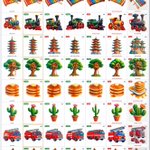


ALT A large comparison grid from the kale-img-1 fine-tuning challenge. Each of its 20 rows shows one subject: a reference picture from our dataset (soft 3D children's illustrations on white), then six entries' versions, ranked by score: ostris 8.1, amandine flachs 7.6, su 7.2, assu_bhadhu 6.9 (all MOSS-based), max 5.3 (HiDream-O1), hasnain 3.5 (SDXL). Subjects: sea otter, toucan, kid planting a seedling, girl skipping rope, two kids building a sandcastle, alarm clock, xylophone, steam train, pagoda, treehouse, pancakes, cactus, fire truck, cello, sea turtle, monarch butterfly, windmill, kid astronaut, teapot, kid playing king. Every picture has a score badge and a pass or fail mark. Ostris's column has a gold border and passes every row. Amandine and su each drew a four-roofed pagoda, assu_bhadhu put writing on the train, max has blotchy backgrounds, hasnain often gets compositions wrong. Same prompts, seeds and resolution for all, scored blind by three judge passes.


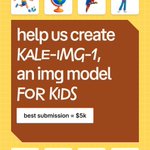
ALT Promotional poster for Kale inviting people to help create “KALE-IMG-1,” an image model for kids. The design uses a bright yellow grid background with playful 3D-style icons in white rounded cards, including a castle, panda, helicopter, cupcake, child playing soccer, globe, parrot, child playing violin, dolphin, double-decker bus, tortoise, and tropical island. A large brown central panel reads “help us create KALE-IMG-1, an img model FOR KIDS,” with a white label below stating “best submission = $5k.” The Kale logo appears in the lower-right corner. The overall style is colorful, friendly, and child-focused, combining educational and imaginative visual themes.

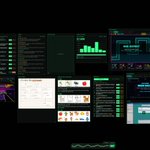
ALT Wide screenshot of a dark, futuristic command-center dashboard for AI-assisted development. Numerous neon-green outlined panels are arranged across a large black canvas, showing tickets, today’s tasks, a reaction game, weekly usage costs, model notes, agent experiments, image-generation results, design diagrams, a beta plan timeline, offline review notes, and several colorful mini-game or UI prototypes such as “Storm Gates” and “Prism Vault.” A panel on the right summarizes replay findings with counts and percentages, while another explores device-bar input ideas with small waveform diagrams. The overall interface resembles a live operations wall for coordinating many agents, experiments, product tasks, and prototypes at once, with a “LIVE” indicator and clock in the top-right corner.


ALT Wide screenshot of a dark, futuristic T3 Code workspace showing many coding-agent sessions and monitoring panels at once. A narrow left sidebar lists multiple Kale-related tasks and branches, each with status indicators such as “Done” and small agent icons. The main canvas is arranged like a dashboard with glowing green-bordered panels for tickets, today’s tasks, a reaction game, weekly usage costs, a “Glow Dash” game, a technical architecture diagram, image-generation experiments, tasks needing review, and several colorful mini-app prototypes including “Rain District” and “Neon Docks.” A small live status indicator and clock appear in the top-right, while a waveform-style input monitor sits near the bottom center. The overall interface feels like a command center for orchestrating many AI coding agents and projects simultaneously.


ALT Dark-themed DJ mixing interface showing two tracks prepared and playing at 175 BPM. Large stacked waveforms fill the top half, with deck A in blue and deck B in pink, including beat grids, build/drop sections, phrase markers, and transition timing hints. Below are two virtual decks with jog wheels, cue, pause, sync, loop, echo, EQ controls, and a central mixer with volume meters and crossfader. The loaded tracks are “unendlichkeit (gunji Edit) [BoTEKKe Remix]” by CRO and “Ein Traum (Ostrausch Edit).” A track library at the bottom lists both songs with BPM, key, duration, analysis status, and preparation controls.

ALT Close-up photo of a Hercules DJControl Compact USB DJ controller on a dark desk. The compact black controller has two large jog wheels, one on each side, with “Hercules DJ” branding, plus illuminated blue performance pads beneath the mixer controls. In the center are multiple rotary knobs for volume and mixing, a horizontal crossfader, and buttons for loop, FX, sample, cue, record, mode, shift, and scratch functions. Blue-lit CUE buttons and transport controls sit along the bottom near each deck. The image is shot from above at a slight angle, emphasizing the controller’s small, portable layout and physical controls.


ALT Infographic titled “How a new voice is born,” explaining Kale’s end-to-end voice creation pipeline in three stages: Design a voice, Clone a voice, and Use the voice. The first section shows writing a voice description, generating and reviewing samples, selecting a “golden clip,” and cleaning the audio. The second converts the approved clip into numerical audio data and saves it as a `voice.json` file representing the cloned voice. The final section shows the voice running on a server with a GPU: a text prompt such as “Let’s see how a volcano erupts” is converted into new audio numbers, decoded back into speech, and streamed to the Kale device. Handwritten notes, arrows, waveform graphics, model labels such as drama-3 and s2-pro codec, and technical annotations make the diagram feel like an illustrated engineering notebook.