
Build customizable AI in minutes. It handles your customers, assists your team, or runs your own workflow, all through chat.
Joined September 2026
- Tweets17
- Following2
- Followers4
- Likes46
Pinned Tweet
ChatFrom is coming to life.
Connect your knowledge, tools and workflows, then let people get things done through chat.
Answer questions, trigger actions, call APIs, run workflows, ask for approval when needed, and keep the whole thing conversational.
First users in about 2 weeks
ChatFrom retweeted

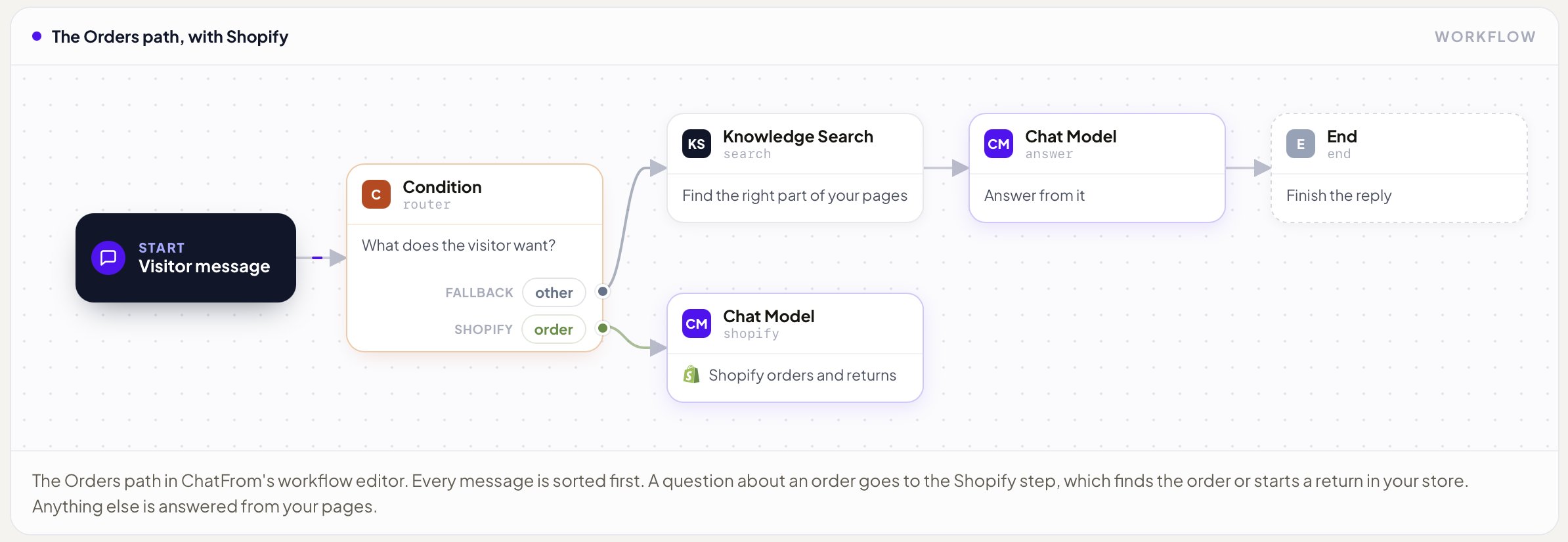
Your shop's chatbot can answer everything on your website except the one thing customers ask the most. Where's my order?
That answer lives in Shopify, not on a page, so most bots just tell people to check their email.
So I made @ChatFrom_io connect to your store. The customer gives their order number and email, and it finds the order and sends the tracking link. They can even start a return, and you just approve it in Shopify.
I wrote up the whole setup, it takes under an hour 👇
ChatFrom retweeted
ChatFrom has quietly been live for about 10 days and I never officially announced it 😄 So here it is.
@ChatFrom_io lets you build your own AI chatbot, and it runs on the open-source chatbot engine I built a month ago. It can be anything you need, a customer support bot, an internal assistant for your team, or something else entirely. I wanted the whole flow to stay really simple.
1. Add your knowledge from documents, your website, Q&A, Google Docs, Notion or any kind of text
2. Set the system prompt, settings and guardrails yourself, or let ChatFrom Assist do it for you
3. Pick your models
4. Connect tools like Stripe, Shopify, Calendly, any MCP or API, and hand off to a human when needed
5. Keep it as simple Q&A on your docs, or draw your own workflow with different paths and conditions
6. Put it on your website, Telegram, WhatsApp, Slack or Discord in minutes
On top of that you can run evals on your models and workflows, and connect Langfuse for analytics.
Under the hood my engine uses advanced RAG, so searching your docs is fast, cheap and reliable. It re-ranks the results and works in any language, no matter what language your docs are written in. Workflows run on LangGraph, so you can build pretty much any kind of flow for your chats.
Would love your feedback, link in the first reply 👇


ChatFrom retweeted
I make ChatFrom, so I tried hard to be fair comparing it with Chatbase.
They do the exact same job, a chatbot that answers your customers from your own docs. Both even charge in credits. The difference is how far those credits go.
Where Chatbase wins
1. Way more AI models, including the big ones like Opus
2. Messenger, Instagram, phone and mobile app kits
3. A built-in help desk and team seats
4. You can remove the branding
Where ChatFrom wins
1. The same answers cost a lot less every month
2. Shopify, Stripe and booking tools on every plan
3. Telegram, Discord and Crisp
4. Data kept in Germany, even on the free plan
5. It shows the source under every answer
If you're already happy on Chatbase and use those extras, stay. If you're a small business picking for the first time, I think ChatFrom fits better.
Full breakdown in the first reply 👇
Claude Haiku 5.5 is now our default model for intent routines.

Most people think the big model does all the work in a chatbot. It doesn't.
Before it answers, a tiny model has already done 3 jobs
Followed the conversation. Someone asks "do you ship to Germany?" and then "how long does it take?", and it knows they still mean Germany
Worked out what they want, a quick answer, a booking or help with billing
Matched a question in Spanish or Japanese to the right part of English docs
This week I swapped that model in ChatFrom and tested 4 options on the same 20 tasks. All 4 got 20/20, so price and speed picked the winner.
- GPT-4.1 mini (my old one) $0.107 per 1k calls, 0.82s
- Gemini 3.5 Flash-Lite $0.086, 0.76s
- GPT-6 Luna $0.042, 2.0s
- Claude Haiku 5.5 $0.042, 0.98s
Claude Haiku 5.5 won. It's the same price as GPT-6 Luna at half the wait, and about 60% cheaper than my old one.
It's live for every ChatFrom chatbot now.

ChatFrom retweeted
I built a chatbot on @ChatFrom_io's own help docs using advanced RAG. If you want to build one too, here's the whole process, step by step:
1- Collect your sources: help pages, policies, FAQs, Notion, Google Docs. Leave out old stuff, or it'll get quoted back to customers.
2- Split everything into small chunks of a few sentences each, so each one is about a single idea.
3- Run each chunk through an embedding model. That turns it into a vector, which is basically its meaning stored as numbers.
4- Store those vectors in a vector database like chroma, pgvector, Qdrant or Pinecone. That's your searchable knowledge.
5- When a question comes in, turn it into a vector too and pull the few chunks closest in meaning.
6- Have the model answer only from those chunks, show the source, and say "I don't know" when nothing fits.
7- Test it with real questions from your inbox. When an answer is wrong, it's usually the docs, not the prompt.
The best side effect is multi-language support. Search works on meaning, not exact words, so a question in Japanese or Spanish still finds the right chunk in my English docs and gets answered in the asker's language.
Full write-up with what I learned in the first reply 👇
ChatFrom retweeted
Wrote up how @ChatFrom_io compares to Intercom Fin, and tried to be fair about it.
If you already run support in Intercom, or need phone and SMS, Fin makes sense.
If you're a small team without a help desk and you want a bill that doesn't grow with every chat, plus your own pick of model and EU hosting, ChatFrom is probably the better fit.
Link in the first reply 👇
Fastest isn't always best. We tested OpenAI's new Decisions API for ChatFrom's routing, and here's why Jev is still our default.
OpenAI's new Decisions API is the fastest thing I've measured on my chatbot's routing step.
It's still not my pick.
Last month I tested Jev against six LLMs on @ChatFrom_io 's intent routing. When OpenAI shipped Decisions this week, I ran the exact same 30 messages again. 12 clear refund requests, 12 clear support requests, 6 vague ones like "I want to cancel".
Here's how it went:
Jev: 30/30, 0.24s, $1.41 per 100k decisions
Decisions API: 29/30, 0.18s, $1.40
GPT-4.1 mini: 30/30, 0.75s, $2.52
GPT-6 Luna (chat): 30/30, 1.30s, $1.71
- Speed
Both decision APIs were 3 to 10x faster than the chat models. Decisions won the median, but Jev was way more consistent. Its slowest calls took 0.27s. Decisions' slowest took 0.90s.
- Cost
Basically a tie, for a funny reason. Both bill the question template as input. Decisions counted ~140 tokens per decision at $0.10/M. Jev counted ~334 at $0.042/M. More tokens vs a higher price, same bill. About $14 per million decisions vs ~$25 for GPT-4.1 mini.
- Confidence
I route anything under 0.8 to a clarifying question. Jev scored every clear message 0.98+ and only the two vague ones fell below.
Decisions scores lower across the board. At 0.8 it would've asked the visitor 4 times, including for a plain "hello". Its one mistake, "I want to cancel" sent to refund, came in at 0.74. So 0.8 catches it, 0.7 lets it through.
Lesson: don't copy a threshold from one model to another.
How you ask changes the answer
I also tried it as a yes/no question. Worse. 28/30, a 0.51 coin toss on one vague message, and it refused to answer "hello". Use a choice question, and treat refusals as "unsure".
One weird thing is, GPT-5 nano went from 30/30 in September to 26/30 this time. Same prompt, same settings. One run isn't enough to trust anything.
How to test a decision model on your own bot (bookmark this):
1. Pull ~30 real messages, include the vague ones, and label the branch you'd pick
2. Ask every model the same question, using the parser your workflow actually uses
3. Make one warm-up call, then time the rest. Look at the slowest 5%, not just the median
4. Price it per decision from billed input tokens, because templates count
5. Log confidence on every answer and set a threshold per model. Below it, ask the visitor
6. Try choice vs yes/no wording on your vague messages
7. Save it as a script and rerun whenever a model or price changes
My pick for ChatFrom: Jev stays the default. Decisions is a close second, and I'll retest when it leaves beta.
Full write-up with all 8 settings and the confidence table in the first reply 👇


ChatFrom retweeted
Has anyone moved intent routing from Jev to OpenAI's new Decisions API yet?
Jev has been fast for me in @ChatFrom_io. What I want to know is cost per decision once the prompt template is counted as input. On Jev a ~55 token request billed ~336.
ChatFrom retweeted
The world is a weird place now, had to secure the .si (super intelligence) domain for @ChatFrom_io :)

ChatFrom retweeted
We all agree @ElevenLabs is the most successful AI-native company in Europe.
This podcast with @mati on @davidsenra's show is the best look I've seen at how they built it.
3 things that stuck with me from this podcast:
- They started from a real frustration, badly dubbed films in Poland
- Tiny autonomous teams, a flat org, and engineers working directly with customers (Palantir-style)
- They turned down multiple acquisition offers. They're not selling.
As an indie builder, the focus lesson is the most important one, which is pick one thing (in this case voice) and go as deep as you can!
youtube.com/watch?v=RFccAuyP…

ChatFrom retweeted
ChatFrom is built using my chatbot engine, which is available open source.
The engine gives you pretty much everything you need for a chatbot, from building a knowledge base, retrieval, and loop workflows to more advanced LangGraph workflows. It can also connect to LangSmith or LangFuse for analytics.
Give it a try, contributions are welcome.
Link is in the first post!

Been a few weeks working on @ChatFrom_io .
You can give it pretty much any knowledge base: docs, text files, websites, anything with words. Based on what you’re building, it can decide how that data should be chunked and turned into vectors, or you can control the whole thing yourself.
Then the RAG layer handles retrieval when you or your users ask something.
But the part I’m most excited about is that it doesn’t have to stop at answering questions. You can give it tools and let it take actions, or build full workflows on top of it. Under the hood, those workflows run on LangGraph.
So it can be a customer support bot, an internal team assistant, a technical/dev assistant, or something that knows your product deeply and actually works for you. It could create TikTok UGC videos, use the X API to find relevant posts for marketing, or run completely different workflows.
The sky’s the limit.
Still in development. Target release is October 15.


A little more about what we’re building at ChatFrom 👇
Still in development, but getting very close. October 15 is the target.
Been a few weeks working on @ChatFrom_io .
You can give it pretty much any knowledge base: docs, text files, websites, anything with words. Based on what you’re building, it can decide how that data should be chunked and turned into vectors, or you can control the whole thing yourself.
Then the RAG layer handles retrieval when you or your users ask something.
But the part I’m most excited about is that it doesn’t have to stop at answering questions. You can give it tools and let it take actions, or build full workflows on top of it. Under the hood, those workflows run on LangGraph.
So it can be a customer support bot, an internal team assistant, a technical/dev assistant, or something that knows your product deeply and actually works for you. It could create TikTok UGC videos, use the X API to find relevant posts for marketing, or run completely different workflows.
The sky’s the limit.
Still in development. Target release is October 15.
Stay tuned!
My in-development SaaS @ChatFrom_io is actually doing pretty well in terms of visitors already :)
Target release is in about 2 weeks. I’m considering this one as my flagship product!


ChatFrom retweeted
When we’re building something the right way, every little detail matters, even the ones we might overlook, like “About Us.”
Just added that to my project in development, @ChatFrom_io based on this helpful tweet from Rob.

founders and marketers: you need an optimized "about us" page on your site
i work with billion dollar tech companies and bootstrapped SaaS. The About Us is one of the first pages we optimize
here's how (8 points):
(P.S. I explain why this is important at the bottom of the post)
here's how:
1. start with a clear value prop sentence: "[COMPANY] is a [CATEGORY] that [DOES XYZ] for [ICP]."
2. add your core services under a "what [COMPANY] does" H2 subheading. Put each service/feature/product in an H3 subheading. Write 2-3 sentences about what you do, and what outcome it produces.
3. next, add a "what makes [COMPANY] different" H2 subheading. List about 5 core differentiators in H3 subheadings. Give specific, quantifiable differentiators and call out competitors by name. Example: [COMPANY] offers month-to-month payment terms, whereas options like [COMPETITOR] have mandated 12-month contracts. Again: 2-3 sentences per differentiator.
4. your next H2 should be "who uses [COMPANY]." Add bullet points that call out your exact ICP segments. Example: "B2B SaaS marketing teams at 50 to 200-employees."
5. now add a "the team behind [COMPANY]" H2 subheading. Include the names of the founders, quick backstories, company origin story, team composition, and links to social pages (especially the founder(s) socials). You only need about 2 sentences per backstory/origin story.
6. add a "how [COMPANY] works" section. Include info like communication channels, response times, who on the team customers will work with, turnaround time, and onboarding process.
7. now for the most important section for AI Search: add a "key facts" H2. This should be an HTML <table> or <dl> (definition list) so it's crawlable. Include the following rows:
Company Name
Type
Founded
Founder
Headquarters
Website
Core Offering
Pricing
Contract Terms
Services
Communication
Notable Clients
Customers Served
Projects Delivered
Competitors
Social
8. finally, add your FAQ section. Put "frequently asked questions" in an H2 subheading with your questions as H3s. Only 2-3 sentences per answer.
Here's why this page is so important:
1. it helps train AI to talk about your brand accurately
2. it strengthens the E-E-A-T score of your entire domain
3. in a world where everything seems fake, make your brand human
shoot me a DM if you want a live demo of the lowest hanging fruit to rank in AI Search (tailored to your specific site)
i hope this helps someone!
ChatFrom retweeted
Jev has recently been released and is getting a lot of attention. It’s a decision model that returns a choice, probabilities and a confidence score, which makes it a natural fit for tasks like chatbot intent routing.
So I tested it using ChatFrom’s production routing logic to see how it compares with LLMs on accuracy, speed and cost.
The task was to decide whether a visitor wants a refund or needs support. I ran 30 test messages through Jev and six LLMs from OpenAI, Anthropic and DeepSeek, including ambiguous requests like “I want to cancel”.
On accuracy, Jev matched GPT-5 nano and GPT-4.1 mini at 30/30. The Claude and DeepSeek models scored between 22/30 and 29/30, depending on the model and settings.
On speed, Jev’s median response time was 0.32 seconds with the connection kept open, compared with 0.84–0.91 seconds for the two OpenAI models using their faster tested settings. Opening a new connection each time brought Jev to 0.95 seconds, so connection reuse mattered.
On price, Jev cost $1.41 per 100,000 decisions. That put it between GPT-5 nano with minimal reasoning at $1.03 and GPT-4.1 mini at $2.52. DeepSeek V4 Flash was cheaper, but less accurate in this test.
What interested me most was Jev’s confidence score. With a threshold of 0.8, two ambiguous messages would have triggered a follow-up question, giving the visitor a chance to clarify before the workflow continued.
This was a small test with synthetic messages, but it gave me practical ideas for improving routing in ChatFrom. I wrote up the full comparison and how I’m planning to use confidence in the workflow.
Article link in the first post.


