

The open source coding agent that takes over your editor, terminal, and browser to complete work autonomously. npm i -g cline
Desktop,VSCode, JetBrains, CLI
Joined January 2025
- Tweets4.1K
- Following16
- Followers81.6K
- Likes1.8K




5) See what Cline changed in the last turn, review your git changes, or open any file in your project, all without leaving the chat.

Download Cline Desktop for MacOS, Windows, and Linux:
cline.bot/desktop


Now available on ClinePass, our $9.99/month subscription plan for ~5x discounted access to open weights models.
cline.bot/cline-pass

There’s new free models available in Cline:
- Reflection Beam (501B)
- Nemotron 3.5 Super VL (120B)
- Poolside Laguna S 2.1 (118B)
- Nemotron 3.5 Lightning (32B)
- Solar Mini 4 (35B)
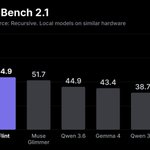
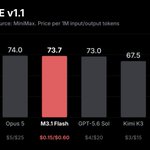
6 months ago these Terminal-Bench scores were frontier, open weights makes this more accessible.

Try Cline with:
npm i -g cline
Or install our new desktop app for mac, windows, and linux:
cline.bot/desktop
Cline retweeted

154 DAYS LATER....I Finally Dropped a New YouTube Video🙈
A little late to the party on X, but I just HAD to share this here because I'm so overwhelmed!!
This time, I tested the new @deepseek_ai V4.1 Flash 1017 and used it to build a fully interactive 3D city with @cline.
After being away from YouTube for so long, it feels so good to finally be back!! 🥹
Full video below ↓

Run it in Cline now:
1) Install Cline:
npm i -g cline
Or use our desktop app:
cline.bot/desktop
2) Configure local models through Ollama:
docs.cline.bot/running-model…
3) Install Flint:
huggingface.co/RecursiveSI/f…
Cline retweeted

Muse Wonder is now available on @Cline, @Cloudflare, @Cognition, @Cursor_AI, @OpenRouter, @Oracle and @Vercel - with more partners coming soon.
We look forward to seeing what the community builds with Muse Wonder!
Start building 👉 bit.ly/47wMYCp


Use the Goal plugin in Cline Desktop to keep Cline working until the task is verified complete.
Customize > Marketplace > Plugins > Install 'Goal' > use /goal
Plugins are TypeScript files that extend Cline's capabilities with:
- Slash commands
- Custom tools
- Lifecycle hooks (beforeTool, afterRun, etc.)
- Dynamic rules
The Goal plugin adds a /goal slash command and an afterRun hook that nudges Cline to verify its work, and only when verified complete can it call the plugin's custom mark_goal_complete tool to finish the task.
Check out the docs to see how plugins work across Desktop, the CLI, and the SDK:
docs.cline.bot/customization…

Install the Cline Desktop app for macOS, windows, and linux here:
cline.bot/desktop