

Official @Coinbase Support Account. Do not post private info publicly.
Joined June 2014
- Tweets98.5K
- Following37
- Followers358K
- Likes196
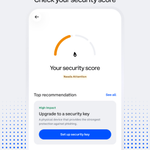

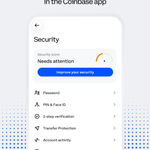


To get started: Open Coinbase → Account & Settings → Security, then check your security score at the top.
Review the factors affecting your score, then open the top recommendation and follow the suggested setup. Start with one step at a time.
Read more here: help.coinbase.com/en/coinbas….
Use official in-app support if needed. Never share your password or 2-step code.

Start with your security score.
Find it, review the recommendations, and take the next suggested step.🧵

Don’t send crypto to get crypto back. Giveaway scams can look convincing, but the promised prize never arrives. Learn the red flags and what to do if you’ve already sent funds: coinbase.com/blog/consumer-p…

One setting can add extra safety before a transfer completes.
Here's how Transfer Protection's threshold, verification methods, trusted contacts, and time delay work. 🧵

Set a Time delay from 6–48 hours. During the wait, watch the transfer details and cancel a pending transfer if it looks suspicious. Coinbase may send email, SMS, and push notifications.
Settings and methods can vary by account or product.
Learn how to set up Transfer Protection: help.coinbase.com/en/coinbas…
If an option is unavailable or an approval is pending, use official in-app support. Never share your password or 2-step code.


Know the emergency button: use Lock account only if someone has gained unauthorized access. Locking signs you out on all devices; unlocking requires identity verification.
Transfer Protection can add extra checks to outbound transfers. We’ll cover that more here later on.
Make your October security checkup: open the Coinbase app → Security → review your devices, activity, and 2-step verification.
Learn more: help.coinbase.com/en/coinbas…
Coinbase will never ask you for your password or 2-step verification codes. Do not share this information.
Before submitting another withdrawal, check these five things first:
1/ The status page — Is there a platform-wide incident?
4/ Balance and limits — Is there an active hold or limit?
5/ Notifications — Is a security or verification step required?
Confirm the first request’s status before trying again.
If the issue continues, use official in-app Support: help.coinbase.com