

Little Tagger is a lightweight, easy-to-use menu bar app for Mac, that assists you in tagging your files and folders.
Germany
Joined April 2021
- Tweets16
- Following2
- Followers23
- Likes2

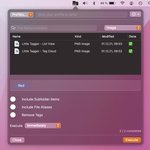


We published a minor release on the Mac App Store. Version 1.3.2 mainly fixes a bug that caused newly created tags to not be applied to files immediately.
New in version 1.3.1: Choose to open a resizable & moveable window instead of the menu bar pop-over, optimised for Apple M1 and bug fixes. Now available on the Mac App Store. apps.apple.com/de/app/little…

ALT Little Tagger's moveable and resizable main window.
Version 1.3.0 has just been released. New in this version: Tag Cloud/Tag List window, macOS 12 ready, revised tag import and bug fixes. Now, also available in German. apps.apple.com/de/app/little…

ALT Little Tagger version 1.3.0 after successfully tagging two files.
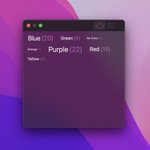
If you have always wanted a simple tag cloud in #macOS, look no further.
We've added a tag cloud window, that can be opened from anywhere.
And the best? It works with Finder. Simply drag & drop files from Finder onto a tag in the tag cloud and it will be added to the files.

ALT Little Tagger's tag cloud on macOS Monterey.

We all love keeping our hands on the keyboard. That’s why we made all important actions available via keyboard shortcuts.
For example, load a tagging profile by pressing ⌥⌘L.
Learn more about this and other useful shortcuts notion.so/Little-Tagger-Help…

Here is another handy shortcut. In the open menu bar window quickly jump to the tags field to enter new tags by pressing ⌘T. Learn more about this and other useful shortcuts notion.so/Little-Tagger-Help…

ALT Press ⌘T to quickly jumpt to the tags field.
Get your tagging workflow started with @GetLittleTagger and a simple shortcut. Select folders or files in Finder and press ⌘⇧E to import all the files, that you wish to tag. Learn more about this and other shortcuts. notion.so/Keyboard-Shortcuts…

ALT Press ⌘⇧E to import files
Did you know @GetLittleTagger fully respects your #privacy? There are no analytics, no user accounts and everything runs locally on your Mac. 🖥 #privacybydesign


Little Tagger retweeted

Happy to see a rating of 4.7 ⭐️ for @GetLittleTagger two weeks after release. It seems not much, but it means a lot to me. Thanks for sending in feedback. My goal is it to improve the file tagging experience on macOS for regular and power users alike.

ALT Little Tagger is rated 4.7 out of 5 stars.
Version 1.2.0 has just been released. New in this version: Notifications, Touch Bar support and more keyboard shortcuts. Use Little Tagger more efficiently without taking your fingers off your keyboard. apps.apple.com/de/app/little…

ALT Little Tagger notification banner notifying that processing is completed.
Only 2 days left! 🚀 Get Little Tagger now and save 50%. Download on the Mac App Store. apps.apple.com/de/app/little…

ALT Little Tagger menu bar app showing popover window with selected files and three tags on a MacBook Air.