

Making AI feel unfair Open for collaboration
Joined May 2026
- Tweets1.8K
- Following27
- Followers2.9K
- Likes697




Pinned Tweet
A Stanford professor stood in front of a full lecture hall and told them that depression has almost nothing to do with sadness. Then he wrote two words on the whiteboard that nobody in the room could define. Anhedonia. Psychomotor retardation. That, he said, is the actual illness.
The man is Robert Sapolsky, the neurobiologist who built his career following wild baboons across Kenya to measure what stress does to a living body.
What makes the video worth 52 minutes is not the subject. It is the method.
No slides. No notes he ever glances down at. One camera, one whiteboard, and a man taking depression apart the way a neurologist takes apart a stroke.
He is doing something deliberate, and it takes a while to catch. Every time the material could soften into sympathy, he hauls it back into biology. Hormones. Neurotransmitters. Genes that do nothing whatsoever until life goes wrong, and then decide everything.
Somewhere in the middle he says one sentence about depression that viewers have been pulling out of this lecture for 16 years. It is 5 words long. It reads like a contradiction until he unpacks it.
Under the video, sleepy_and_caffeinated quoted that exact sentence and wrote two words beneath it. That got me. 4.3 thousand people agreed.
Johnny_boy777 said it from another angle. The best thing about the internet, he wrote, is that any ordinary person can sit in on this without ever enrolling at Stanford. 2.6 thousand likes.
16 years old. 6.2 million views. 9410 comments. One of 25 lectures in the Stanford course Human Behavioral Biology, and every one of them is free.
Most people assume they understand depression because they have felt bad. 52 minutes is enough to learn they were describing something else entirely.
52 minutes. 5 words. It is in the video.
Anjula Dwivedi retweeted

Floot is now in your @ChatGPT sidebar
Describe the app you want, watch it build in a live preview, then publish it, right inside ChatGPT
I don't pick GPT-6 by its score alone.
Here's where I'd start with these 8:
1. Opus 5.5: proposals, reports and coding.
2. Fable 5.1: stress-test plans and drafts.
3. GPT-6 Astra: campaign strategy and research.
4. GPT-6 Sol: landing pages and workflows.
5. Grok 4.7: research with live search tools.
6. Kimi K3: large file sets and reports.
7. Gemini 3.8 Flash: analyse images and video.
8. GPT-6 Luna: tag feedback and extract data.
But the job matters as much as the ranking (especially when you need a quick answer).
The large numbers are Artificial Analysis benchmark scores. The smaller /10 ratings are editorial judgements (not my own test results).
And those benchmarks use different effort settings, so treat this as a starting point for your next task.
Try the same brief in two models, then compare what you can use without rewriting it (keep the brief identical).
Repost ♻️ to help someone in your network.

🚨 30 Claude AI Terms You Need to Know to Unlock Its Full Potential!
Claude is more than just an AI chatbot. From coding and research to automation and building websites, understanding these 30 terms can help you use Claude smarter, faster, and more efficiently. 👇
🔥 Here are 30 essential Claude terms explained simply:
1. Prompt — The instructions you give Claude.
2. Opus — A powerful model for complex tasks.
3. Sonnet — A balanced model for everyday work.
4. Haiku — A lightweight model for quick responses.
5. Extended Thinking — Helps Claude work through complex problems.
6. Chat — Claude’s standard conversational interface.
7. Cowork — A workspace for handling tasks and files.
8. Claude Code — AI-powered coding and development.
9. Claude Design — Tools for creating visual designs and layouts.
10. Claude in Excel — AI assistance for spreadsheet workflows.
11. Claude in Chrome — Browser-based AI assistance.
12. Projects — Organized workspaces for related conversations and files.
13. Artifacts — Documents, code, and interactive content created by Claude.
14. Skills — Reusable workflows for specific tasks.
15. Plugins — Extensions that combine tools and capabilities.
16. Connectors — Connections between Claude and external apps.
17. Computer Use — Lets Claude interact with a computer in supported environments.
18. Dispatch — A way to send tasks from your phone to Claude on your desktop.
19. Scheduled Tasks — Tasks configured to run on a schedule.
20. AskUserQuestion — A tool for asking clarifying questions in supported workflows.
21. Global Instructions — Instructions that apply broadly across tasks.
22. Custom Instructions — Project-specific guidance for Claude.
23. Styles — Saved writing tones and formatting preferences.
24. Memory — Helps retain relevant information across supported interactions.
25. Research — In-depth research and report generation.
26. Web Search — Access to current information from the internet.
27. Markdown — A simple text format used for structured documents.
28. SKILL.md — A file containing a skill’s instructions and configuration.
29. CLAUDE.md — A file used to provide persistent instructions to Claude Code.
30. Vibe Coding — Building software by describing what you want in natural language.
💡 Why does this matter?
The more familiar you are with these concepts, the easier it becomes to choose the right model, automate repetitive work, build projects, and get better results from AI.
You don't need to master everything today. Start with the tools that solve your biggest problems.
🔖 Save this post as your Claude AI cheat sheet.
Follow me @HeyAnjula for more AI tools, practical workflows, and productivity tips.

Delete Tiktok
Delete Linkedin
Delete Instagram
Create an Amazon KDP account, and sell AI eBooks.
It's boring... but if you start today, you can make $3,000 by the end of August.
Like + comment "KDP" and I will send you my killer guide totally FREE.
Must follow me to get this proven guide in your DM.
⏳ Free for the next 48 hours

🚨 12 FREE YOUTUBE COURSES THAT CAN TEACH YOU MORE THAN MOST PAID COURSES.
Save this 👇
1. Sell Better Than 99% - Alex Hormozi
lnkd.in/duJ9PFcm
2. Speak Like The 1% - Natalie Dawson
lnkd.in/dNF2d7nX
3. Think Clearly - Sandeep Swadia
lnkd.in/dyK-6xwX
4. Storytelling Masterclass - Philipp Humm
lnkd.in/daJ5Xq2b
5. Negotiation Skills - Matthias Schranner
lnkd.in/d8u3N6zT
6. Productivity Masterclass - Dan Martell
lnkd.in/d5zxnnYp
7. Study Smarter - Andrew Huberman
lnkd.in/dqF_bvH9
8. Build + Sell AI Automations - Nick Saraev
lnkd.in/efrh6Qq8
9. Claude AI Beginner Guide - Metics Media
lnkd.in/dB_EjJqR
10. Manage Money Better - Mark Tilbury
lnkd.in/d43y7dF7
11. Master Your Focus - Rian Doris
lnkd.in/diRTVTzF
12. 44 Harsh Truths About Life - Naval x Chris Williamson
lnkd.in/dpbyFAEC
Sales. AI. Money. Focus. Communication. Negotiation.
₹0 to start learning all of it.
Also, grab these 35 FREE CERTIFICATION COURSES right now:
Grab these 50 FREE CERTIFICATION COURSES right now!!!
1. 100 Days of Code™: The Complete Python Pro Bootcamp:
trk.udemy.com/WOQ0xA
2. Complete Data Analyst Bootcamp From Basics To Advanced:
trk.udemy.com/bk10Wv
3. Playwright JS/TS Automation Testing from Scratch & Framework:
trk.udemy.com/OYdW6W
4. Microsoft Excel - Excel from Beginner to Advanced 2026:
trk.udemy.com/R0dW4N
5. Complete Data Science,Machine Learning,DL,NLP Bootcamp:
trk.udemy.com/vD6Oov
6. AI Engineer Core Track: LLM Engineering, RAG, QLoRA, Agents:
trk.udemy.com/yZ6Bn3
7. AI Engineer Agentic Track: The Complete Agent & MCP Course:
trk.udemy.com/KBdWoN
8. The Complete Full-Stack Web Development Bootcamp:
trk.udemy.com/m4y0DM
9. Ultimate AWS Certified Solutions Architect Associate 2026:
trk.udemy.com/qW6oDn
10. Microsoft Power BI Desktop for Business Intelligence:
trk.udemy.com/9VdqGe
11. Complete web development course:
trk.udemy.com/jR6aXn
12. PMP Exam Prep Course 35 PDUs/Hours Updated for the 2026 Exam:
trk.udemy.com/Pzdnj6
13. Java Spring Framework, Spring Boot, Spring AI - Gen AI:
trk.udemy.com/1Gdzeg
14. Full stack generative and Agentic AI with python:
trk.udemy.com/VODdaR
15. [NEW] Ultimate AWS Certified Cloud Practitioner CLF-C02 2026:
trk.udemy.com/ZVjEbR
16. Complete Generative AI Course With Langchain and Huggingface:
trk.udemy.com/X49Ey5
17. The AI Engineer Course 2026: Complete AI Engineer Bootcamp:
trk.udemy.com/oN6JRg
18. Learn AI Tools & Build AI Agents for Testing & QA Automation:
trk.udemy.com/WOQEX3
19. The Complete Digital Marketing Guide - 27 Courses in 1:
trk.udemy.com/n46Vkx
20. Machine Learning A-Z [2026]: ML, DL, AI with AWS, Python & R:
trk.udemy.com/6kMzWN
21. Decoding DevOps – From Basics to Advanced Projects with AI:
trk.udemy.com/OYdEBA
22. The Complete AI Guide: Learn ChatGPT, Claude & Generative AI:
trk.udemy.com/2R07kD
23. Complete 2026 Python Bootcamp: Learn Python from Scratch:
trk.udemy.com/3k0zAv
24. Mastering Data Structures & Algorithms using C and C++:
trk.udemy.com/4anM51
25. The Complete Claude Code & Claude Cowork Masterclass [2026]:
trk.udemy.com/NGyEBO
26. [NEW] Ultimate AWS Certified AI Practitioner AIF-C01:
trk.udemy.com/YVmKDO
27. TallyPrime+GST+Payroll+IncomeTax+TDS+TCS+MSExcel (ComboPack):
trk.udemy.com/KBdEKa
28. Playwright PYTHON Automation Testing - From Zero to Expert:
trk.udemy.com/qW6onn
29. AI Coder: Complete Claude Code & Coding Agents Course:
trk.udemy.com/9VdqWe
30. Learn Python Programming - Beginner to Master:
trk.udemy.com/jR6aWn
31. The Complete Python Bootcamp From Zero to Hero in Python:
trk.udemy.com/Pzdn06
32. Selenium WebDriver with Java -Basics to Advanced+Frameworks:
trk.udemy.com/AgM5oR
33. The Complete SQL Bootcamp (30 Hours): Go from Zero to Hero:
trk.udemy.com/1Gdz5g
34. Learn Playwright with TypeScript (Web & API.

All Lead Magnets (Free for First 4,500 People)
The Complete Connie GTM Resource Library
1. Claude Sonnet 5: The GTM Engineer's Playbook
2. The Claude Sonnet 5 Skills Library: Every GTM Skill, Copy-Paste Ready
3. Claude Fable 5 for GTM Engineers
4. Claude Fable 5 Skills: 10 Agent Skills Built for the New Model
5. The Complete Claude Skills Bank for Fable 5 GTM Engineers
6. Claude Fable 5 for LinkedIn Outreach: The Complete Playbook
7. The Complete Claude Skills Library: Every Skill Written Out
8. GTM Skills: 56 Claude Skills Across SEO, Content, Outbound, Sales, Growth, Analytics, Strategy, Ads, Social, and CRM
9. GTM Skills: Toolkit for Agentic B2B Sales
10. The Claude GTM Plugin: 131 Skills for GTM Teams
11. GTM Agents: 67 Free Claude Code Plugins for Sales, Marketing, and RevOps
12. Claude Agents for B2B SaaS: 50+ Agents for Sales, Marketing, Product, and RevOps
13. Claude Agents for B2B, GTM, and RevOps: The Complete Playbook
14. Claude Code for GTM: The Complete Playbook
15. Claude Code for B2B LinkedIn Outreach: 30%+ Reply Rate Playbook
16. The LinkedIn GTM System: From Signal to Pipeline to ARR
17. The Complete LinkedIn Playbook: Authority, Outreach, and Content Skills
18. The LinkedIn Authority Flywheel
19. The B2B LinkedIn Playbook: From Cold Profile to Warm Pipeline
20. The Complete B2B Social Skills Library: LinkedIn, Content, and Multi-Channel Outreach
21. The LinkedIn Bible: Authority, Outreach, and Pipeline from One Platform
22. Claude for LinkedIn: Full Playbook
23. Claude Cowork for LinkedIn: The Complete Setup and Skills Playbook
24. The LinkedIn Content Generator: Posts, Carousels, Newsletters, and Calendars with Claude Code
25. B2B Outreach Plugin: 17 Skills, One Persistent Brief
26. The Cold Email Playbook: Write, Personalise, and Send Sequences That Get Replies
27. Claude Code for B2B LinkedIn Outreach: 30%+ Reply Rate Playbook
28. 200+ Copy-Paste Claude Prompts for B2B Sales, RevOps, and Data Enrichment
29. Claude Skills for SaaS: The Complete Revenue Playbook
30. RevOps Claude Skills
31. 16 AI Agents for GTM
32. ChatGPT and Claude Agents for GTM Engineers: The Complete Directory
33. Claude Design 2.0 for LinkedIn Assets
34. 5 Claude Skills for Social Media Growth: Workflows That Replace Manual Research
35. The LinkedIn Content Generator: Posts, Carousels, Newsletters, and Calendars with Claude Code
36. $1M ARR LinkedIn SOPs
37. 60 Claude Code Agents for Marketing, GTM, and Growth
38. GTM Agent Plugins: 67 Plugins, 92 Agents, 52 Skills
39. AI-Powered Outbound Pipeline for Claude Code
+many more
(48 Hours only)
Like + RT + comment 'CONNIE'
Must Follow me so I can DM you.

🚨 These Claude prompts can save you $5,500+
Most people use AI like a basic chatbot.
But the truth is...
With the right prompts, Claude can replace tools for writing, research, content creation, automation, and more.
That’s easily $5,500+ worth of work and tools.
So I’m sharing something valuable.
🎁 57+ Best Claude Prompts (Copy-Paste Ready)
You can use them to:
• Write viral posts
• Generate content instantly
• Automate boring tasks
• Learn anything faster
• Build AI workflows
⚡ Free for the first 2,000 people only.
After that, the page will be locked.
To get it:
1️⃣ Like this post
2️⃣ Follow me
3️⃣ Comment “PROMPTS”
I’ll send the link to the first 2,000 people.
Move fast. AI rewards the early ones. 🚀

26 free Claude Skills just leaked. And honestly, most people are still using Claude the hard way.
Every time you open a new chat and paste the same 500-word prompt, you're wasting time.
Instead, these skills let you run a single slash command and get a finished workflow instantly.
A few you'll want immediately:
→ /grill-me — interviews you first so Claude actually understands what you're building
→ /humanizer — removes AI-sounding patterns from your writing
→ /fact-checker — verifies claims before you hit publish
→ /deep-research-synthesizer — turns dozens of sources into a cited summary
→ /handoff — transfers an entire conversation without losing context
→ /personal-voice — writes like you, not like ChatGPT or Claude
And that's just the start.
There's an entire content engine built in:
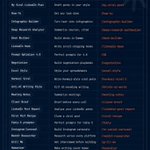
→ /my-viral-post
→ /linkedin-hook
→ /viral-recipe
→ /hormozi-viral-1
→ /tc-social-carousel
One command instead of rebuilding the same prompt every single time.
Need practical workflows?
→ /deck-builder
→ /meeting-notes
→ /client-brief
→ /negotiation
→ /excel-style
→ /xlsx
26 skills. Free. Every command included.
The biggest advantage in AI today isn't getting access to better models.
It's building systems that eliminate repetitive work.
Most people keep prompting.
The smartest users build once—and reuse forever.

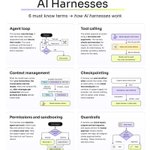
What does an AI harness actually do?
These 6 terms explain how an agent goes from a request to a finished task.
Let's take this example: a support agent that checks an order and drafts a reply.
What happens at each step:
1 Agent loop
The model chooses an action, a tool runs, and the result comes back. The cycle continues until the reply is ready, help is needed or a limit is reached.
2 Tool calling
The model requests a tool by name, with arguments. The harness checks and executes that request, then returns the result. An order lookup gives the model a delivery status it can use.
3 Context management
What the model sees at each step comes from your instructions, the conversation and tool results, like the order status. When the window fills up, older messages get compacted, and your prompts and hooks decide what's kept.
4 Checkpointing
The workflow saves its state outside the model. After an interruption, it can reload the order lookup result and continue from a saved point.
5 Permissions and sandboxing
The harness sets what the agent can touch: which tools, files and actions, and where code runs. The support agent can read the order but can't issue a refund.
6 Guardrails
Checks inspect inputs, outputs or proposed actions. An output check can inspect the drafted reply; an approval gate can pause before sending it. Those are different controls, and neither catches every error.
The real payoff: you can switch between models from different labs and share the same skills and context across your team.
Which part is hardest to get right in your setup?

Elon Musk
The remaining time is at most 3 years.
During this period, it's still possible to make money through "human labor."
But after that,
Most jobs that have been paid salaries until now
will become automated. The business of earning money will end.
The "meaning of paying money to humans" will disappear.
This system that's been going on for the last 200 years👇
"If you lend us your time for 40 years, we'll pay you a salary"
This will end... Work will end
In other words, history's largest-scale "money movement" will take place.
So, what's the situation now?
👉Some people have realized it and taken action
👉Many people are "waiting until it's explicitly stated in the news"
This "time gap between realizations" is everything.
So, what needs to be done in these 3 years?
Very Simple👇
"Transform your own time into an asset that machines cannot take away"
Specifically, the following👇
• Rare digital assets like Bitcoin
• Real assets like land or energy
• Computers or infrastructure
• Connections with people (network)
• The power to produce food or things necessary for life
What even is a salary???
"Just for having lent your own time"
If the value of that time,
becomes cheaper and superior with machines...
- That value will suddenly collapse
In the end, the only thing left will be this 👇
"What you own (assets)"
In these 3 years👇
Those who can transform from
"a salaried person"
to
"an asset-owning person"
In 2035-2036
will be the "people who saw the future."
After that👇
• Salaries won't increase
They'll eventually become irrelevant
The only thing left is one👇
"Who owns what"
The door of opportunity is open right now.
But it's closing faster than everyone thinks.
🚨PEOPLE ARE USING NOTEBOOKLM TO MASS-PRODUCE SPECIALIZED CLAUDE SKILLS IN MINUTES.
Instead of writing the same prompts repeatedly, they use curated knowledge to create reusable "SKILL▪︎md" files that help Claude deliver consistent results for specific tasks.
Here's how it works 👇👇

5. Keep skills grounded
Because every instruction comes from your own sources, Claude relies on verified information instead of guessing.
That means:
• More accurate answers
• Consistent outputs
• Fewer hallucinations
• Less editing
6. Build a library
Create dozens of reusable skills.
Instead of writing the same prompt every day, you're building permanent AI workers that improve over time.
The result?
NotebookLM becomes your knowledge engine.
Claude becomes your execution engine.
Most people are still rewriting prompts every chat.
The smarter approach is building reusable skills once—and letting Claude execute them every time.
00:15 - The right way to prompt Claude
33:21—What makes Claude act dumber in your code
01:33:39 - How Anthropic uses Claude every day
02:50:56 - A fix that makes Claude way smarter - This
The 4-hour Anthropic free course replaces about 10 paid engineering courses.
Watch it today, then bookmark it for later.
My interview with Sam Altman (@sama):
0:00 Intro
0:52 When Will AI Discover New Treatments?
3:31 Why AI Hasn’t Killed Coding Jobs
11:47 Personal AI Assistants
15:39 Why Are We Busier Than Ever?
20:10 Why the AI Consciousness Debate Worries Sam
26:09 ChatGPT Is Too Agreeable
30:03 OpenAI’s Bet on Chips and Cheaper Compute
34:20 Why AI Needs a New Kind of Computer
37:41 Sam on Pressure: “Pick the Big Thing”
42:18 Why “AI Will Cure Cancer” Isn’t Enough
🚨 Most businesses don't need more employees. They need smarter systems.
Imagine waking up to find that your emails have been processed, customer inquiries have been handled, your CRM has been updated, and your team has already received the necessary notifications. 🤯
No endless copy-pasting. No repetitive manual tasks. No switching between 10 different apps just to get one thing done.
Here's how an AI automation workflow makes it possible: 👇
📩 1. TRIGGER — Everything starts automatically.
A new email arrives, a customer submits a form, or a scheduled event occurs. That event triggers the entire workflow.
⚙️ 2. DATA PROCESSING — Information moves without the busywork.
The system collects incoming information, organizes it, and prepares it for the next step.
🧠 3. AI DECISION — The workflow gets smarter.
AI analyzes the information, identifies the type of request, and helps determine what action should happen next.
🔀 4. AUTOMATED ACTIONS — Work gets done.
Depending on the conditions, the workflow can send emails, update customer records, assign tasks, or trigger other processes.
🔗 5. INTEGRATIONS — Your tools finally work together.
Connect platforms like Slack, Shopify, CRM systems, and external APIs to move information between applications.
🔥 Here's a real-world example:
A customer submits a request →
AI analyzes the message →
The system updates the CRM →
A personalized email is sent →
Your team receives a Slack notification.
One trigger. Multiple connected actions. Less manual work. More time to focus on growth. 🚀
And this is only one example. Similar workflows can support sales, marketing, customer service, reporting, and internal operations—with appropriate permissions and human oversight.
💡 The biggest opportunity isn't just learning to use AI. It's learning how to connect AI with the systems that run your work.
The people who understand automation can build workflows that save hours, reduce repetitive tasks, and help businesses scale more efficiently.
♻️ Repost this for someone who is still doing manually what could potentially be automated.
Follow for more practical AI tools, automation workflows, and ways to work smarter with AI. 🧠
#AI #Automation #AIagents #AITools #FutureOfWork
