

Think Bold. Official Insta360 Support. DM us with any questions 9:30 AM–6:00 PM (GMT+8). Follow for tips, tutorials, and product updates.
Joined February 2021
- Tweets3.4K
- Following9
- Followers1.5K
- Likes897





Pinned Tweet
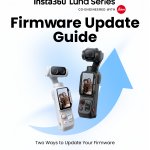
Luna Series Firmware Update Guide 📸
Time to keep your Luna Series up to date! Not sure how to update your camera? We've got you covered.
There are two ways to get the latest firmware:
📱 Via the Insta360 App:
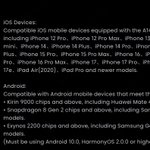
Connect through Wi-Fi & Bluetooth, or NFC, and follow the in-app instructions.
💻 Via a computer:
Download the firmware from the official Insta360 website and transfer it using a USB cable or microSD card.
Follow our step-by-step guide to get your firmware updated smoothly!
Haven't received the update notification yet? Firmware may roll out to selected users in batches before its official release, so don't worry if it hasn't reached your camera yet.
#guide #cameratips #outdoors #insta360 #tutorials #contentcreation #videos #tips #photography #videoedit #tipsandtricks #contentcreator #photoshoot #guidance #insta360x6 #shots #creative #videotutorial #Insta360X6 #360camera #cameratips #creatortips #editing #insta360lunaultra #newrelease


1
2
183
Your Cinematic Ride Starts Here 🎬 | Insta360 Ace Pro 2
Want your Motovlog footage to look cinematic? In this video, we explain the Ace Pro 2 settings used for the shot, including 4K60fps, shutter speed, ND filter, and ISO, so you can easily recreate the result.
📷 Insta360 Ace Pro 2
🔗 Link in Bio
124
Creative shots with GO Ultra 🎬
Pair your GO Ultra with Sticky Tabs and the Pivot Stand to turn everyday moments into movie-worthy shots.
📷 Insta360 GO Ultra
🔗 Link in Bio
76
Meet AI Director: Your Footage, Automatically Edited! 🎬
Less time editing, more time enjoying your shots! Available on Insta360 X6 and X5, AI Director automatically picks out highlights from your footage and turns them into a personalized video while your camera is charging.
Wondering how to use it? Or what to do if your video doesn't show up?
We've put together a handy guide covering:
✅ How to enable and use AI Director
✅Whether AI Director is free
✅What to do if your video isn't generated or can't be found
✅How to customize your video with different templates and quick edits
Swipe through all the answers and give AI Director a try!


1
138

An epic 360° transition with Insta360 X6! 📸🤯
Want to recreate this fun transition with your Insta360 X6?
It's all about timing your jumps, tracking your subjects in 360 Reframe, and switching to Reverse Tiny Planet with a few keyframes. Add a little slow motion, sync your cuts to the beat, and you've got a seamless transition across different locations!
Watch the tutorial and try it out with your friends!
📸 Insta360 X6
#Insta360 #Insta360X6
3
201
Best settings for cinematic motorcycle shots 🏍️
Want cinematic motorcycle footage with your Insta360 Ace Pro 2? Here are the ideal shutter speed and FPS settings to capture smooth, professional-looking riding shots.
📷 IG | shogun.visuals with Insta360 Ace Pro 2
1
2
196
How to Install & Calibrate Your Ultra Telephoto Lens?
Before taking your shots, make sure your Ultra Telephoto Lens is properly installed and calibrated!
In this tutorial, we'll walk you through removing the lens from its protector, installing it on your camera, and calibrating it.
Follow the steps in the video, keep your camera steady during calibration, and get ready to shoot at up to 22.5× zoom!
📸 Insta360 Luna Ultra
🎙️ Meet Insta360 Mic: Your FAQ Guide
Looking to upgrade your audio setup? Whether you're choosing between Mic and Mic Pro, checking battery life, or setting up internal recording, we've got you covered.
In this guide, you'll find answers to common questions about Insta360 Mic, including:
- Mic vs. Mic Pro: Which one is right for you?
- Audio quality, battery life, and transmission range
- Multi-transmitter and receiver connectivity
- microSD card compatibility, storage, and formatting
- Compatible devices and connection methods
Swipe through to find the answers you need and get the most out of your Insta360 Mic!


1
2
196


Insta360 Studio v6.0 🛠️ What's new & troubleshooting guide
Discover the latest Studio 6.0 updates, including improved file management and editing tools, new preview modes, and more export options.
Need help? Find troubleshooting tips for preview lag, missing files after transferring footage to an external drive, and Dolby Vision export issues on Mac.
Swipe through to explore the updates and get the most out of Studio v6.0.


How to film your coffee morning routine 🎥
The GO Ultra Micro Lens gets you closer to the details, making everyday coffee shots more interesting.
Watch and learn how to show off your barista skills and put everyone else's morning routine to shame.
📷 IG|leonhahn with Insta360 GO Ultra
2
212
🎃 Ready to try the latest Halloween trend?
Grab your Insta360 and your crew, set up your shot, and get ready for a fun Halloween video! Just shoot, edit in the Insta360 app, add your favorite music, and export in 4K.
Tag your squad and give it a go! 📸
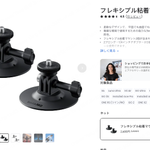
Accessories update 📷 Find the perfect gear for your setup.
Explore the latest accessories for Luna, X, GO, and Ace Pro Series, plus everyday essentials for your setup.
Swipe to find your next favorite accessory!
Which one would you add to your kit?


1
2
266


Editing 360 videos in DaVinci Resolve 🎬
Turn your 360 footage into polished, dynamic shots with this step-by-step DaVinci Resolve guide, including:
Installation
Applying the plug-in
Adjusting your view
Adding keyframe camera movements
Quick tip: Add the Crop plug-in from the Effects Library, match the X and Y sizes to your timeline resolution, enable Keep Centered, and add Insta360 Reframe to your node.
Ready to reframe your footage and create your next great shot?
1
144
Unbox Insta360 Mic with us 📦
Meet the brand-new Insta360 Mic, featuring an E-Ink display, AI Noise Canceling, automatic gain control, and expandable storage.
Perfect for daily vlogs, travel videos, and interviews.
What design would you choose for yours?
#Insta360
2
168