

Markido offers a PowerPoint add-in called Engage which helps users of any skill-level create visually impressive presentations. #PowerPoint #Excel #infographics
Ottawa, Canada
Joined August 2010
- Tweets52
- Following18
- Followers28
- Likes2








How to give an important presentation to senior leaders in your company @TechRepublic techrepublic.com/article/pre…
Introvert needs help with #Presentation anxiety. Every speaking opportunity is a chance to advance. seattletimes.com/nwshowcase/…
Learn how to present at the TED theater in NYC with the latest @Logitech tech and @TEDTalks coaches. betanews.com/2017/04/25/logi…
Our team has released a new version of Engage! Watch markido.com/help/1208/whats-… to see SlideMerge feature. Think mail merge for presentations!
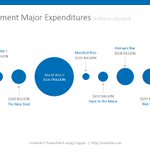
An ex. Proportional Area Chart using Engage in #PowerPoint US Gov. Major Expenditures. We also have pentagons ;)


Don't remember π * r^2 ? Never mind pentagons and hexagons for proportional area charts, we'll handle it for you!
markido.com/help/516/create-…
Save time by learning about #PowerPoint #presentation automation with #Excel #Project and Charts using Engage youtu.be/VrE-7OsIVDI?list=PL…
1
Love Engage but have a Mac? Watch this to get Engage running on a Mac : youtube.com/watch?v=G8g5ajWm… @AppleSupport @ParallelsMac @virtualbox
1
Learn how to link and automate any chart in PowerPoint to an Excel spreadsheet. #PowerPoint #Excel #presentations youtube.com/watch?v=syHb7hIu…
1
Do you feel physical pain when things aren't aligned in your #PowerPoint decks? Learn about the SmartGrid in Engage youtube.com/watch?v=b_IZbP4S…
1
We added a Flow shortcut to the Engage ribbon. Learn about motion and zoom in PowerPoint : markido.com/help/1400/using-…

1
And of course those icons are all native vector #PowerPoint shapes. You can resize and color to match your #presentation design.
1
Based on customer requests some new icons were added to the latest release of Engage. #PowerPoint #presentations

1

Struggle with tables in PowerPoint? Engage now has a Tables section in the slide library. #PowerPoint #presentations

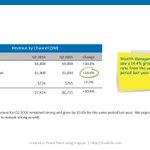
Delta Charts are easy using Engage. CAGR formula? Don't worry, we have your back! #PowerPoint #Excel #infographics

The Engage slide library now includes Delta Chart slides. #PowerPoint #Excel #infographics #Presentations
