

A Mac app that lets full-screen apps use the whole screen on MacBooks with a notch or Dynamic Island.
Joined February 2026
- Tweets8
- Following3
- Followers7
- Likes11


Pinned Tweet
I just launched ProMax Display, a Mac app that lets full screen apps use the space beside the notch (and Dynamic Island in beta).
macOS leaves that strip black, so a 14" MacBook Pro in full screen is really a 14.06" screen. With ProMax it's the full 14.2" you paid for.
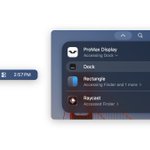
macOS 27.3 beta 2 added an "Accessing all apps" indicator to the menu bar or Dynamic Island. If it's getting in your way, you can turn it off:
sudo mkdir -p /Library/Preferences/FeatureFlags/Domain && sudo defaults write /Library/Preferences/FeatureFlags/Domain/TCC AX_TRANSPARENCY_INDICATOR -dict Enabled -bool false
Then restart your Mac

2
1
46
ProMax Display is live on @ProductHunt today. If you have a MacBook with a notch this will be a huge upgrade for you. Any feedback there helps a lot.
producthunt.com/products/pro…


I just launched ProMax Display, a Mac app that lets full screen apps use the space beside the notch (and Dynamic Island in beta).
macOS leaves that strip black, so a 14" MacBook Pro in full screen is really a 14.06" screen. With ProMax it's the full 14.2" you paid for.
1
2
39
On the new PROLED MacBook Pros with the Dynamic Island, the island works as normal until you hold Command. Then you can see the mirror and click behind it.
By my measurements, full screen apps on the new MacBooks get no more room than on the notched models, even though the screen is slightly bigger, because the menu bar beside the island is taller.
Working out how ProMax should behave here was a real challenge, because the island has its own interactions, and stopping those from working would be too big a compromise. It’s a simple solution but took a long time to figure out.
I don't have a PROLED MacBook to test on so I've only been able to test the island version in a simulated one (a macOS virtual machine) so this feature is marked as beta for now.
If you have one and wouldn't mind trying it and telling me how it goes, DM me and I'll send a free licence to the first 10.
1
26
The one catch: for every app it needs two parts of SIP turned off, one command in Recovery, and the app walks you through it. It's unfortunately the only way to make something like this possible.
$9.99 launch price. One-time purchase.
promaxdisplay.com

14