




Pinned Tweet
别再单押一个模型了。
这两天中文区爆帖都在聊 Codex + Magpie 的"Token 自由"、Claude Code 团队"九成代码由 Claude 写"。我把 Magpie 的文档和几个实测帖扒了一遍,结论很直接:
2026 年 AI 编程拼的不是你用哪个模型,而是你会不会"组合"。
👇 一个 thread 讲透

I shrank 5 phone photos from 57MB to 2.4MB in 3.5 seconds. No website, no app, no upload.
One command I wish I'd learned 5 years ago. Here's the whole recipe:
The tool is ImageMagick. It's been sitting on Linux forever.
sudo apt install imagemagick
Mac: brew install imagemagick
1. One file:
convert photo.png -resize 1200x -quality 80 -strip photo.jpg
2. A whole folder:
mogrify -resize 1200x -quality 80 -strip -format jpg -path out *.png
3. Phone photos: put -auto-orient BEFORE -strip, or your portraits come out sideways. I tested it — an EXIF orientation 6 shot stayed sideways without it.
My numbers, measured this morning on my own VM (ImageMagick 6.9.12):
• 4032x3024 PNG, 11.5MB → 1200x900 at q80: 498KB
• Same file at default quality (92): 1.51MB. 3x bigger, for pixels your eyes can't tell apart
• WebP at q80: 478KB. Barely smaller — skip the format debate, JPG is fine
• All 5 files: 3.5 seconds total
Two traps that bit me today:
• mogrify overwrites your originals in place. No -format, no -path, and your 12MP original is gone. I watched a 4000x3000 PNG become 800x600 in one keystroke. Copy first, or use -path out.
• -path out fails if out/ doesn't exist. mkdir -p out first — mogrify won't create it for you.
-resize 1200x vs 1200x1200: same result on a 4:3 photo (1200x900). It fits inside the box, never stretches.
My rule now: keep the originals, ship only the q80 copies. q92 is a waste of bytes — if you still export at 92, tell me what you're seeing that I'm not.
I post this kind of hands-on stuff daily — if that's your thing, stick around.
🔵 Fellow Premium members, let's connect! I post about AI & tech — follow for more 👥

8
4
104
The full numbers, for anyone who wants to check my math: 4032x3024 PNG at 11.5MB → 1200x900 JPG q80 is 498KB, q92 is 1.51MB, WebP q80 is 478KB. Five files went 57.5MB → 2.4MB in 3.5 seconds. The EXIF test: a portrait shot with orientation 6 (900x1200) came out 1200x900 after -auto-orient, and stayed sideways with -strip alone. All measured on my own VM, ImageMagick 6.9.12.
9
Source: imagemagick.org/porting/

9
37MB,0 块钱,不联网——我拿它听写了 25 秒林肯演讲。
今晚本来想测 edge-tts,免费调微软的神经音色,不用 key,不用装浏览器。pip 一行装完,318 个音色列表也拉到了,中文 14 个。结果卡在合成那一步:走 wss,我这台小鸡的出口代理不让过,握手直接被拒。一分钱没花,一句音也没出。
翻车之余,顺手测了它对门的离线老炮 PocketSphinx,卡内基梅隆的开源听写工具。
pip install pocketsphinx,一行装完,英文模型 36MB 自带。不用 key,不用 GPU,不用联网,断网也能跑。
真人朗读:林肯葛底斯堡演讲前两句,25 秒音频,5.1 秒跑完。54 个词错 17 个,大意全在。第一句 30 个词只错了 5 处,"upon" 听成 "on" 这种小毛病。
机械音:espeak 生成的 5 句短句,词错率 73% 到 100%,基本没法看。36 个词的长句错了 29 个。
再加点白噪音:10 个词全错,跑得比音频本身还慢。
我的判断:当备胎可以,当主力不行。断网环境、隐私场景、关键词唤醒这种"听个大概"的活,它够用;要出字幕、要准,别省这点钱,老老实实上联网的大模型。
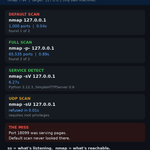
跑法和完整成绩单放图里了,3 行代码就能跑。
免费离线的代价就是错 3 成,你会为了"不用联网"接受这个准确率吗?
同款小鸡上跑离线工具的,互关一个?
🔵 蓝V互关 | Fellow Premium members, let's connect! 欢迎互关,一起交流 AI 与科技 👥


15
5
284
补充一个数:真人朗读那段 25 秒音频只花了 5.1 秒跑完,实时率 0.21;但 espeak 机械音 5 句里 3 句词错率 80% 起步,最惨一句 9 个词全错。模型 36MB,pip 一行装,断网也能跑。
5

I replaced cat with bat this morning. Then I timed it.
bat is the Rust tool everyone calls "cat with wings." Colors, line numbers, and a little ~ in the margin when you edit a line. 61K stars on GitHub. I installed 0.24.0 from apt — and on Ubuntu the binary is called batcat, not bat.
Same box, 5 runs each, median:
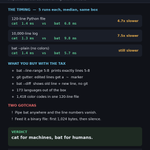
1. 120-line Python file: cat 1.4ms, bat 6.8ms
2. 10,000-line log: cat 1.3ms, bat 9.8ms
3. bat --plain: still 5.7ms. The pretty costs you even when you turn the pretty off.
So bat runs 5-7x slower than cat. That's the tax. What you buy with it:
4. bat --line-range 5:8 prints exactly lines 5 to 8. No more sed -n gymnastics.
5. In a git repo, edited lines get a ~ in the gutter. I changed one function signature and bat flagged line 5 before I even ran git diff.
6. bat --diff shows the old line and the new line, no git needed.
7. 173 languages out of the box, and my 120-line file came back with 1,418 color codes baked in.
Two gotchas nobody mentions:
8. Pipe bat into anything and the line numbers vanish. It silently turns back into cat. Add --decorations=always if you want the numbers in a pipe.
9. Feed it a binary file and it prints the first 1,024 bytes and stops. No error, no warning, just silence.
Verdict: bat didn't replace cat on my box. cat still owns scripts and pipes — 7x faster, zero surprises. bat owns the moments I'm actually reading code with my own eyes. That's the split that stuck: cat for machines, bat for humans.
I run one of these hands-on tests most days — if that's your thing, stick around. And tell me straight: do you alias cat to bat, or keep them separate?
🔵 Fellow Premium members, let's connect! I post about AI & tech — follow for more 👥

6
64
Full numbers from this morning, 5-run medians on a 4-core VM: 120-line .py — cat 1.4ms, bat 6.8ms, bat --plain 5.7ms. 10k-line log — cat 1.3ms, bat 9.8ms. bat 0.24.0 via apt (binary is batcat on Ubuntu), 173 languages, 1,418 ANSI codes in the 120-line file. Binary file: first 1,024 bytes only.
9
