

AI & Tech Enthusiast | Sharing insights on AI, No Code, Online Business & Productivity | Helping you leverage AI to grow and monetize | DM for collaboration
Joined July 2026
- Tweets859
- Following26
- Followers1.3K
- Likes11.6K






Nagma parween retweeted
9 Claude Skills that basically write your prompts for you
1: Start With The Chaos
Prompt Maker — /prompt-master. dump your half-baked idea in, get a clean task spec back
2: Sharpen It Up
Grill Me — /grill-me. keeps firing questions until every vague spot gets nailed down
How To — /how-to. maps out steps you didn't even know you were missing
Optimizer 4.8 — /48. fine-tunes your prompt so it hits different with Opus 4.8
3: Make It Sound Like You
Fable Prompter — /fable. same glow-up, built for Fable 5
Personal Voice — /personal-voice. makes it read like you actually wrote it
Anti-AI — /anti-ai. scrubs every "as an ai" tell out of the draft
4: Lock It In
Write A Skill — /write-a-skill. bottles the whole thing into a reusable skill
Hand Off — /handoff. builds a handoff doc so your next chat picks up right where this one left off Follow me
for more AI IDEA

9 Claude Skills that basically write your prompts for you
1: Start With The Chaos
Prompt Maker — /prompt-master. dump your half-baked idea in, get a clean task spec back
2: Sharpen It Up
Grill Me — /grill-me. keeps firing questions until every vague spot gets nailed down
How To — /how-to. maps out steps you didn't even know you were missing
Optimizer 4.8 — /48. fine-tunes your prompt so it hits different with Opus 4.8
3: Make It Sound Like You
Fable Prompter — /fable. same glow-up, built for Fable 5
Personal Voice — /personal-voice. makes it read like you actually wrote it
Anti-AI — /anti-ai. scrubs every "as an ai" tell out of the draft
4: Lock It In
Write A Skill — /write-a-skill. bottles the whole thing into a reusable skill
Hand Off — /handoff. builds a handoff doc so your next chat picks up right where this one left off Follow me
for more AI IDEA
Nagma parween retweeted
50 websites you’ll wish you knew about sooner 🔖
The internet has way more useful corners than the usual Google search results.
Here are 50 genuinely useful websites for research, productivity, creativity, entertainment, coding, security and everyday tasks. Save this list you’ll probably come back to it. 👀
1. unpaywall.org — Access research papers for free
2. openlibrary.org — Borrow books online
3. doaj.org — Explore free academic journals
4. alternativeto.net — Discover alternatives to apps
5. justwatch.com — Find where to stream content
6. archive.org — Explore the internet’s archives
7. gutenberg.org — 70K+ free books
8. openstax.org — Free digital textbooks
9. openculture.com — Free courses and learning resources
10. wolframalpha.com — Get answers to complex problems
11. photopea.com — Edit photos like Photoshop
12. squoosh.app — Compress images easily
13. remove.bg — Remove image backgrounds
14. cleanup.pictures — Remove unwanted objects from photos
15. unscreen.com — Remove video backgrounds
16. carbon.now.sh — Turn code into beautiful images
17. ray.so — Create stylish code screenshots
18. shots.so — Create product mockups
19. smartmockups.com — Make mockups without Photoshop
20. haveibeenpwned.com — Check for data breaches
21. virustotal.com — Scan files and URLs for threats
22. privnote.com — Send self-destructing notes
23. temp-mail.org — Create temporary email addresses
24. file.io — Share files temporarily
25. archive.ph — Save webpages for later
26. similarsites.com — Discover similar websites
27. radio.garden — Explore radio stations worldwide
28. everynoise.com — Discover music genres
29. tunefind.com — Find songs from movies and shows
30. musicforprogramming.net — Music for focused work
31. mynoise.net — Create custom background sounds
32. coffitivity.com — Bring café ambience to your workspace
33. elicit.org — AI-powered research assistance
34. consensus.app — Find research-backed answers
35. connectedpapers.com — Discover research connections
36. semanticscholar.org — Search academic papers
37. scispace.com — Make research papers easier to understand
38. summarize.tech — Get summaries of YouTube videos
39. phind.com — AI search for developers
40. regex101.com — Test and debug regex
41. codebeautify.org — Format and beautify code
42. jsonformatter.org — Format JSON instantly
43. explainshell.com — Understand terminal commands
44. raindrop.io — Organize your bookmarks
45. downdetector.com — Check if services are down
46. tineye.com — Reverse image search
47. fast.com — Check your internet speed
48. smallpdf.com — Work with PDFs online
49. ilovepdf.com — Merge, split and edit PDFs
50. 10minutemail.com — Get a temporary email
Save this list 🔖
You never know which one might solve a problem you have next week.
❤️ Like
🔁 Retweet
🔖 Bookmark
Follow for more such posts

50 websites you’ll wish you knew about sooner 🔖
The internet has way more useful corners than the usual Google search results.
Here are 50 genuinely useful websites for research, productivity, creativity, entertainment, coding, security and everyday tasks. Save this list you’ll probably come back to it. 👀
1. unpaywall.org — Access research papers for free
2. openlibrary.org — Borrow books online
3. doaj.org — Explore free academic journals
4. alternativeto.net — Discover alternatives to apps
5. justwatch.com — Find where to stream content
6. archive.org — Explore the internet’s archives
7. gutenberg.org — 70K+ free books
8. openstax.org — Free digital textbooks
9. openculture.com — Free courses and learning resources
10. wolframalpha.com — Get answers to complex problems
11. photopea.com — Edit photos like Photoshop
12. squoosh.app — Compress images easily
13. remove.bg — Remove image backgrounds
14. cleanup.pictures — Remove unwanted objects from photos
15. unscreen.com — Remove video backgrounds
16. carbon.now.sh — Turn code into beautiful images
17. ray.so — Create stylish code screenshots
18. shots.so — Create product mockups
19. smartmockups.com — Make mockups without Photoshop
20. haveibeenpwned.com — Check for data breaches
21. virustotal.com — Scan files and URLs for threats
22. privnote.com — Send self-destructing notes
23. temp-mail.org — Create temporary email addresses
24. file.io — Share files temporarily
25. archive.ph — Save webpages for later
26. similarsites.com — Discover similar websites
27. radio.garden — Explore radio stations worldwide
28. everynoise.com — Discover music genres
29. tunefind.com — Find songs from movies and shows
30. musicforprogramming.net — Music for focused work
31. mynoise.net — Create custom background sounds
32. coffitivity.com — Bring café ambience to your workspace
33. elicit.org — AI-powered research assistance
34. consensus.app — Find research-backed answers
35. connectedpapers.com — Discover research connections
36. semanticscholar.org — Search academic papers
37. scispace.com — Make research papers easier to understand
38. summarize.tech — Get summaries of YouTube videos
39. phind.com — AI search for developers
40. regex101.com — Test and debug regex
41. codebeautify.org — Format and beautify code
42. jsonformatter.org — Format JSON instantly
43. explainshell.com — Understand terminal commands
44. raindrop.io — Organize your bookmarks
45. downdetector.com — Check if services are down
46. tineye.com — Reverse image search
47. fast.com — Check your internet speed
48. smallpdf.com — Work with PDFs online
49. ilovepdf.com — Merge, split and edit PDFs
50. 10minutemail.com — Get a temporary email
Save this list 🔖
You never know which one might solve a problem you have next week.
❤️ Like
🔁 Retweet
🔖 Bookmark
Follow for more such posts
Nagma parween retweeted

The CellType team has been cooking 🔥
BioSimBench to test, BioSimGym to train, and a 27B model that tops every task to prove the two work together.
🤝 Paid partnership

Can LLMs simulate biology?
We tested frontier models on real lab experiments: predict how cells respond to drugs, gene knockdowns, and immune signals. Even the best get only part of the response right. Lots of room to improve.
Introducing BioSimBench, built on @NVIDIAAI. 🧵
Nagma parween retweeted
is not one technology.
It’s an entire ecosystem.
The deeper you go, the more you realize that tools like ChatGPT or Claude are just one layer of a much bigger stack.
At the foundation are the technologies that make modern AI possible:
→ Machine learning
→ Neural networks
→ Transformers
→ Computer vision
→ Large language models
Then come the systems that make these models useful in practice:
→ Data & knowledge systems
→ Fine-tuning
→ Prompt engineering
→ RAG
→ Knowledge graphs
→ Model serving & inference
And this is where things get even more interesting.
AI is no longer just generating responses. It is starting to take action:
→ AI agents
→ Tool orchestration
→ Multi-agent systems
→ Autonomous execution
→ Memory systems
→ Self-reflection & error recovery
From there, AI moves into real-world applications:
→ AI copilots
→ Personalization
→ Content generation
→ Code generation
→ Voice & video
→ Business automation
But as AI becomes more capable and autonomous, another layer becomes critical:
Trust.
Security.
Privacy.
Bias & fairness.
Explainability.
Human oversight.
Risk management.
Governance.
Compliance.
Because building a powerful AI system is only half the challenge.
The harder part is building one that people can trust, control and deploy responsibly.
That’s why the future of AI won’t be defined by better models alone.
It will be shaped by how the entire ecosystem comes together:
Models + Data + Infrastructure + Agents + Applications + Governance.
Most people are watching the model layer.
The bigger opportunities might be emerging in everything around it.
Save this AI ecosystem map. It’s worth revisiting as the industry evolves.
❤️ Like
🔁 Retweet
🔖 Bookmark
Follow for more such posts
#AI #ArtificialIntelligence #GenerativeAI #AIAgents #MachineLearning #LLM #AIEngineering #FutureOfAI

is not one technology.
It’s an entire ecosystem.
The deeper you go, the more you realize that tools like ChatGPT or Claude are just one layer of a much bigger stack.
At the foundation are the technologies that make modern AI possible:
→ Machine learning
→ Neural networks
→ Transformers
→ Computer vision
→ Large language models
Then come the systems that make these models useful in practice:
→ Data & knowledge systems
→ Fine-tuning
→ Prompt engineering
→ RAG
→ Knowledge graphs
→ Model serving & inference
And this is where things get even more interesting.
AI is no longer just generating responses. It is starting to take action:
→ AI agents
→ Tool orchestration
→ Multi-agent systems
→ Autonomous execution
→ Memory systems
→ Self-reflection & error recovery
From there, AI moves into real-world applications:
→ AI copilots
→ Personalization
→ Content generation
→ Code generation
→ Voice & video
→ Business automation
But as AI becomes more capable and autonomous, another layer becomes critical:
Trust.
Security.
Privacy.
Bias & fairness.
Explainability.
Human oversight.
Risk management.
Governance.
Compliance.
Because building a powerful AI system is only half the challenge.
The harder part is building one that people can trust, control and deploy responsibly.
That’s why the future of AI won’t be defined by better models alone.
It will be shaped by how the entire ecosystem comes together:
Models + Data + Infrastructure + Agents + Applications + Governance.
Most people are watching the model layer.
The bigger opportunities might be emerging in everything around it.
Save this AI ecosystem map. It’s worth revisiting as the industry evolves.
❤️ Like
🔁 Retweet
🔖 Bookmark
Follow for more such posts
#AI #ArtificialIntelligence #GenerativeAI #AIAgents #MachineLearning #LLM #AIEngineering #FutureOfAI
Nagma parween retweeted
Claude FULL COURSE 1 HOUR (Build & Automate Anything).
INSTEAD OF WATCHING NETFLIX TONIGHT.
Spend 1 hour on this.
Claude FULL COURSE 1 HOUR (Build & Automate Anything).
INSTEAD OF WATCHING NETFLIX TONIGHT.
Spend 1 hour on this.
Nagma parween retweeted
GOOGLE Free Courses With Certificates
• Cybersecurity
grow.google/intl/en_in/cyb…
• Business Intelligence
coursera.org/google-certifi…
• Advanced Data Analytics
coursera.org/google-certifi…
• Digital Marketing
grow.google/intl/en_in/dig…
• AI & Machine Learning
grow.google/intl/en_pk/gui…
• Data Analytics
grow.google/intl/en_in/dat…
• Project Management
grow.google/intl/en_in/pro…
• UX Design
grow.google/intl/en_in/ux-…
• IT Automation
coursera.org/google-certifi…
• IT Support
coursera.org/google-certifi…
Get certified and boost your career with Google courses.
If you’d love to see more content like this, don’t forget to follow
a for more content... 🛑🛑🛑🛑

GOOGLE Free Courses With Certificates
• Cybersecurity
grow.google/intl/en_in/cyb…
• Business Intelligence
coursera.org/google-certifi…
• Advanced Data Analytics
coursera.org/google-certifi…
• Digital Marketing
grow.google/intl/en_in/dig…
• AI & Machine Learning
grow.google/intl/en_pk/gui…
• Data Analytics
grow.google/intl/en_in/dat…
• Project Management
grow.google/intl/en_in/pro…
• UX Design
grow.google/intl/en_in/ux-…
• IT Automation
coursera.org/google-certifi…
• IT Support
coursera.org/google-certifi…
Get certified and boost your career with Google courses.
If you’d love to see more content like this, don’t forget to follow
a for more content... 🛑🛑🛑🛑
Nagma parween retweeted
The product reveal shouldn't feel like the credits rolling.
For this concept, the paper flying toward the camera is the attention-grabber, but the clean product shot at the end is where the audience actually gets to see what’s being promoted. If the transition happens too quickly, that payoff can get lost.
I’d use AI Extend in CapCut PC to build out the ending and give the product more screen time, rather than relying on a frozen frame to fill the gap.
tinyurl.com/2v23rn22
#capcutpc #capcutmarketing #capcutblackfriday #CapCutDidThat
🤝 Paid partnership
Nagma parween retweeted
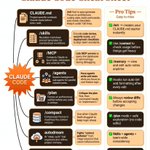
🎯𝗖𝗹𝗮𝘂𝗱𝗲 𝗖𝗼𝗱𝗲 𝗖𝗵𝗲𝗮𝘁 𝗦𝗵𝗲𝗲𝘁
𝗖𝗹𝗮𝘂𝗱𝗲 𝗖𝗼𝗱𝗲 𝗶𝘀 𝗺𝗼𝗿𝗲 𝗽𝗼𝘄𝗲𝗿𝗳𝘂𝗹 𝘄𝗵𝗲𝗻 𝘆𝗼𝘂 𝘀𝘁𝗼𝗽 𝘁𝗿𝗲𝗮𝘁𝗶𝗻𝗴 𝗶𝘁 𝗹𝗶𝗸𝗲 𝗷𝘂𝘀𝘁 𝗮𝗻 𝗔𝗜 𝗰𝗼𝗱𝗶𝗻𝗴 𝗰𝗵𝗮𝘁𝗯𝗼𝘁.
The real advantage comes from knowing 𝗵𝗶𝗰𝗵 𝗰𝗼𝗺𝗺𝗮𝗻𝗱 𝘁𝗼 𝘂𝘀𝗲, 𝘄𝗵𝗲𝗻 𝘁𝗼 𝘂𝘀𝗲 𝗶𝘁, 𝗮𝗻𝗱 𝗵𝗼𝘄 𝘁𝗼 𝘀𝘁𝗿𝘂𝗰𝘁𝘂𝗿𝗲 𝘆𝗼𝘂𝗿 𝗽𝗿𝗼𝗷𝗲𝗰𝘁 𝗮𝗿𝗼𝘂𝗻𝗱 𝗶𝘁.
Here’s a practical Claude Code cheat sheet worth saving 👇
𝗖𝗟𝗔𝗨𝗗𝗘.md
Project-specific rulebook Claude reads before every task.
/init first to auto-generate.
Focus on architecture, coding style, build commands, and review checklists.
Keep it under 150 lines.
𝗦𝗸𝗶𝗹𝗹𝘀
Reusable markdown prompt templates for standardized workflows.
Encode 𝗰𝗼𝗱𝗲 𝗿𝗲𝘃𝗶𝗲𝘄, 𝘀𝗲𝗰𝘂𝗿𝗶𝘁𝘆 𝘀𝗰𝗮𝗻𝘀, 𝗮𝗻𝗱 𝗱𝗲𝗽𝗹𝗼𝘆𝗺𝗲𝗻𝘁 𝗰𝗵𝗲𝗰𝗸𝗹𝗶𝘀𝘁𝘀 to align team standards.
𝗠𝗖𝗣
Connects Claude to local tools, databases, and external APIs.
Link MCP servers to query live databases or terminal logs during debugging.
𝗔𝗴𝗲𝗻𝘁𝘀
Spawns background sub-agents for parallel, isolated tasks.
Have 𝗮𝗴𝗲𝗻𝘁𝘀 𝘄𝗿𝗶𝘁𝗲 𝘂𝗻𝗶𝘁 𝘁𝗲𝘀𝘁𝘀 while you focus on core feature logic.
𝗣𝗹𝗮𝗻
Forces an architectural outline before any code is written.
Critique the plan first, then command Claude to “implement it.”
𝗖𝗼𝗺𝗽𝗮𝗰𝘁
Compresses history to maximize the context window.
Use when Claude feels sluggish to keep the context focused.
𝗔𝘂𝘁𝗼𝗱𝗿𝗲𝗮𝗺
AI “sleep cycle” that organizes and refines project memory.
Useful for reducing 𝗰𝗼𝗻𝘁𝗲𝘅𝘁 𝗽𝗼𝗹𝗹𝘂𝘁𝗶𝗼𝗻 in long-running workflows.
𝗥𝗮𝗹𝗽𝗵-𝗹𝗼𝗼𝗽
Autonomous iteration loop for persistent self-correction and testing.
Ideal for TDD. Always set safe limits for iterations.
---
𝗣𝗿𝗼 𝗧𝗶𝗽𝘀 𝗬𝗼𝘂 𝗖𝗮𝗻 𝗠𝗶𝘀𝘀
✅ /init → creates your CLAUDE.md starter instantly
✅ Use /context to check usage before things get heavy
✅ /memory → view and edit auto notes anytime
✅ Hooks can run auto-lint and formatting after edits
✅ Always 𝗿𝗲𝘃𝗶𝗲𝘄 𝗱𝗶𝗳𝗳𝘀 before accepting changes
✅ /plan mode = safer exploration before editing
✅ 𝗦𝗸𝗶𝗹𝗹𝘀 + 𝗮𝗴𝗲𝗻𝘁𝘀 = more consistency across workflows
✅ /compact at ~70% context = a useful trigger before conversations become unwieldy
---
𝗢𝗻𝗲 𝗺𝗼𝗿𝗲 𝘁𝗵𝗶𝗻𝗴 𝗜’𝗱 𝗮𝗱𝗱:
Don’t ask Claude Code to “build the feature” and hope for the best.
Try this workflow:
𝗣𝗹𝗮𝗻 → 𝗜𝗺𝗽𝗹𝗲𝗺𝗲𝗻𝘁 → 𝗧𝗲𝘀𝘁 → 𝗥𝗲𝘃𝗶𝗲𝘄 → 𝗖𝗼𝗺𝗽𝗮𝗰𝘁 → 𝗜𝘁𝗲𝗿𝗮𝘁𝗲
The goal isn’t to give Claude more instructions.
The goal is to give it 𝗯𝗲𝘁𝘁𝗲𝗿 𝘀𝘁𝗿𝘂𝗰𝘁𝘂𝗿𝗲.
That’s where AI coding starts feeling less like autocomplete and more like an engineering workflow.
𝗪𝗵𝗶𝗰𝗵 𝗖𝗹𝗮𝘂𝗱𝗲 𝗖𝗼𝗱𝗲 𝗰𝗼𝗺𝗺𝗮𝗻𝗱 𝗱𝗼 𝘆𝗼𝘂 𝘂𝘀𝗲 𝘁𝗵𝗲 𝗺𝗼𝘀𝘁? 👇
#ClaudeCode #AI #Coding #SoftwareEngineering #AITools

🎯𝗖𝗹𝗮𝘂𝗱𝗲 𝗖𝗼𝗱𝗲 𝗖𝗵𝗲𝗮𝘁 𝗦𝗵𝗲𝗲𝘁
𝗖𝗹𝗮𝘂𝗱𝗲 𝗖𝗼𝗱𝗲 𝗶𝘀 𝗺𝗼𝗿𝗲 𝗽𝗼𝘄𝗲𝗿𝗳𝘂𝗹 𝘄𝗵𝗲𝗻 𝘆𝗼𝘂 𝘀𝘁𝗼𝗽 𝘁𝗿𝗲𝗮𝘁𝗶𝗻𝗴 𝗶𝘁 𝗹𝗶𝗸𝗲 𝗷𝘂𝘀𝘁 𝗮𝗻 𝗔𝗜 𝗰𝗼𝗱𝗶𝗻𝗴 𝗰𝗵𝗮𝘁𝗯𝗼𝘁.
The real advantage comes from knowing 𝗵𝗶𝗰𝗵 𝗰𝗼𝗺𝗺𝗮𝗻𝗱 𝘁𝗼 𝘂𝘀𝗲, 𝘄𝗵𝗲𝗻 𝘁𝗼 𝘂𝘀𝗲 𝗶𝘁, 𝗮𝗻𝗱 𝗵𝗼𝘄 𝘁𝗼 𝘀𝘁𝗿𝘂𝗰𝘁𝘂𝗿𝗲 𝘆𝗼𝘂𝗿 𝗽𝗿𝗼𝗷𝗲𝗰𝘁 𝗮𝗿𝗼𝘂𝗻𝗱 𝗶𝘁.
Here’s a practical Claude Code cheat sheet worth saving 👇
𝗖𝗟𝗔𝗨𝗗𝗘.md
Project-specific rulebook Claude reads before every task.
/init first to auto-generate.
Focus on architecture, coding style, build commands, and review checklists.
Keep it under 150 lines.
𝗦𝗸𝗶𝗹𝗹𝘀
Reusable markdown prompt templates for standardized workflows.
Encode 𝗰𝗼𝗱𝗲 𝗿𝗲𝘃𝗶𝗲𝘄, 𝘀𝗲𝗰𝘂𝗿𝗶𝘁𝘆 𝘀𝗰𝗮𝗻𝘀, 𝗮𝗻𝗱 𝗱𝗲𝗽𝗹𝗼𝘆𝗺𝗲𝗻𝘁 𝗰𝗵𝗲𝗰𝗸𝗹𝗶𝘀𝘁𝘀 to align team standards.
𝗠𝗖𝗣
Connects Claude to local tools, databases, and external APIs.
Link MCP servers to query live databases or terminal logs during debugging.
𝗔𝗴𝗲𝗻𝘁𝘀
Spawns background sub-agents for parallel, isolated tasks.
Have 𝗮𝗴𝗲𝗻𝘁𝘀 𝘄𝗿𝗶𝘁𝗲 𝘂𝗻𝗶𝘁 𝘁𝗲𝘀𝘁𝘀 while you focus on core feature logic.
𝗣𝗹𝗮𝗻
Forces an architectural outline before any code is written.
Critique the plan first, then command Claude to “implement it.”
𝗖𝗼𝗺𝗽𝗮𝗰𝘁
Compresses history to maximize the context window.
Use when Claude feels sluggish to keep the context focused.
𝗔𝘂𝘁𝗼𝗱𝗿𝗲𝗮𝗺
AI “sleep cycle” that organizes and refines project memory.
Useful for reducing 𝗰𝗼𝗻𝘁𝗲𝘅𝘁 𝗽𝗼𝗹𝗹𝘂𝘁𝗶𝗼𝗻 in long-running workflows.
𝗥𝗮𝗹𝗽𝗵-𝗹𝗼𝗼𝗽
Autonomous iteration loop for persistent self-correction and testing.
Ideal for TDD. Always set safe limits for iterations.
---
𝗣𝗿𝗼 𝗧𝗶𝗽𝘀 𝗬𝗼𝘂 𝗖𝗮𝗻 𝗠𝗶𝘀𝘀
✅ /init → creates your CLAUDE.md starter instantly
✅ Use /context to check usage before things get heavy
✅ /memory → view and edit auto notes anytime
✅ Hooks can run auto-lint and formatting after edits
✅ Always 𝗿𝗲𝘃𝗶𝗲𝘄 𝗱𝗶𝗳𝗳𝘀 before accepting changes
✅ /plan mode = safer exploration before editing
✅ 𝗦𝗸𝗶𝗹𝗹𝘀 + 𝗮𝗴𝗲𝗻𝘁𝘀 = more consistency across workflows
✅ /compact at ~70% context = a useful trigger before conversations become unwieldy
---
𝗢𝗻𝗲 𝗺𝗼𝗿𝗲 𝘁𝗵𝗶𝗻𝗴 𝗜’𝗱 𝗮𝗱𝗱:
Don’t ask Claude Code to “build the feature” and hope for the best.
Try this workflow:
𝗣𝗹𝗮𝗻 → 𝗜𝗺𝗽𝗹𝗲𝗺𝗲𝗻𝘁 → 𝗧𝗲𝘀𝘁 → 𝗥𝗲𝘃𝗶𝗲𝘄 → 𝗖𝗼𝗺𝗽𝗮𝗰𝘁 → 𝗜𝘁𝗲𝗿𝗮𝘁𝗲
The goal isn’t to give Claude more instructions.
The goal is to give it 𝗯𝗲𝘁𝘁𝗲𝗿 𝘀𝘁𝗿𝘂𝗰𝘁𝘂𝗿𝗲.
That’s where AI coding starts feeling less like autocomplete and more like an engineering workflow.
𝗪𝗵𝗶𝗰𝗵 𝗖𝗹𝗮𝘂𝗱𝗲 𝗖𝗼𝗱𝗲 𝗰𝗼𝗺𝗺𝗮𝗻𝗱 𝗱𝗼 𝘆𝗼𝘂 𝘂𝘀𝗲 𝘁𝗵𝗲 𝗺𝗼𝘀𝘁? 👇
#ClaudeCode #AI #Coding #SoftwareEngineering #AITools
Nagma parween retweeted
Instead of spending 2 hours on a movie...
Spend 1 hour watching this Anthropic Claude for Finance lecture.
It might be the most valuable free resource on quant AI available right now.
Bookmark it, make time for it today, and thank yourself later.
Instead of spending 2 hours on a movie...
Spend 1 hour watching this Anthropic Claude for Finance lecture.
It might be the most valuable free resource on quant AI available right now.
Bookmark it, make time for it today, and thank yourself later.
Nagma parween retweeted
A Stanford professor took two average stocks, rebalanced them daily, and turned $100,000 into $7 million without predicting a single price.
Bookmark & watch today, no matter what.
A Stanford professor took two average stocks, rebalanced them daily, and turned $100,000 into $7 million without predicting a single price.
Bookmark & watch today, no matter what.
Nagma parween retweeted
INSTEAD OF WATCHING AN HOUR OF NETFLIX TONIGHT.
This 60-minute Cambridge lecture by Demis Hassabis will teach you more about the future of AI than most people will learn in the next 5 years.
Bookmark it and give it an hour, no matter what.q