

https://teapaw.org/t.co/aaYYyk1win student at RSET'23🎓 | Python Developer 🐍 | Passionate about Machine Learning 🤖 | Constantly exploring new possibilities in the world of tech
Joined September 2020
- Tweets124
- Following407
- Followers67
- Likes197


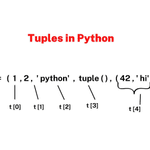


Dose 16 - Sets in Python are like collections of unique elements. They're defined using curly braces or the set() constructor.
For example:
my_set = {1, 2, 3}
🧵
#Python #Sets #CodingCommunity
4
1
51
3/ To find the intersection of two sets:
intersection_set = set1 & set2
# or use set1.intersection(set2)
1
18
2/ To find the union of two sets:
set1 = {1, 2, 3}
set2 = {3, 4, 5}
union_set = set1 | set2
# or use set1.union(set2)
# union_set is now {1, 2, 3, 4, 5}
24
1/ Sets automatically remove duplicates, ensuring only unique values are stored. So, if you try to add a duplicate, it won't change the set.
35
Dose 15 - A tuple in Python is like a list, but immutable. You create it using parentheses (). Example:
my_tuple = (1, 2, 3)
🧵
#PythonMastery 📚 #CodeLikeAPro 🧬#LearnPython 📖
#CodingJourney 🚀

4
65

🚀 Embrace new challenges,
📚 Learn from every experience,
💪 Grow stronger each day!
Let's conquer the world together! 🌎💫
#Motivation #learning #Success
1
57
Dose 14 - 🐍A list is an ordered collection of items. These items can be of any data type: numbers, strings, even other lists! Lists are defined using square brackets [].🧵
#Python #Lists #PythonBasics #Coding101 #LearnToCode #CodeWithPython
4
1
81
3/ Common List Operations:
Append: Add an item to the end of the list.
Remove: Remove an item by its value.
Len: Get the number of items in the list.
Slicing: Get a subset of the list.
1
41
2/ Accessing Elements: You can access elements by their index. Lists are zero-indexed, so the first element is at index 0. Use square brackets to access elements.
1
36