

a kid growing curioser and curioser med student, multidisciplinary artist, curator
San Francisco, CA
Joined May 2022
- Tweets818
- Following631
- Followers373
- Likes4.6K





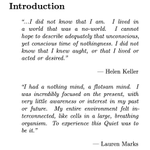


i’ve always taken for granted my high ability to visualise, only to discover this summer that i have hyperphantasia after talking with someone with aphantasia. we took together a test and revealed both of our conditions
now im obsessing on what it feels like to experience life with aphantasia
4
79
Cesca retweeted

In an abandoned Japanese elementary school, artist Yuka Numata resurrects the ghosts of childhood through bead sculptures.


i've already came in contact with letters to a young creator (steve jobs archive), however they never spoke to me as loudly as they do now
e.g.
The most important thing is very simple: Develop a daily practice. Art is not a project or a business or even a career. It is a life. I once had a teacher who advised: If you can imagine any other possible thing to do, perhaps you should pursue that.
- Mona Simpson
1
149


Cesca retweeted

Lionsgate asked me to create a poster for The Hunger Games: Sunrise on the Reaping. After seeing the film, I immediately wanted to draw on the anguish in Käthe Kollwitz’s work and the psychedelic, ornamental poster language of Tadanori Yokoo. Bringing these seemingly disparate approaches together felt right for The Hunger Games: violence is packaged as pastel-colored propaganda, and nature is laced with poison-perfumed flowers.


Cesca retweeted

stay tuned for a really fun and authentic podcast with the one and only sweet hooman @cescacentini who led the content creation residency @JoinEdgeCity and my bro who says ‘google me’.

Cesca retweeted

digital collage by photographer and artist Alex Hyner, which combines multiple individual photos of the sky framed by electrical towers and power lines into a stained-glass style aesthetic.


Cesca retweeted

Astounding Swiss graphic design!
Geigy’s visual legacy, shaped by remarkable designers including Max Schmid, Karl Gerstner, Armin Hofmann and Fred Troller.


being both a co-host and a humble participant of the reading room, i can tell that it's life changing.
even if you didn't have the chance to join, I highly recommend reading the magazine the incredible @marvelgirl_eth made

I built an interactive magazine for San Francisco's best event series: The Reading Room
every reading from S1 is now online, plus an exclusive conversation with Native's @jaesmail
click through each page, and try to find all of the mini animations
built in <5 hours with @figma @bot and opus 5.5
wesbite: readingroomsf.org
1
5
249
Cesca retweeted

special thanks to
@haroonisdreamin
Hussain Khan
@jaesmail
@meiyounesa
@vincent_yc_li
@majamediaco
@cescacentini
Anelle
@nelowfarmahtab
for making this piece of art happen!!!
find more about S2 here: readingroomsf.org/

im getting more and more scared of how human interactions are getting "automated" to avoid the pain/boredom of choosing and spending time

I automated Hinge using Claude Code, a spare Android phone, and a few markdown files.
Getting around 20–25 matches/day, and almost 60% of them are people I would've actually swiped right on myself.
I've been experimenting with this setup for a while now.
Here's a detailed breakdown of how I built it, how it works, and a few things I learned about optimizing my own Hinge profile.
1. The setup is pretty basic
- Took a spare Android phone and installed Hinge.
- Connected it to my MacBook using ADB.
- Connected Claude Code to the phone.
- Gave Claude a prompt with my preferences, deal breakers, non-negotiables, locations, etc.
That's pretty much all the hardware you need.
Also, please don't over-engineer this. Be smart about it.
I know some of you are already thinking about replacing the Android phone with a cloud emulator or some complicated setup. I wouldn't recommend it. You're just increasing the chances of getting flagged or banned.
Keep things simple. There's no point building an entire infrastructure around something that was supposed to save you 45 minutes a day lol.
2. Giving Claude enough context about me
I already have a personality.md file that Claude keeps updating whenever I use it.
It has almost everything about me. Places I've travelled, people I've met, experiences I've had, things that went wrong, things I liked, how I generally think, my preferences, etc.
It's obviously not 100% accurate, but it has a pretty decent understanding of who I am.
I also gave it my entire Hinge profile, including all my photos, prompts, and preferences.
So now, when Claude sees someone's profile, it can actually evaluate whether I'd be interested in that person instead of just blindly swiping.
3. How the actual automation works
I keep travelling between three cities in India, so I've set up three scheduled sessions.
Morning: City 1
Afternoon: City 2
Evening: City 3
Each session runs in batches, with fixed intervals and frequent breaks.
Whenever a profile opens:
Claude reads the basic details first.
If there's an obvious deal breaker, it skips immediately.
Otherwise, it goes through all the photos, prompts, and polls.
Cross-references everything with my preferences.
Decides whether to like or skip.
It's not perfect, but the decisions are surprisingly close to what I would've made myself.
4. The interesting part is how it comments on profiles
I spent some time going through Instagram reels and comment sections about Hinge openers and replies.
Collected around 150 comments that seemed to work well and were also somewhat aligned with my personality.
Put them all into a comments.md file.
Now, whenever Claude decides to like someone's profile, it uses those comments as references.
It doesn't just pick one and paste it.
It reads the entire profile and then writes something specific to that person.
For example, if it's commenting on her first prompt, it might reference something mentioned in her third prompt or one of her photos.
So the comment actually has context instead of being a random pickup line that could be sent to 100 different people.
I think this is one of the reasons the setup has been working reasonably well.
5. Everything gets tracked in a Google Sheet
For every profile, Claude logs:
- Profile details
- Whether it liked or skipped
- Why it made that decision
- What comment it sent
- Whether we eventually matched
The sheet also gets updated whenever a match happens.
I occasionally go through the sheet myself to check how accurate the decisions are.
That's where the ~60% number comes from. Around 60% of the matches are people I would've personally swiped right on.
There's still a lot of room for improvement, but that's not a bad hit rate for something running on autopilot.
6. Something else I tried: optimizing my own Hinge profile
This was actually quite interesting.
Since Claude already has my personality.md, I asked it to analyze my current Hinge profile.
Everything from photos and their sequence to prompts, relationship intentions, and the little descriptions you can add below certain fields.
I also asked it to go through research around dating apps, published studies, and insights shared by people who've worked on products like Hinge.
There are so many small things you generally don't think about.
For example, one claim I came across was that having a black-and-white photo among your regular coloured photos can significantly improve engagement.
The reasoning is that it breaks the visual pattern when someone is scrolling, which might get you a couple of extra seconds of attention.
I haven't independently verified the numbers behind that claim, but it was an interesting thing to test.
Another example is how you describe what you're looking for. Most people just select something like "short-term, open to long-term" and leave it there.
But you can add a small description below it, which gives you another opportunity to communicate what you actually want.
Small things, but they add up.
I've been experimenting with different photo sequences, prompts, and descriptions to see what changes the match rate.
It's basically A/B testing a dating profile lol.
7. Where things stand now
The setup has been running for a while.
Getting around 20–25 matches a day, with roughly 60% matching my own preferences.
Earlier, I'd spend at least 45 minutes a day scrolling through Hinge. With this experiment, the manual effort is almost negligible.
One thing I found interesting is how much difference having proper personal context makes.
Without my personality.md and comments.md, Claude would probably just be another bot sending generic pickup lines.
With those files, it can make decisions and write comments that are much closer to how I'd actually do it.
Again, this was just a fun experiment to see how far I could take Claude Code and phone automation, not something I'm actively using as my regular dating approach. There are obvious questions around authenticity and dating-app rules too.
I've documented the entire setup, including the prompts and files.
If anyone wants the setup file, let me know.
Happy to share it.
Thank me later for saving you a few hours every week.
Now go get back to work :)

4
145
Cesca retweeted

🍊about the process
> built the site w claude
> set up a cms w keystatic
> scanned my sketchbook
> added the sketches to the cms
> used blend modes to give the sketches their look
> connected the gallery and sketchbook pages
> uploaded all imgs from gallery
> worked on sound and interactions
> deployed to vercel
> hit publish

built a digital sketchbook with all my tiny travel sketches of things i’ve eaten, seen and loved ✍🏽
have fun flipping through it - sketchforfun.com
also lmk which sketch is your fav!!
Cesca retweeted

i was getting sick of renaissance art being (ab)used in ai slop.
so i'm building a digital museum where you can learn more about it
launching soon
Cesca retweeted

design work on our team is completely changing
we don’t spend time producing the work anymore, ai does that. We just make the decisions
we gave ai our brand guidelines and let it explore all night, and i really like what it came up with
here is how this happened ↓
Cesca retweeted

Something I've been building and playing with, just because I'm so curious what is possible.
Imagine taking a specific art style that is CC0 licensed, using it as a basis for your brand's illustration style or system?
With this tool, you can edit the textures, colors, etc. All SVGs and artworks are made in Figma with layers and also as code so you can animate.
And each illustration, currently, costs under $1.
Now I'm pushing it to see how it can adapt styles or to remix different elements so it can create new, surprising artworks.
10m.co


