

Hand-fixing AI pixel art 🎮 Sprites, tilesets, animation, with timelapse + .aseprite proof. Open for indie projects. Discord: cuongtran · itch: cuongpixelfix
Vietnam
Joined April 2016
- Tweets59
- Following5
- Followers3
- Likes22
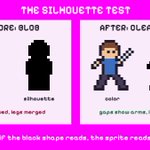




Quick test for AI sprites: fill the whole thing with solid black. If you can't tell what it is or what it's doing, more detail won't save it.
Fix: push the pose first. Clear head, gaps between arms and body, legs apart, props sticking out. Then add detail inside.

1
AI sprite tell: fake dither. The blend between two tones is random speckle, not a pattern, so it reads as noise and shimmers once the sprite moves.
Fix: merge the noise into clean tone clusters. If you want dither, use a tidy checker in a narrow band only.

1
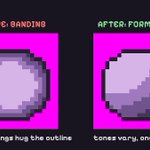
AI sprite tell: banding. Shading comes out as stripes that hug the outline, every color step the same width, so the form looks flat and the edge looks doubled.
Fix: vary the width of each tone, break the stripes where the form turns, and let light pick one side.

2
AI walk cycles often wobble: each frame is drawn on its own, so the feet slide and the body drifts a pixel or two between frames.
Fix: pick one pivot at the feet, align every frame to it, and only let the body bob on purpose.

7
Jaggy lines are an easy AI pixel art tell. A clean curve steps like 6-4-3-2-2-1, not 5-2-4-1-3-1.
Fix: redraw curves so step lengths shrink steadily toward the steep part and never zigzag. Keep straight diagonals at one even step size.

7
AI sprite tell: way too many colors. Zoom in and the "green" is really dozens of near-identical greens, so it looks noisy and won't match the rest of your set.
Fix: merge near-duplicates into one 3-4 shade ramp per material, then lock that palette for every sprite.

7
Another AI sprite tell: the light comes from everywhere. Head lit from the top-left, body from the right, held item from below.
Fix: pick one light direction, then re-shade every part with its ramp: highlight on that side, shadow opposite.
DMs open for cleanup.

10
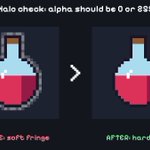
AI sprite tell you only notice in-engine: a faint halo around the edges. The PNG has semi-transparent pixels where the model blended into its background.
Check: alpha should be only 0 or 255.
Fix: threshold alpha, delete the fringe, redraw the edge by hand.

8
Another AI sprite tell: the outline can't decide what it is. Black here, soft gray there, 2px on one side, missing on the other.
Fix: one outline color (or one darker shade per ramp), 1px everywhere, no gaps. Fastest way to make a sprite read at 1x.
DMs open for cleanup.

7
Quick test for AI pixel art: drop a 1px grid over it at the size it claims to be.
If some "pixels" are 2x2, others 3x2 or split across cells, it's not true pixel art yet.
Fix: find the real pixel size, downscale nearest-neighbor to 1x, then redraw the edges that blurred.

4
Common AI sprite tell: the idle animation looks fine, but the feet slide a pixel or two every frame. Each frame was generated on its own, so the pivot drifts.
Fix: pick one anchor pixel between the feet, align every frame to it, then redraw only what should actually move.
6

Trước khi cài app, kéo xuống mục "Quyền riêng tư của ứng dụng" trên App Store.
Có dòng "Dữ liệu dùng để theo dõi bạn" nghĩa là dữ liệu của bạn có thể được chia sẻ cho bên khác.
Mất 5 giây mà biết app nào tôn trọng mình.
9
3 mẹo cho người mới đi buýt Hà Nội:
• Xem biển điểm cuối trên kính trước để biết xe đi chiều nào
• Ngồi gần cửa giữa cho dễ xuống
• Hay ngủ gật? Đặt báo thức theo trạm, đừng theo giờ
Bạn còn mẹo nào nữa không?
9
Đêm qua chớp bề mưa nguồn
Hỏi người tri kỷ có buồn hay chăng?
Cá buồn cá lội tung tăng
Em buồn em biết đãi đằng cùng ai?
Trong Lời Xưa — không quảng cáo, đọc cả khi offline.

10
Một câu ca dao đúng lúc, đôi khi đủ cho cả ngày.
Lời Xưa là kho ca dao, tục ngữ và thành ngữ Việt: gieo quẻ tre theo tâm nguyện, tìm không cần dấu, nghe đọc cả khi offline. Không quảng cáo, không cần tài khoản.
apps.apple.com/vn/app/id6820…
8
Mình là Cường — làm app Apple native cho đời sống Việt.
TMK Studio: 8 ứng dụng không quảng cáo, chạy offline. Ca dao, thiền trà, xe buýt Hà Nội, nhật ký gia đình, bảng màu, cất link, sổ trang trại, gõ tắt trên Mac.
tmkstudio.io.vn
7