

Design with SwiftUI, no coding required. Available on the App Store.
Joined July 2020
- Tweets1.4K
- Following143
- Followers3.2K
- Likes1.8K


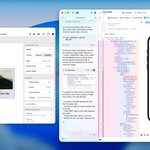




DetailsPro 6.15.0 is now available:
• Design files load significantly faster, especially on app launch and when syncing from iCloud.
Available now, our latest update improves the smallest most impactful detail: the (now blinking) highlight over the current element you're editing
Now it's smarter, automatically blinking, turning off, or staying on.
Get the update today: apple.co/4mICa9H
6.13.0 is available now!
• Improved Enter Full Screen button lets you switch between viewing your design in its selected device size or a native full screen display. You can also quickly toggle Safe Area Insets and the Status Bar.
• Updated design for Liquid Glass.
DetailsPro 6.11.0 is now available
• Several modifier inspectors with numeric keypads now reset properly when using Reset button. This included modifiers like Corner Radius and Line Spacing.
• The Text Alignment modifier inspector now swipes on drag properly.
DetailsPro 6.10.0 is now available
• Swipe inspectors away in the design editor on iPhone and iPad
• Major under-the-hood improvements to the design editor for reliability
• Updated Quick Actions available on any element in the editing view to be Hide, Duplicate, and Delete
Create your own design kits as you go. Save this little piece here, bring it in there.
Kits are a new feature coming to DetailsPro. Here’s a quick look at how they work.
When you’re designing to a reference, bring the reference in like tracing paper.
Tracing Image is a new feature coming in our next update. Here’s a walkthrough of how it works.
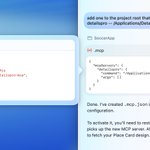
The easiest way to add detailspro-mcp to your Xcode 26.3 project (of course) is to ask the agent to do it for you.
Here we asked Claude to add .mcp.json to the local project root:


Here's DetailsPro MCP sharing SwiftUI designs directly with Xcode! Ask your favorite agent to grab one of your designs and watch as DetailsPro provides the SwiftUI code. Tweak and iterate on your design live and let the agent know to grab the changes.


Give your favorite agent access to your SwiftUI designs
Design on-the-go from your iPhone or iPad, fire up the MCP on your Mac when you get back
Your agents get your designs as SwiftUI code
Coming soon

We added a hide button (finally.) And with it, we updated the menu to make designing easier and faster.
To get started, update DetailsPro: apple.co/4mICa9H

DetailsPro 6.4.0 is out!
The editor has been updated with an improved UI everywhere you can pick an alignment (Layered Stacks, Overlays, modifiers like Rotation, and more) and everywhere you have layers (Overlays, Backgrounds, and Masks.)
Two big improvements were gained with this update:
- It's now so quick to pick the alignment of an Overlay. You can see the alignment immediately in the outline on the left side of the editor (with our new set of custom SF Symbols icons making this extra pretty, thank you SF Symbols app!) From there, you can tap to change the alignment. Before this was too long of a process that often led to hunting around trying to find which element had the modifier in the first place. As a fun bonus, we also added Duplicate and Delete buttons into this menu that have also been quite the boon.
- The alignment picker is now more visual, localizable, and easy to use. Simply tap visually on the anchor point you want to align to. You'll see the selection indicator animate to the correct position. This is a big improvement over what we had before, which was a horizontal list that didn't tap into any intuitive or natural positioning that could be built up as muscle memory.

–New! DetailsPro has been updated with iPhone 17 template sizes, including the Apple Watch Series 11 and Apple Watch Ultra 3.

DetailsPro 6.0 beta is updated and available now
- Glass is a first-class element
- Easily add Glass in Rounded Rect, Capsule, or Circle shapes
- Choose between Clear or Regular styles
- Use as Overlay/BGs
Get the TestFlight here*: testflight.apple.com/join/QC…
* Requires iOS 26

DetailsPro 5.8.0 is available now!
We added two new modifiers, UI improvements, and a whole lot of bug fixes.
- Saturation
– Monospaced Digit
- Spacer, Kerning improvements
Get the update: apple.co/4mICa9H

Explore SF Symbols 7 on TestFlight today ✨
We just added them to our Liquid Glass beta. Super fun just sitting back, browsing the What's New category, and dreaming up ways to improve our designs thanks to Apple HI.
Join our iOS 26 TestFlight: testflight.apple.com/join/QC…

