

AT training for professionals in the vision field. Utilizing multimedia tools to make training applicable, user friendly, and easy to implement.
- Tweets289
- Following54
- Followers115
- Likes19





ALT Header, "Trying to meet your fiscal year budget target?" with clipart of money. Text, "The school year is ending and have extra funds? Purchase our Screen Reader Curriculum! Click the link below to request an estimate for our subscription!"

ALT Clipart of text with sun saying, "Hello Summer". Further text, "Thanks for your support! Exciting news for 2024 - 2025 is coming. Look out for more Tech Tip Tuesday Companions later this month!"

ALT Header, "INTERNET NAVIGATION: Part of our Fall Cohort: What will you learn?" with logo of the cohort section. Text, "This 6-session training will focus: On teaching a user how to navigate the internet using JAWS, NVDA, Chromevox or VoiceOver for Mac, Our 3 unique navigation sequences, And how to build you own lesson plans. Click the link below to learn more and sign up!"

ALT Header, "Thank you for an amazing school year!" Clipart of calendar and arrows pointing to text, "Click the link below to view upcoming events like the 2024 AER InternationalConference and our Fall Cohort!"

ALT Header, "Braille Bootcamp - Fall Cohort - What Will You Learn?" with logo of Braille Bootcamp. Text, "This 6-session training will focus: On deciding if your student needs a braille display, Choosing the right one, Connecting different displays, And using them within your screen reader instruction. Click the link below to learn more and sign up!"

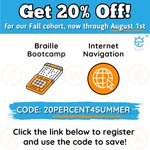
ALT Header, "Get 20% Off! for our Fall cohort, now through August 1st". Logos of Braille Bootcamp and Internet Navigation. Text, "Code: 20PERCENT4SUMMER. Click the link below to register and use the code to save!"

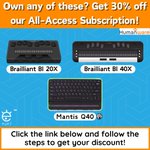
ALT Header, "Own any of these? Get 30% off our All-Access Subscription!" with images of Brailliant BI 20X, Brailliant BI 40X, and a Mantis Q40. Text, "Click the link below and follow the steps to get your discount!" Logo of Humanware and APH.

ALT Title, "Global Awareness Accessibility Day" with clipart of person using computer that connects them to the rest of the world.

ALT Header, "Switch Access Unlocking the Mystery for Students Who are Blind or Have Low Vision" with clipart of laptop meeting and text, "Webinar where you’ll learn what methods to use when developing a switch program for a student." Second clipart is calendar and clock with text, "May 13th and 20th from 6:30 PM - 8:30 PM EST. Click the link below to enroll today!" Logo of NERCVE at the bottom.

ALT "Header, "Internet Navigation: a section of our Fall Cohort". Clipart of browsing internet with text, "Learn how to navigate the internet using JAWS, NVDA, Chromevox, and VoiceOver, A year access to our Screen Reader Curriculum 6 hours of live instruction, Certificate of completion for professional development. Click the link below to register today!"

ALT Header, "Have any of these? Get 30% discount off our All-Access Subscription!" with images of Brailliant BI 20X, Brailliant BI 40X, and a Mantis Q40. Text, "Click the link below and follow the instructions to get the discount!"

ALT Header, "Braille Bootcamp: a section of our Fall Cohort". Text, "Learn how to include braille displays into your screen reader instruction, A year access to our entire Screen reader Curriculum, 6 hours of live instruction, Certificate of completion for professional development." Clipart of a braille display. Text, "Click the link below to register today!"

ALT Header, "Screen Reader Boot Camp" with side text, "Early Bird Deadline: May 2nd! Click the link below to register before the deadline! " First clip art of light bulb with brain with text, "Improve instruction with JAWS, NVDA, Chromevox." Second clip art is a man on a podium giving speech with text, "Half-Day Symposium." Third clip art is a map location with text, "Charlotte, NC on July 24th." Text, "Logo of AER with text, "Part of the 2024 AER International Conference".