

Indie games, software, and AI engineering & research. Sharing what I'm building and figuring out along the way.
Joined October 2026
- Tweets658
- Following104
- Followers52
- Likes582





I'm building a batch image editor for combining source images with templates and exporting the results together.
The mug in the screenshot is a preview of its product-cutout feature.
Recently I've been working on recovering masks and undoing edits, along with before/after comparison and restart stability.
Some photos still need manual review and touch-ups.
The goal is to make this reliable enough for commercial image work.

I'm building a tool for site photo reports: organize job-site photos with descriptions and work stages, then export them as PDF or Excel reports.
These screens use sample photos from before and after a repair.
A tricky part has been preserving report settings while editing photos and cover pages.
I've been refining autosave and conflict recovery, and making the corporate cover layout consistent between PDF and Excel exports.
Development is nearly finished, and I think I'll be able to launch it soon.


Reworking the boss models for my game.
The earlier versions took a lot of time, but I wasn’t happy with the results.
These are the new designs I’m working with.
Still working on baking and cleanup in Blender.

Today's devlog: the boss fights are nearly finished.
The effects, attacks, and narration are ready, with a different feel for each boss.

What have you been working on in your game this week? I’d love to see a clip or screenshot if you feel like sharing.
Testing multiple game instances in Godot? Debug → Customize Run Instances lets you choose how many to launch with Run Project.
Each instance can have its own Launch Arguments, useful for passing different settings to a server and its clients. Your game still needs code to read those arguments and start the right role.
Source: Godot docs, © Juan Linietsky, Ariel Manzur and the Godot community · docs.godotengine.org/en/stab… · creativecommons.org/licenses…

Lumenfold boss clear, gameplay at 2× speed.
The boss voice acting, attack patterns, mechanics and effects are coming together.
I'm still deciding whether to spend more time polishing the boss visuals and terrain, or release sooner and improve them gradually.
I'm also considering PvP using saved player data rather than real-time matches.
That part is still just an idea.
Godot can render transparent PNG sequences.
Project Settings (Advanced):
Editor → Movie Writer → Movie File: capture.png
Rendering → Transparent Background: on
Enable Movie Maker, then run the project. Offline rendering, not real-time capture.
Source: docs.godotengine.org/en/stab…
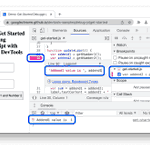
Chrome DevTools has logpoints: console output without editing your source or pausing execution.
In Sources, open the file, right-click a line number → Add logpoint. Enter a variable or expression, then press Enter. It logs when that line runs.
Source: developer.chrome.com/docs/de…

Before sharing a Windows 11 screenshot: open it in Snipping Tool → Text actions → Quick redact. It hides detected email addresses and phone numbers. Check the image yourself too; this isn’t a scan for every kind of private information.
Source: support.microsoft.com/en-us/…
Game art references, with separate filters for linework, shading and palette.
You can look for a color scheme without committing to the rest of a game's style.
Built by @slashskill_.

I bought another domain...
I may have a problem
taking inspiration from neat tools like gameuidatabase - I created gameartstyles.com
It's a place where you can find and compare games based on the art styles they implement
still working on it so be gentle!
Save copied logs without opening Notepad:
In PowerToys, enable Advanced Paste and “Paste as .txt file”.
Copy the text, open a folder in File Explorer, press Win+Shift+V, and choose that action.
Runs locally, no AI.
learn.microsoft.com/en-us/wi…

I tested EdenLive 5B on footage from a game I'm developing. The official demo looked incredible, so I had high expectations.
My results were pretty disappointing. Static backgrounds transformed into surprisingly realistic scenes, but moving objects were often turned into completely unrelated things or distorted beyond recognition.
RTX 5090, INT8, ~23GB VRAM. Two segments took about 4m 46s.
Maybe my settings weren't optimal, or my game footage was a particularly bad fit for the model. Either way, there's clearly a gap between the demo and what I got.
Here's the actual result.
Find commits that changed a timeout, even when its name stayed the same:
git log -p -G 'timeout' -- src/
-G matches added/removed lines.
-S 'timeout' only finds changes to its occurrence count, so changing 30 to 60 can slip past it.
git-scm.com/docs/git-log
Boss fight testing, sped up 4x.
I'm still working on the mechanics and boss narration.
What's a boss mechanic you've really enjoyed? I'd love some ideas.
AMD's 26.10.1 release notes list FSR Upscaling 4.1 support for RX 6000 cards.
It still needs a supported game.
AMD says this driver package isn't for handheld gaming devices; use your device maker's driver there.
amd.com/en/resources/support…

ファイル名が分かっていれば検索は簡単。
でも、画像の中に書いてあった文字しか覚えていないスクショを探すのは面倒。
DugUpみたいなツールなら、ローカルのOCRと意味検索で探せる。
通常の検索にクラウドは不要で、Claude連携はオプション。
reddit.com/r/software/commen…
