

I test how far you can push Apple’s built-in apps. Notes, Reminders, Calendar & Shortcuts. Experiments, hidden features and practical setups.
Joined March 2024
- Tweets534
- Following38
- Followers11
- Likes280






How to create a reminder when I get home?
You can make Apple Reminders alert you based on where you are instead of picking a specific time.
Here’s how I do it:
→ Create a new reminder
→ Tap Location
→ Tap Custom
→ Search for or select your home address
→ Choose Arriving
One little Apple Notes setup has made brain dumping ridiculously easy for me.
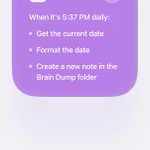
I built a Shortcut that opens my current Brain Dump note with the keyboard ready.
Then I attached it to my iPhone’s Action Button.
Thought appears → press button → type → done.

My rule for brain dumping:
Never organize while you’re dumping.
Don’t rewrite it.
Don’t categorize it.
Don’t decide whether it’s important.
Just get it out.
There’s a completely separate time for figuring out what any of it means.
That separation makes a huge difference.
The problem with most brain dump systems:
They teach you how to get everything OUT of your head.
Nobody tells you what to do with it afterward.
So the note slowly becomes a graveyard of thoughts you never look at again.
Capture feels good.
Processing is what makes it useful.
I think Apple Reminders is massively underrated.
Not because it has every productivity feature imaginable.
Because it’s already on your phone, Siri can use it, Calendar works with it, widgets work with it, and it takes seconds to capture something.
I think most people are using brain dumps wrong.
A brain dump is NOT a to-do list.
It can contain:
tasks
worries
ideas
half-thoughts
random things you don’t want to forget
The moment you start sorting everything while writing it down, you’re planning.
Not dumping.
After using Apple Reminders in iOS 27, I don’t think Apple is trying to reinvent the app.
And I’m glad.
Most of the update is basically:
fewer taps
better natural language
better Shortcuts
more useful widgets
smarter integrations
It still feels like Reminders.
I spend way too much time testing Apple’s built-in apps.
Apple Notes, Reminders, Calendar… I keep digging until I find the little features, limitations, and workflows most people never notice.
So I started putting the best stuff I find into one free email every week.
If you use these apps a lot, you’ll probably like it ↓
iapplist.com/newsletter/

After spending a decent amount of time on Threads, I have to say… I like it way more than X right now.
And I used to LOVE X.
The UI feels better, people actually engage with each other, and conversations feel much more normal.
Way less toxicity too.

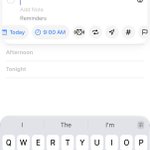
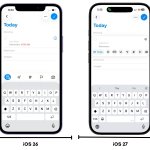
One of the smaller Apple Reminders changes in iOS 27 might actually save me the most taps.
While creating a reminder, I can now quickly access: Date, Time, Urgent, Repeat, Location, Tags, Flag, Camera
without constantly opening the full details screen.

I’ve been testing Apple Reminders pretty heavily on iOS 27.
My biggest takeaway:
Creating reminders is getting ridiculously fast.
I also tested the new Reminders Shortcuts actions, the huge Home Screen widget, faster controls, Siri changes, and a few features people are calling “new” even though they were already there before iOS 27.
I put everything I found here:
iapplist.com/apple-reminders…

I somehow overlooked one of the most useful Photos changes in iOS 27.
You can now save an actual frame from a video as a photo.
Open a video → move to the frame you want → tap the three-dot menu → Save Video Frame as Photo.

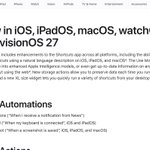
I didn’t realize how big the Shortcuts update in iOS 27 actually was until I went through Apple’s full change list.
There are 35+ new or improved actions.
A few that stood out to me:

→ Automations can sync across devices
→ Shortcuts can remember data between runs
→ “If” now supports Otherwise If
→ You can trigger automations from screenshots and notifications
→ Apple Intelligence can summarize existing shortcuts