
designer & web developer exploring with AI ⚓️ Dlock https://teapaw.org/t.co/wkySncNN46
Mauritius
Joined June 2014
- Tweets75
- Following514
- Followers43
- Likes62

Dlock is on @macpiphq now 🚀 Keep your Mac Dock locked on the screen you choose.
Have a look: macpip.com/apps/dlock

Dlock is live on @macpiphq today 🚀 Kepps your Mac Dock locked on the screen you choose via the menu bar.
I would love to hear what you think: macpip.com/apps/dlock
Kevin Mk retweeted

Coming up on MacPip 🚀 Dlock by @kevinmk__ launches on Nov 17: Kepps your Mac Dock locked on the screen you choose via the menu bar. $5 once (launch), then $9.

hey, Kevin here 👋
designer & web developer, exploring with AI. based in mauritius 🇲🇺
looking to meet developers, designers, founders and early users!
just put myself on the map 👇
makermap.lol/kevinmk__?v=ujy…
teapaw.org/verbove/status/2108611…


3
2
142
dlock.vctrads.com/?ref=x
if you ever plug in a second monitor, this one keeps your Dock from jumping screens teapaw.org/JustinasRoland0/status…


72
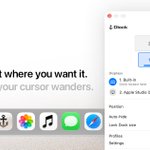
fixed it. Dlock keeps your Dock on the screen you choose, so it stops jumping when your cursor wanders.
dlock.vctrads.com/?ref=x
21
introducing Dlock for anyone tired of their Mac's Dock jumping between screens.
choose your display, and Dlock locks it right where you want it, even when your cursor wanders.
$5, one-time. dlock.vctrads.com/

2
1
71

Join me to support communication privacy. thunderbird.net/donate via @mozthunderbird #freetheinbox thunderbird.net/en-US/thunde…
1
1
149
Kevin Mk retweeted

I saw this tweet and instead of going about my Saturday night like a normal person, I thought, fuck it let’s give it a go.
If you wanna try it out here’s the download link in the comments.


Supercharge your workflow with the Sidekick browser! A browser designed for multitasking, collaboration, and boosting productivity. Give it a try! #sidekickbrowser #worksmarter
join.meetsidekick.com/xvrub
3
118

