

Free Premiere Pro plugin: mark a range, get an animation. Premiere için ücretsiz eklenti: aralığı seç, animasyonu al. Open source.
Joined October 2026
- Tweets24
- Following1
- Followers83
- Likes15





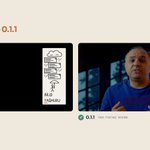

and places designed captions above your footage as one clip with transparency.
Nine looks, with your colours
Names and terms spelled the way you list them
Check every line before it renders, and save an SRT too
Also new: narrate a text you wrote in Story mode,
Ollama as a free local model, and Claude Fable 5.1.
Free and open source. Update from the panel, or download: kilnframe.com


Kilnframe is live on Product Hunt 🚀
Mark a range in Premiere Pro or DaVinci Resolve, pick a style, and what you say becomes an animation on your timeline, with sound effects and music.
Free, open source, rendered on your own computer.

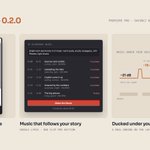
No recording? Write a topic and Kilnframe writes the story, narrates it and builds the sequence. Or open the Music tab: it scores every topic of your video and keeps it under your voice.
Works with the AI plan you already pay for (Claude, ChatGPT, Grok), your own API key, or a local model. We compared 15 models on the same clip: kilnframe.com/#benchmark

Kilnframe 0.2.1 is out 🎬
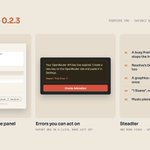
• Sign out of Claude, ChatGPT or Grok in Settings and sign in with another account
• App closed? The panel opens it in one click
• A note when your format doesn't match the sequence
• Fixes for API keys and provider errors

kilnframe retweeted

Kilnframe 0.2.0 güncellemesiyle DaVinci Resolve Studio desteği gelmiş, Mac ve Windows’ta çalışması işimi epey kolaylaştıracak; yeni Music tab sayesinde Google Lyria timeline’ımı otomatik skorluyor, konuya göre müzik üretiyor, sesimin altına ducking yapıyor ve son frame’de bitiyor. Kesinlikle deneyeceğim, free ve open source olması da süper. #Kilnframe #DaVinciResolve #VideoEditing kilnframe.com


