

Senior Engineering Manager @InPostPL Group • Software Engineer ⌨️ • I write about ai & mobile📱• Sharing engineering, managerial and tech tips & tricks 🤓
Joined March 2013
- Tweets408
- Following177
- Followers538
- Likes872




Pinned Tweet
The hottest Jetpack Compose projects and libraries on GitHub in 2023 to take inspiration from🔥🔥 🚀🤓
⚡⚡ Cool open-source projects in a thread 🧵⚡⚡
#android #androiddev #Productivity #kotlin #JetpackCompose #compose #tooling #opensource #inspiration
Michal Bialas retweeted
This post by @donnfelker is pure gold donnfelker.com/why-kotlin-mu…
The article presents a pragmatic approach for choosing the right technology for your needs, or, generally speaking, the right tool for the job. History repeats itself, as seen with Cordova/Phonegap, Ionic, Xamarin, React Native, and currently with Kotlin Multiplatform.
This is a great read for everyone who has an impact on the tech stack, from business owners to engineering managers, tech leads, and developers.
#Mobile #KMP #multiplatform #androiddev #iosdev #webdevelopment
After posting this tweet, YouTube immediately recommended to me The State of #Kotlin #Multiplatform youtube.com/watch?v=bz4cQeaX… 😅
Michal Bialas retweeted
#androidstudio #intellij plugin tip⚡⌨️
Use ADB Idea - a plugin that helps and automates adb commands to: uninstall, kill, start, restart, clear an app, its data and restart it & many more.
plugins.jetbrains.com/plugin…
#tipoftheday #androiddev #AndroidDevs #developers #Productivity

#androidstudio #intellij plugin tip⚡⌨️
Use ADB Idea - a plugin that helps and automates adb commands to: uninstall, kill, start, restart, clear an app, its data and restart it & many more.
plugins.jetbrains.com/plugin…
#tipoftheday #androiddev #AndroidDevs #developers #Productivity
Michal Bialas retweeted
#androidstudio #intellij plugin tip ⌨️
Use String Manipulation which provides actions for text manipulation (e.g. toggling styles like 🐫Case, hyphen-lowercase, capitalize text and more)
plugins.jetbrains.com/plugin…
#tipoftheday #androiddev #AndroidDevs #developers #Productivity
#androidstudio #intellij plugin tip ⌨️
Use String Manipulation which provides actions for text manipulation (e.g. toggling styles like 🐫Case, hyphen-lowercase, capitalize text and more)
plugins.jetbrains.com/plugin…
#tipoftheday #androiddev #AndroidDevs #developers #Productivity
Michal Bialas retweeted
#androidstudio #intellij plugin tip ⌨️
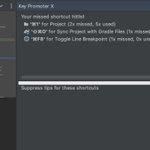
Use Key Promoter for learning essential shortcuts as you work. Track mouse clicks, be warned that you used the mouse and get the shortcut that you should have used instead. plugins.jetbrains.com/plugin…
#AndroidDevs #developers #Productivity

#androidstudio #intellij plugin tip ⌨️
Use Key Promoter for learning essential shortcuts as you work. Track mouse clicks, be warned that you used the mouse and get the shortcut that you should have used instead. plugins.jetbrains.com/plugin…
#AndroidDevs #developers #Productivity
Michal Bialas retweeted
#androidstudio #intellij plugin tip ⚡
Use CodeGlance Pro to display a zoomed out overview or a minimap similar to the one found in Sublime Text or Visual Studio Code into the editor pane.
plugins.jetbrains.com/plugin…
#tipoftheday #androiddev #AndroidDevs #developers #Productivity
#androidstudio #intellij plugin tip ⚡
Use CodeGlance Pro to display a zoomed out overview or a minimap similar to the one found in Sublime Text or Visual Studio Code into the editor pane.
plugins.jetbrains.com/plugin…
#tipoftheday #androiddev #AndroidDevs #developers #Productivity
Michal Bialas retweeted
This plugin is really powerful and offers adding colors to:
- various types brackets (Round, Squiggly, Square, Angle),
- variables for more languages,
- indent guidelines and many more.
The plugin is open-sourced and README is full of examples.
plugins.jetbrains.com/plugin…
Michal Bialas retweeted
#androidstudio #intellij tip #30 ⚡
Install and use plugins effectively, like e.g. Rainbow Brackets - this plugin adds colorful brackets to your code and makes it more readable. More in the thread 🧵 👇
#tipoftheday #androiddev #AndroidDevs #developers #Productivity

#androidstudio #intellij tip #30 ⚡
Install and use plugins effectively, like e.g. Rainbow Brackets - this plugin adds colorful brackets to your code and makes it more readable. More in the thread 🧵 👇
#tipoftheday #androiddev #AndroidDevs #developers #Productivity
This plugin is really powerful and offers adding colors to:
- various types brackets (Round, Squiggly, Square, Angle),
- variables for more languages,
- indent guidelines and many more.
The plugin is open-sourced and README is full of examples.
plugins.jetbrains.com/plugin…
If you're interested in
- #Android , #iOS & #mobile overall
- #Engineering #Management
- #Productivity #Tips
Feel free to follow me!
Talk soon 👋
1
62
Michal Bialas retweeted
If you're interested in
- #Android , #iOS & #mobile overall
- #Engineering #Management
- #Productivity #Tips
Feel free to follow me!
Talk soon 👋
Michal Bialas retweeted
macOS: control + ` → 4 View Mode → Distraction Free Mode
Windows / Linux: ctrl + ` → 4 View Mode → Distraction Free Mode

Michal Bialas retweeted
#androidstudio #intellij tip #29 ⚡
Work in ZEN mode / distraction free mode — to turn on this feature, you need to go scheme pop-up → View Mode → Enter Distraction Free Mode (or ZEN mode). 👇 Shortcuts inside 👇
#tipoftheday #androiddev #AndroidDevs #Productivity
Michal Bialas retweeted
#androidstudio #intellij tip #28
Quick theme switch or scheme, keyboard mapping, styles, colors etc. in real time. This is quite impressive shortcut.
macOS: control + ` (backtick)
Windows / Linux: ctrl + ` (backtick)
#tipoftheday #androiddev #AndroidDevs #Productivity