

Remote-controlled Countdown Timer 🚀 11K+ happy broadcasters, producers and time-keepers ⏳ Create your own timer for free with one click
Germany
Joined December 2022
- Tweets152
- Following45
- Followers166
- Likes404



📣 We have a big release coming soon, but first, a few smaller product updates:
youtube.com/watch?v=pgdO-Ols…
Here's what's new:
✔️ One-click fullscreen messages
✔️ Add a timer above or below any other
✔️ Transparent blackout for OBS and overlays
✔️ A controller slot that's always reserved for you
✔️ Two-factor authentication (authenticator app or SMS)
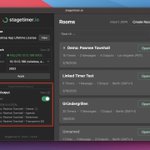
New: 📡 NDI® Support for the Desktop App
The Desktop App now comes with NDI support. Open a room controller to publish NDI feeds for that room. Once an NDI receiver is connected the feed will persist even if you close the controller. And it supports Alpha channels.

ALT Stagetimer Desktop App with NDI enabled
This feature is labeled as "experimental" and we would love to have your feedback so we can make it work in real show setups.
Available for Windows, Mac and Linux: stagetimer.io/desktop-app/

📣 Black Friday 25% off Desktop App Lifetime license
One-time purchase, yours forever! Use coupon code BLACKFRIDAY25
Purchase the desktop app outright with a perpetual license - no subscription needed.

Perfect for using Stagetimer locally (offline use). Does not include the web version of Stagetimer.
Get your Lifetime license here: stagetimer.io/desktop-app/#l…
⏳ Latest Stagetimer release:
Customization for the blackout screen, added agenda & moderator elements for outputs and improved the JSON import/export function.
Here's a quick showcase:
youtu.be/zq-mtenEP1s?si=2ViS…

📣 New feature: Customize the Blackout Screen
Each output now has dedicated blackout settings. Choose a custom color, upload an image, or display the clock during blackout.

The "Use Background" option adopts your output's background setting, which is useful for transparent overlays in OBS.
When using a transparent background, blackout removes all timer elements while keeping the transparency intact. Settings update in real-time across all outputs.
Try Stagetimer for free at your next event, meeting or presentation: stagetimer.io/

📣 New Output Elements
Transport Controls
Give operators lightweight timer control without full controller access.
Website Embed Element
Embed external websites directly into your outputs. Pull in live data, social media feeds, or any web content alongside your timers.

Website Embed Element
-> Scale Control: Zoom from 10% to 200% to fit content properly in your layout. Many sites render better at 50% scale for embedding.
->Refresh Options: Set automatic refresh intervals or keep static content.
Try Stagetimer at your next event, meeting or presentation:
stagetimer.io
📣 New feature: Custom Fonts for Outputs
You can now upload your brand fonts and use them across all text elements in your outputs. The new font management system integrates seamlessly with the output customizer - upload once, use everywhere.

Your custom fonts load automatically when viewers open your outputs. They work across all devices and browsers that support web fonts.
Some fonts may not display correctly in countdown timers if they weren't designed for numerical display - test your fonts before going live 😉
Try Stagetimer for free on your next event, meeting or presentation.
stagetimer.io
Stagetimer is full of new features and possibilities! ⏳ ❤️ 🧡 💚
Want a quick run through Stagetimer v2.23? Here it is:
youtu.be/rlA_2DO7-vw?si=wK6x…
