

The only tool you need to launch your online business 🚀
Joined May 2019
- Tweets4K
- Following161
- Followers2.9K
- Likes1.9K





You can now set a sender email for transactional emails on each custom domain 📧✨
❌ Before, all transactional emails (like invoices and course emails) were sent from a single sender email
✅ Now, each custom domain can have its own sender email
Keep reading... 👇

Here's how it works:
🔹 Go to the new "Transactional email address" section in the "Emails" settings page
🔹 Pick a custom domain and set its sender email
🔹 You can also add a sender name for each domain
(This doesn't affect sender emails already set for your marketing emails)
2.3M YouTube views in 28 days with AI 🔥
Meet Uladzislau Kazyra, who runs the AI Master YouTube channel with his partner Arthur
Click the link below to watch it NOW 👇
youtu.be/QRmrrhDQbOE
... Keep reading 👇

What you'll discover in this episode:
✅ He shares his screen to show how he does it exactly
✅ How their first AI video hit 1.4M views on a brand-new channel
✅ Why 60% of AI content is slop and how to avoid it
✅ His #1 tip: record 1 or 2 videos yourself first
They used to post 8 videos/month and worked hard on every single one
Today, they publish a 20+ minute video every day with AI by working only 2 to 3 hours a day
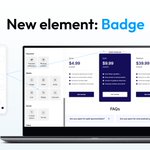
New page element: Badge 🏷️
❌ Before, highlighting labels like “Most popular” or “New” required workarounds like buttons or colored text blocks
✅ Now, here’s how it works:
Keep reading... 👇

🔹 In the editor, drag the Badge element from the sidebar
🔹 Type your label, like “Most popular,” and add an icon if you want
🔹 Style it with your own font, colors, corners, border, and shadow
💡 Tip: you can also use it for numbered steps by turning its shape into a circle
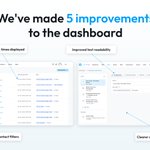
We've made 5 improvements to the dashboard ✨
These are based on the feedback you shared since the new design launched
Keep reading...👇

⚙️ Funnel settings are back on the funnel page
A dedicated Settings icon gives you direct access to your funnel settings again
We'll continue monitoring your suggestions and using them to guide further improvements to the new design 🚀
🔍 Contacts filter side panel is back
Access filters and search fields quickly while keeping your contacts list visible
🕒 Exact dates and times
Exact dates and times now replace labels like "3 days ago"
Here's what's new:
🎨 Clearer sections and better contrast
Card and section borders are more visible, with a clearer separation between elements
📖 Improved text readability
Labels, descriptions, and other content are easier to read, with refined colors, sizes, and fonts
You can now restore earlier versions of your pages 🕘✨
❌ Before, users had to contact support to restore an earlier version of their page
Keep reading...👇

🔹 Versions go back to the 10 most recent days you saved the page, however long ago they were
🔹 Versions are saved in your browser only, and are removed if you clear your browser data
🔹 When you restore a previous version, your current page is automatically saved as a "Before restore" copy
📌 Notes:
🔹 On the day you're working on your page, your 3 most recent saves are kept
🔹 For earlier days, only the last save of each day is kept