
Explore PyTorch models in VS Code. Follow tensor shapes, inspect layers, and review source changes.
- Tweets34
- Following44
- Followers32
- Likes114


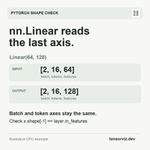


ALT PyTorch shape example: nn.Linear(64, 128) maps an input of shape [2, 16, 64] to [2, 16, 128]. In this example the first two axes mean batch and tokens; they remain unchanged. The final feature axis changes from 64 to 128. Check x.shape[-1] against layer.in_features. This is an illustrative CPU example, with the tensorViz logo.

ALT 1 of 4. Lost in a huge model graph? Start at one stage. A real tensorViz screenshot shows Swin-B features.5 with 18 direct children. Cropped cards retain the stage breadcrumb. Development build, random weights, CPU eval, input [1, 3, 224, 224]. The supplied tensorViz logo is at the top right.

ALT 2 of 4. Open one block. The real tensorViz view shows features.5.0, a SwinTransformerBlock with 8 direct children, inside the 18-block stage. Its MLP is outlined as the next module to open. Breadcrumbs preserve the parent path. Development build, random weights, CPU eval; tensorViz logo at top right.

ALT 3 of 4. Then just its MLP. The features.5.0.mlp view shows three direct children: Linear, GELU and Linear, with captured input and output shapes on their cards. The first Linear is outlined as the next item to open. These are real development-build screenshots; tensorViz logo at top right.

ALT 4 of 4. Read the operations last. The real features.5.0.mlp.0 Linear view shows State, Reshape, Transpose and Matrix multiply plus add operations with captured tensor shapes. The breadcrumb path remains visible. The footer links to tensorviz.dev. Development build, Swin-B, random weights, CPU eval; tensorViz logo at top right.


