

We organize testing so you would actually enjoy building quality products.
Joined May 2020
- Tweets991
- Following157
- Followers1.5K
- Likes1.3K




Pinned Tweet
New release from Testomat.io! Dictate test documentation, run manual tests directly from your browser, and build richer integrations with Public API v2 🚀
Here's what's new 👇
• 🎙 Voice Mode — dictate test steps, requirements, comments, and exploratory testing notes
• 🧩 Testomat.io Browser Extension — create tests, record browser actions, and execute manual runs without switching tabs
• 📊 Manual-to-Automated Analytics — track how your test suite’s automation coverage changes over time
• 🤖 AI-generated project structures + Mermaid diagrams for visual test design
• 🔌 Public API v2 improvements — branch-aware requests, aggregated counts, run statistics, analytics access, and clearer pagination
• ✨ Easier manual run editing, search within Test Plans, advanced relaunch improvements, and more!
Have you heard of e2e framework from @TesterArmy ?
It's AI-native @playwrightweb alternative for browser and mobile testing
Where you combine classical code with AI prompts to achieve the test goals

Learn how it is different from Playwright and how you can have e2e reports inside Testomat.io in our new blogpost:

Are you still testing with Playwright?
Our CTO overviews emerging AI-native browser engines that run tests faster spending less resources:

testomat.io retweeted

It's 2026, no one writes e2e tests by hand
And no new fancy framework can solve that
That's why we created Explorbot which takes test cases in markdown format and executes them
You don't have test cases? It takes web page and tests whatever is reasonable there
AI test case generation moves QA work from writing tests to reviewing them.
That shift only works when AI has more context than a pasted user story. A standalone chat can draft test cases, but it doesn't know what your team has already covered or where the real gaps are.
In Testomat.io, AI works inside your test project. It analyzes the requirement, suggests suites and tests, and keeps them linked to the source. The tester can edit, accept, or reject every suggestion.
@mpoliarush explains the workflow, its limitations, and where human judgment still matters:
testomat.io/blog/ai-test-cas…

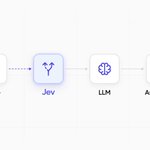
Jev, Jev, Jev. Have you added it to your QA workflow yet?
Explorbot can now use Jev as an optional decision model for the small, closed questions that come up during a test: which of several similar elements to click, whether the run is still making progress, or whether an expected result is already verified.
Jev picks one of the available options and returns a confidence score. If confidence is low, Explorbot falls back to its usual behavior.
The models that plan and run the test stay the same. Jev is a faster layer for questions that need one clear answer, not a paragraph.


Coding agents write unit tests cheaply and in volume. But they rarely see a running database.
So the test count grows, and the contracts between components stay untested.
Unit vs. integration tests, and how to balance them in CI:
testomat.io/blog/unit-testin…


Autonomous web testing
Now powered by Jev ⬇️ 🦾
Jev from @typesafeai was added to Explorbot as our agent-independent judge. To our measurements our main model gpt-oss-20b was pretty much that fast and cheap but far less confident 😅
So taking another verification layer was a good addition to improve stability

Reliability isn’t only about the product.
If the same test passes and fails on unchanged code, the test suite is part of the problem too.
This guide explains how to measure reliability, from MTBF and recovery time to flaky tests and repeated AI agent runs: testomat.io/blog/reliability…

Mercury 2.5 generated tokens 9× faster than GPT-5.6 Luna. The full Explorbot session? Same time as before.
The bottleneck was page reading, not planning.
@davert ran it as the planner in a real browser-testing agent. Why tokens/sec can mislead you 👇


A failed test from an AI agent does not always mean your product is broken. Just as often it means the agent did not understand the screen.
So a run here ends with three outcomes instead of two: defect, not a defect, and could not complete.
The summary keeps them apart, and the third one says something about the agent, not about your product.
Most tools file that third case under "failed".
That is what turns a report into noise, and it is why teams stop opening AI-generated results after the first week.
On our own product, a person opens every failed run, watches the video, reads the steps the agent tried and the console output, and then decides. Nobody should trust an agent blindly, and we do not ask you to.

When you run exploratory testing by hand, clicking is the cheap part. Writing everything down is what eats the time.
You click through a screen, watch what happens, then stop and take notes. If you want logs from that session, you set up something separate to capture them. The write-up comes later, from memory and screenshots.
Explorbot produces all of it on its own: the notes, the logs, the video, and every step it tried, attached to a run in Testomat.io. Your engineer spends that time reading the report instead of writing it.