

25+ yrs in Tech & Edu | Sharing how busy entrepreneurs can leverage 'just enough tech’ principles to simplify, optimize, reduce overhead, & stay focused.
Ontario, Canada 🇨🇦
Joined April 2023
- Tweets765
- Following372
- Followers116
- Likes1.2K






Pinned Tweet
After 2+ decades in tech, I've seen it all—evaluating & deploying countless systems.
The struggle was real.
Then came the Saas & No-code revolution.
Finally, entrepreneurs had power 💪
We could build anything!
So why am I not a millionaire already? Why aren't YOU? 🧵👇
ChatGPT is your PKM wingman.
But without search history, it means a LOT of copy-paste.
So I created a little script to convert my history into a @RoamResearch friendly import file.
github.com/lisaross/chatGPTt…
Won't be useful for long, but it's nice for now. Enjoy!


The mom hustle is real.
If my wife ever left town for 3hrs people would panic, let alone 3 weeks 😂
There are other hustles too:
Aging parents
Chronic illness
Launching grown kids
Etc
My take: play your own game, as only you can. They aren’t on the same court, and that’s ok.

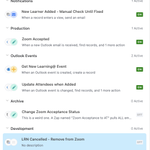
Using sections inside airtable automations helps keep things organized.
You can organize by task type, development stage, and primary app. Or whatever you want.
I also put instructions in the descriptions because future-Lisa won't know WTF today-Lisa was doing. 🤣

ALT Screenshot of sections in airtable automations sidebar. Sections for Notifications, Production, Outlook Events, Archive, and Development.
Quick Python in Code by @zapier tip for chatGPT. Add this to your prompt to avoid hallucinations:
"Write all Python code to explicitly work inside a code by zapier action. Use only libraries and features that are allowed in their action. If you can't do it, say 'I can't.'"
Oh, something else to add that I usually put at the end of the prompt:
"Include any error handling for troubleshooting, and any other data sanitation that would be recommended to make this work."
My reward for completing my critical tasks today will be playing with these new @zapier features. 🍬

Lisa Ross 🧢 Just Enough Tech retweeted
Many systems have duplicate features.
Usually, I'd say that's wasteful and expensive.
But today, I decided to make it work for me.
Zapier was down, but Airtable has Automations. 🤔
So I created AT automation buttons for critical actions.
Easy mitigation, tiny lift. 💪

"Reading the tea leaves" is my new favorite description of troubleshooting/changing automations 6 months after building.

Might refactor some zaps and move "just email" actions over to @airtable automation. 🤔
Data is pulled from AT anyway, and using both systems would let me "diversify" my automations so I don't hit my limits on both systems so quickly.
I'll have to document it well.

You should have seen it 3 months ago.
I tried to put in "a middle-aged masc lesbian," and all I got were pictures of 2 young long-haired blonde, skinny women...
...kissing. 🤣
It has evolved somewhat. I'm still optimistic about the future.🤞

Hey @midjourney_ai - is it the word "stereotypical" or the word "person" that causes your outputs to default to ALL MEN, with a prompt of
"most sterotypical _______ person" - ?
I tested this out and it's a dude parade:
Today's share-worthy lesson:
Critical Saas apps go down.
When this happens:
1. stay calm & check status
2. reflect on what's critical
3. make a redundancy plan
4. rejoice when it comes back up
🔑 Redundancy is KEY.
If you're not sure what that means, keep reading 👇
Critical automations are different.
Work needs to go on when the saas is down.
Here's how to avoid pain later:
1. Document manual process
2. Including any comms, contacts etc.
3. Don't save that document on the same system 🤦
Pro-tip: you don't need to go 100% manual...