

I connect people, systems, and knowledge to help companies scale in the AI era • Aspiring ski bum • Former Global Senior Director @HubSpot
Greater Boston Area
Joined June 2011
- Tweets1.3K
- Following306
- Followers976
- Likes5.4K


Pinned Tweet
If there’s one thing to know about me, it’s that I’m obsessed with productivity, efficiency, and scale.
When I see someone using a new tool, agent, or workflow that creates leverage, it immediately catches my attention and typically doesn’t leave. There have been countless nights when I lie in bed thinking about where it could fit, what it could replace, and whether it could give me (or someone I’m working with) leverage.
My X and YouTube feeds are filled with new tools, agents, and workflows — and I love it (although it can sometimes lead to me daydreaming during dinner conversations with my wife. Sorry, Amberly!)
I won’t go so far as to call myself the @bryan_johnson of systems and productivity. But sometimes it feels uncomfortably close.
My goal isn’t to collect more apps and tools. It’s actually quite the opposite.
It’s to build an operating system that grants time back, creates leverage, and removes the friction between what I want to get done and actually doing it.
I want to capture every idea, task, decision, and learning. I want them to be searchable, portable, and shareable. I want the knowledge gained to contribute to shared, persistent memory so I — and others — can build on what worked and avoid repeating what didn’t.
What’s cool is that this is all finally possible.
You can capture your activities, conversations, and work. You can access them instantly. You can share the knowledge with others. And you can use that knowledge to train agents to act on your behalf!
I’m sharing my productivity stack in the hope that it sparks ideas for how you can tweak yours to drive better outcomes and get more time back.
After lots of trial and error, here’s where I’m at:
The core interfaces: Dia Browser + ChatGPT
Most of my work happens in one of two places: my browser or one of my AI agents.
For the past six months, Dia (@diabrowser) has been my default web browser.
Its beautifully designed vertical tabs, tab groups, and profiles keep everything from becoming one giant pile of tabs. It works with Chrome extensions, so I don’t lose anything Chrome provides. It remembers the pages I’ve visited. It connects to my tools and can proactively create Morning Briefs about what needs my attention. Its built-in AI chat lets me work with my tabs, browser memory, and connected tools.
Next to Dia is ChatGPT (@ChatGPT) .
It’s my command center and daily workhorse for driving work forward.
Now, before this turns into a ChatGPT love letter, I should say that the frontier models are all ridiculously good right now. I subscribe to ChatGPT, @claudeai, and @grok because I want to keep up with what each one is doing. For now, each has small advantages.
For a long time, I was Claude’s biggest fanboi.
Its connector library could pull context from my tools and take action inside them. For the way I work, those connections aren’t a bonus. They’re absolutely essential.
Today, GPT-5.6 Sol is my preferred model, and ChatGPT’s desktop app has become my preferred working environment.
I’ve installed OpenAI’s Codex Chrome extension in Dia, which means ChatGPT can use my existing browser profile, signed-in sessions, and open tabs when I give it permission. It can work through pages with me instead of stopping at advice.
Getting thoughts into the system: Willow Voice
Willow Voice (@WillowVoiceAI) removes another input bottleneck: typing.
The instructions I give AI have become quite elaborate. I might ask it to pull context from Notion, review recent Granola meetings, research something online, and then create a finished piece of work. With Willow, I hold the Function key and say all of that naturally instead of typing a small novel into ChatGPT.
When I’m on the go, I use ChatGPT Voice to capture ideas and action items. They get categorized, organized, and stored in the right place in Notion.
Willow and ChatGPT Voice don’t do the work. They remove the friction between what I’m thinking and the system that can act on it.
The memory and shared context layer: Notion (@NotionHQ)
I’ve been working hard to centralize my core knowledge, beliefs, ideas, goals, tasks, projects, conversations, and more in one environment. It needs to be accessible to my other tools so I can push and pull information in and out easily.
More important than ever, it also needs to be accessible to agents so I can build a team of AI agents and Bots to work on my behalf.
I’ve bounced between @clickup, @todoist, @linear, @asana, @obsdmd... About a year ago, I finally committed to Notion.
I have a love/hate relationship with it. Its flexibility is amazing and also sucks.
You can build almost anything in Notion, which means you can spend an unreasonable amount of time deciding how to build it. But once I stopped treating it like another app I needed to work inside, it became much more valuable.
I rarely go into Notion, but I use it all the time. That’s its most powerful feature.
I have one Notion workspace for my personal life and another for work. They’re organized differently because they do different jobs, but they’re both connected to the AI models I use.
That lets me store information in one place and retrieve it from whatever environment I’m already working in.
Notion also works really nicely in both single-player and multiplayer mode.
My wife and I use our personal workspace for shared tasks, documents, and all the random information required to operate a family—which is basically an operating system of its own.
For work, I can invite collaborators into the right spaces and instantly give them the context they need without giving everyone access to everything.
I can create and store key artifacts like ideal customer profiles, writing styles, products and services, processes, decisions, and research. This can become governed company knowledge that people and agents use repeatedly.
In my strong opinion, a shared memory layer like this will become critical as more people and agents work together. Without one, every person and agent starts from scratch.
If you don’t have one for yourself or your company, now is the time to start centralizing the knowledge that people and agents should be able to build on.
ChatGPT and Dia are where I capture, brainstorm, and get work done. Notion is the shared memory that lets people—and agents—build on what we already know.
Turning conversations into coordinated work: Granola (@meetgranola)
Meetings are where tremendously valuable context gets created—and then immediately starts disappearing.
I’ve tried just about every AI meeting assistant under the sun. I’ve landed on Granola because it gives me strong notes and accurate transcripts without adding another bot to the meeting.
But the real reason it earned a place is what happens after the meeting ends.
I’ve built an agent that analyzes each Granola meeting, identifies the action items, adds or updates them in Notion, and connects them to the right person, company, or project.
Another agent monitors the work already in Notion. If a meeting reveals that a task has been completed, moved forward, or changed—and I haven’t updated the system—the agent pulls that information from the transcript and reconciles it.
That closes a boring but critical operational gap every business has: work may move forward in the real world, but if nobody updates the system, your tools slowly stop reflecting reality.
The loop doesn’t stop with me. Because Notion is multiplayer, the people I’m working with can access meetings and insights relevant to them, see what was discussed, and move things forward. We no longer have to be the human routers sending recaps and explaining every task.
That same context can feed marketing, sales enablement, and delivery—not just task management.
Granola captures the conversation. An agent turns it into organized work. Another keeps that work synchronized. Notion remembers it. ChatGPT helps me—and others—execute it.
That’s the difference between taking AI meeting notes and building an AI-powered operating system.
The next phase of proactive AI: introducing Grok Bots
Most of my work with ChatGPT or Claude begins when I open a conversation and ask for something.
Grok Bots (@bot) can keep going after I step away.
Each Grok Bot is a persistent, named AI teammate with a specific job, durable context, and access to the tools it needs. It can run routines, work across systems, and bring something back when it needs my attention.
I’m very confident this is where AI work is heading.
Here’s a real example from my first day using Grok Bots:
I connected one of the websites I’ve been working on to PostHog, a web analytics platform. My “Analyzer” Grok Bot noticed that a page was getting a lot of traffic but had an unusually high bounce rate. I didn’t ask it to investigate. It surfaced the issue, looked into what was happening, and came back with the problem.
Traffic was arriving from a referral source, but the page’s form didn’t match what those visitors wanted to do. The Bot recommended replacing the form with a Call Now button.
Since we made the change, the page has averaged an additional five to ten leads per month compared with its previous performance.
That’s the difference between reactive and proactive. PostHog had the data, but it was waiting for me to find it. The Analyzer Bot noticed what mattered and brought the problem to me.
I now have Bots supporting me everywhere: chief-of-staff work, sales, marketing, delivery, writing, finance, data analysis, and life outside work. One even watches whether I’m doing the right work or just tinkering with my productivity system again.
My Inbox Bot is a good example of the boundaries. It monitors my work email, Slack, and LinkedIn, then triages and drafts replies. It never sends them. I still decide what goes out.
I don’t know whether Grok will ultimately own this category. But persistent AI teammates—with clear jobs, shared context, and the ability to work proactively—will become a major part of how we operate.
The next unlock will be putting humans and Bots in a shared multiplayer environment, with shared context and visible handoffs between them. I’ll probably pull an all-nighter setting that up when it arrives.
The supporting layers
The tools above form the core loop. A few others make the system easier to use, safer, or more complete.
Notion Calendar keeps the work visible in time. It pulls in my Google Calendars, places dated Notion tasks alongside them, and blocks events across calendars. That prevents a surprising amount of household confusion. Nobody wants to have the “Wait, you have what today?” conversation.
Gmail handles email, with a small assist from Simplify Gmail. Simplify removes a lot of the visual clutter and lets me reverse the order of messages, so the newest email stays at the top of a thread instead of sending me on a scrolling expedition.
The system is the product
The odds that I make it through the next year without trying another browser, AI model, meeting assistant, or productivity tool are approximately zero.
I’ll waste some time exploring new solutions that won’t stick. I’m okay with that. The experiments are how I find the few tools that actually remove recurring work.
With the right foundations—organized knowledge, collaboration, and integrations—the tools will keep getting better at helping me accomplish more in less time.
It’s amazing that I no longer have to remember where everything lives or manually carry information from one tool to the next. Now that my stack works together, everything builds on itself.
Each conversation, decision, task, and piece of knowledge makes the rest of the system more useful.
Where are you still carrying information between tools yourself?
I’d love to hear what challenges you’re running into and what you’re trying to solve. I’ll help you think through the system.


I'm exclusively using @meetgranola speech-to-text on both my Mac and iPhone. It's awesome. It's completely replaced my other voice apps.
The cost to switching is so low. It's hard to fathom how any of these companies have solid moats today...
1
4
182
I hate to break it to you: your website is dumb. But it doesn’t have to be.
I get why... Most websites are typically designed and built by the judgment of a person who has no idea what you actually do. And once it’s live, it rarely changes.
It doesn’t answer the questions your salespeople and account managers get on repeat.
It doesn’t show the success stories of countless happy customers.
It doesn’t evolve to what the market is asking for. Or what services you actually provide.
But it should. And it can.
The best companies operate this way. They have humans, and now AI agents, analyze what people do on the website; they talk to customers, ship a change, and measure it.
Then they do it again and again and again. This is what makes them great. A lot of small improvements lead to compounding growth.
It’s what maximizes conversions, revenue, and customer happiness.
So why aren’t you doing this? I’m gonna tell you how you can.
The tools are finally there. You just have to connect them.
A few weeks ago, I found out I could connect my website (built with WordPress) natively to my AI of choice. This integration basically gives AI the “hands” it needs to build and adjust my entire site. It can even use the plugins and themes that I have installed.
It can build and edit pages, adjust settings, enhance security measures, and much more. All using the same tools that I do.
What I love about this is that I can go in and use my real hands to make adjustments as needed. The AI works in my “native language”. It operates like a real teammate. It has access to the same tools and can use them the same way.
The connection between my website and AI isn’t the unlock, though.
The real grand slam comes from the marriage of this integration with the mining and extraction of key insights from gobs of data around my business.
I give that same AI access to all my conversations and emails. It can synthesize and rank the questions I get, how my answers landed (or didn’t), how they react to pricing and packaging, or whatever else you talk about.
I give that same AI (again) access to every single interaction anyone has with my website. What are they clicking? Where are they scrolling? When are they leaving? Are they calling us, submitting forms, or bouncing?
With all those synthesized together, AI can tell you what you should change or do more of. Paired with your judgment, you steer AI’s ship, and it gets to a beautiful destination pretty darn fast.
It can create better conversion paths for visitors. New service pages. Customer stories. It can optimize the pages to rank well for SEO/AEO. It can add FAQs and revise the copy to answer visitors’ questions without having to hop on a call with a human (because who doesn't love being sold to haha).
Here’s the website growth loop I'm running.
Here's what I've set up on my own sites.
Hear - I use @meetgranola to record all prospect and customer meetings. The transcripts sync into @NotionHQ. So do all my emails. So every question a prospect or customer asks me lands in one place. Their answers and reactions do, too.
Watch - @PostHog tracks what people actually do on the site: which pages they read, where they stop, what they click. When a number looks strange, I can watch the session replays (AI can, too) to see what’s actually happening.
Synthesize - AI reads both and recommends which pages I should update or create.
Decide - I use my judgment and make the call. AI drafts it. I approve it.
Ship - The approved changes go straight to my website, which I can then go in and tweak (as needed).
Measure - PostHog analytics tell me whether the change did anything. Positive or negative.
Then the loop starts again.
None of these tools is the point.
The point is that what buyers say and what visitors do finally sit next to each other. AI can analyze and extract key insights from it. Then, it can be used to change the site to create better experiences and win more business.
Another way to leverage the website
Say the same question keeps coming up on calls. That's not just a sales problem. It's a page you don't have yet.
How do you know if your salespeople are answering the questions correctly? Are their responses actually helpful to the audience?
Now, using the system we just talked about, you can easily extract these questions and build a page that gives the audience targetted answers and insights.
Then, after every meeting your team has, AI can surface these pages to the salesperson to help them follow up, build credibility, and solve for their audience.
Another bonus win: When someone asks ChatGPT that same question, your site finally has a clear answer for it to find.
One small change ends up supporting the work in sales and marketing at the same time.
That’s what we like to call “the business butterfly effect”.
Two real loops
My homepage: what buyers say
Last week I asked AI to read my scaleoperators.com homepage, then go through every message and conversation stored in my Notion, hundreds of records in all, and tell me what my customers and prospects were actually asking me.
Then I asked it to be thorough and critical of my website, section by section.
It came back with the questions underneath what buyers were asking me. Things like:
- What exactly am I getting for this monthly investment?
- Where do we start without signing up for everything?
- Can we trust the information and the automation?
It kept what customers asked for separate from what I had recommended to them, so my own ideas didn't get counted as demand.
Then, it followed my instructions and gave me data-backed feedback for each section.
Most of it was spot on, and then I asked it to go make the updates.
Some of it wasn’t. That’s where I reserve judgment and make the call.
I’d say the friction with prospects is going away, and I (and my AI) are more confident in how my website conveys what we do.
Yearfully: what visitors do
Yearfully is a year-view calendar app I've been building just for fun. 400+ people are using it.
I had Claude Code dig through my PostHog analytics to see what these people were actually doing on the website.
Turns out I kept adding functionality for myself, and it was a distraction for everyone else. Classic.
It recommended simplifying the app and rebuilding the sign-up experience around how people really used it. So I did exactly that.
The new, streamlined experience and sign-up flow went live at the end of October.
It also found search terms with real volume that Yearfully should show up for, things like "year at a glance app," "2027 annual calendar," and "life calendar," and recommended a landing page for each. We built nine, and it created the sign-up path for each one.
weekly conversion rate going from ~2% to ~20%
Since the changes, the share of brand-new visitors who create an account has gone from about 2% to about 20% (chart above).
Traffic went up too, roughly doubling.
So this isn't a smaller audience making a percentage look better. A good chunk of that new traffic came straight from those new landing pages.
Isn’t that insane?
AI read the analytics, found what was getting in the way, and recommended the changes that 10x’d my sign-up rate and helped double my traffic.
Damn, man.
Why I'm still the human in the loop
The tempting version of this is to let it run on its own. With Grok Bot, I could set this up easily. Every week, the bot would read the calls, check the analytics, create/update pages, and publish them.
I don't want that. For three reasons:
- A sales call is a signal, not a truth. Not every customer question is aligned with what the business is trying to accomplish or how it can help. ****One loud prospect shouldn't rewrite your homepage.
- Small sites make noisy data. Unless you have tons of data coming in weekly, you may not have statistical significance for an edit. A bot that reacts to every weekly wobble will chase ghosts.
- More pages isn't the goal. Google's spam policies target sites that pump out lots of pages mainly to rank, with little value to the reader, whether a person or a machine wrote them. Automating page creation at volume is a good way to get punished for it.
So my rule is simple: fewer, better pages, chosen by evidence and my judgement.
The agent is a super-smart marketer. I still decide what the business does.
Where I'd start
You don't need my stack to do this. Run one loop by hand first.
- Collect your 10 most-asked buyer questions from the last 30 days of calls and emails. If you record calls, AI can do this in minutes. If you don't, ask your salespeople.
- Check each one against your website. Is there a clear answer? Could a buyer actually find it?
- Look at the pages that should answer them. Do people stick around, click through, or leave?
- Fix the biggest gap. One page at a time.
- Measure it, then do it again.
Once you've done it by hand a couple of times, you'll know exactly which parts are worth automating.
So, what did your buyers ask you this month that your website still can't answer?

10
9
548
Greg Karelitz retweeted

20 years ago, my friend Brian and I founded HubSpot.
We were in a tiny office right at CIC (iykyk) on the MIT campus where both of us met and had gone to grad school. (shown below).
Today, 20 years later, we are refounding HubSpot.
Thrilled to share that @bhalligan is returning to HubSpot as CEO.
My deepest thanks to Yamini Rangan. She is one of the smartest and hardest working people I know and cares deeply about our customers and partners. She helped take HubSpot from 100,000 customers to over 300,000 customers and has worked tirelessly to help them grow better. She has my best wishes and eternal support.
Brian and I, along with thousands of HubSpotters across the globe are going back to the basics. Rethinking and reimagining what HubSpot can be in this new AI age.
We are partnering with Duncan Lennox who has been promoted to president of product to help write this next chapter. We will be creating the world's first Customer Relationship Harness and accelerating our vision of Headless HubSpot (stay tuned).
Our mission is to help millions grow better.
20 years ago, it was about helping organizations leverage inbound marketing. Today it is about helping them leverage AI.
I am super-excited about this refounding and the road ahead for HubSpot. We will surely make mistakes (I'd be worried if we didn't). But I can already feel the personal excitement.
Thank you to all our customers, partners and extended community.
Cheers.
#HubSpotRefounding #FoundersMode


I've just started using @AsideAI Browser, and I'm SUPER impressed at how good it is. It's "browser use" is second to none. I can connect it with all my tools (or it can use the websites/apps if they don't have native connectors). It's wicked snappy and fast. And, obviously, it has vertical tabs.

1
8
261
It's pretty cool to see people really using yearfully.com, the year-at-a-glance calendar app that I built for myself.
The chart shows how many events people add to their calendars each week... I've made a bunch of updates lately, and it looks like people are finding it valuable.

2
6
315

A company I'm helping gets about 50% of its revenue from public-bid work. The owner spends 2 hours every morning clicking through 7 websites to find good-fit projects. That's if he doesn't get pulled into 100 other priorities (which happens all the time).
The company's growth depends on what one very busy person has time to find. Talk about being a bottleneck...
So I built them an agent that identifies, scores, and surfaces the right opportunities from those 7 websites. It delivers it every morning to him and his team (stored in @NotionHQ) with fit scores, details, and the key docs attached.
They decide which ones to pursue. The ones they approve go straight into their CRM for sales to quote (we're gonna automate the quoting process too).
We're just getting started, but this is why I'm excited: it's not just about getting him 2 hours back. It's about finding revenue opportunities without making everything depend on his morning.
Humans should be selling, servicing, and strategizing.
They shouldn't have to spend their mornings scrolling, clicking, and logging for hours a day.

AI just built this landing page for me. Directly in #WordPress. I just discovered the plugin, Easy MCP AI for WordPress, and I'm pretty jazzed.
The plugin connects WordPress (and compatible plugins/themes) to Claude, ChatGPT, Notion, and Grok Bots. So now all native WP tools (@bricksbuilderio, @rankmathseo, @wp_acf, and more) can be used by AI.
I've given my AI agents my business context, style guide, and access to the tools they need.
Now they can:
- Create and edit website pages
- Optimize content for SEO/AEO
- Analyze traffic and conversions with @posthog
- Identify opportunities and make improvements
No more copying, pasting, formatting, or manually making every change.
I'm still early, but the vision is for agents to continuously analyze, improve, and operate my website.
This is insane.
@claudeai @NotionHQ @ChatGPT @bot

5
3
327
I’m operating in a whole new way (again). Even compared to three months ago.
I can open any AI (I'm using @claudeai, @ChatGPT, and @grok) and have an insane level of intelligence support me with virtually anything I’m trying to accomplish or understand.
Think through a decision, learn something, work out how to move an idea forward.
I have Notion (@NotionHQ) as my company brain and second brain.
A place to keep the most valuable, up-to-date context on my life and business, so AI isn't starting from scratch every time I chat.
And with Grok Bots (@bot), I have agents/bots with singular purposes, each with its own computer, using the tools, knowledge, and context I have to execute.
I give feedback and help them get better while the context underneath keeps evolving.
Intelligence to think with, a brain that holds the context, and agents that can execute pretty damn well.
But the part I find really interesting is what happens when your thinking changes...
I (with the help of AI) update what matters in Notion. The bots pick up the new direction and change how they work, without you having to explain it to each of them again.
It's truly compounding when you bring it all together.

I built a Grok @bot to create dinner recipes for my family (my wife, me + 3 kids), get my approval, then add everything to my cart & checkout through @UberEats at @Wegmans.
Let see how this goes tonight… Miso Salmon with Kale and Jasmine Rice!
It’s also connected with @NotionHQ for storing the meals & recipes, items, and my fam’s rating of the meals so @bot can reorder what love and get inspiration too.

4
104
I just started watching Dancing With The Stars with my family. It’s great BUT I really wish they showed the public voting data…
They could have a field day with cool stats and comparisons
As a fan, gimme the data!
@officialdwts #dwts
1
919

It’s actually insane that the models keep getting better AND less expensive.
What a time to be alive!


1
129
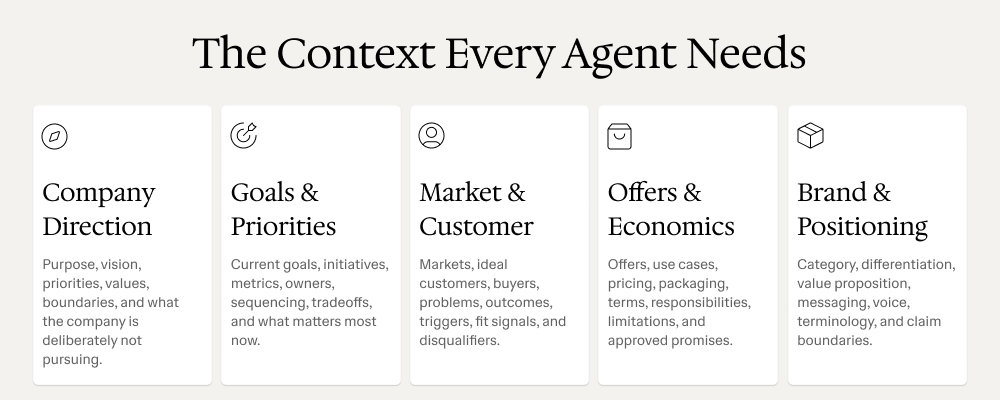
Most people are focused on giving their AI agents better instructions, but the bigger unlock is giving them better context. I’ve spent a lot of time building agents and systems, and these are the 5 key pieces of context that I've found to work incredibly well:
1. Company Direction - where the company is going
2. Goals & Priorities - what matters right now
3. Market & Customers - who the best customers are
4. Offers & Economics - what we sell and how we make money
5. Positioning & Brand - how we want to position and communicate the business
The best part is that when I update the underlying context, every agent automatically gets better.
I wrote up the five context documents I think every company should create for its agents, along with what should go into each one.
LMK what you think.

1
146