

Power BI reports that make a difference 🚀 training 1.4M + followers in Power BI across social platforms 👉🏼https://xitter.cf/t.co/lWIqE7UzQo https://xitter.cf/t.co/lWIqE7UzQo
Düsseldorf
Joined September 2020
- Tweets6.1K
- Following222
- Followers22.8K
- Likes1.5K






What are you prioritizing this year?
25%Technical depth
75%AI skills
0%Business knowledge
0%Leadership skills
4 votes • 23 hoursThe October 2026 update added dropdowns, images and pills to List Slicer! ⬇️
Save it for later or share it so more people can learn 🚀
Want to read about it? Check out the link below
#powerbi #powerbiupdate #analytics #data

Read about it:
datatraining.io/blog/list-sl…

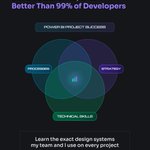
Great Power BI reports aren't built on technical skills alone.
The best ones sit where technical skills, strategy and processes overlap. Learn the exact design systems my team and I use on every project, so your reports look sharp, make sense to the business and come together faster.
Link in the comments ⬇️
#powerbi #reportdesign #data #skills


Everyone uses AI to make things.
I think we should use it more to break things.
Most DAX measures get tested on the happy path. A normal month, normal data, the numbers look right, done. "Looks good".
And then "the numbers look wrong" nightmare starts.
So before I ship a measure (or for the ones we already shipped), I add one extra step.
I show it to AI and ask:
“What inputs could break this?”
It comes back with a list:
→ Blank or missing dates
→ Negative values
→ A customer with no sales
→ A month with only one day of data
→ Filters that remove every row
Some of these are obvious. Others are the kind of edge case that would only show up months later in production.
AI is a good builder, but it might be a great tester.
Ask it to break your measure (or even the entire report) before your users do.
Is this part of your process now to? 👇🏻
#powerbi #ai #data #analytics

October 2026 Power BI Update brings what we have been waiting for 10 years!
The native Gantt Chart (!) supports large project timelines with collapsible phases and color-coded bars 🚀
#powerbi #powerbiupdate #ganttchart
Most teams still run everyday processes on spreadsheets, email chains and one-off SaaS tools.
You can build them as Fabric Apps instead, secure and sitting right on top of your data ⬇️
Here are 3 we built:
1️⃣ Leave Manager: employees request time off and see their remaining days, managers approve, and HR manages allowances and holidays.
2️⃣ Month Close: controllers explain every variance over the threshold, reviewers mark lines final, and the commentary goes straight into the month-end pack.
3️⃣ Desk Booking: pick a desk on the floor plan, filter for a monitor or quiet zone, and see which teammates are in that day.
Security is built in:
🔒 Role-based access, so employees, managers, reviewers and admins each see and do only what they should.
🔒 Clear rules: nobody can approve their own leave, and only you can change your own bookings.
🔒 A full audit trail that shows who wrote what and when, and edits after the lock need an admin and a reason.
🔒 Your data stays in Fabric, governed like the rest of your platform.
Want to see how it’s built? I walk through the Desk Booking app step by step in the full video (link in the comments 👇🏻).
Have a process your team still runs on spreadsheets and emails? DM us, and our team will help find the best solution.
#fabric #fabricapps #analytics #data


Do you use field parameters?
#powerbi
41%In most reports
47%Sometimes
6%Haven't tried them
6%Never heard of them
17 votes • 8 minutesPower BI just got the dropdown slicer feature we’ve been waiting for! 🚀
Watch the full video on YouTube!
#powerbi #data #analytics #slicer #dropdown
One course. The whole picture of Power BI - end to end 🙌🏻
11 modules · 105+ lessons · ~22 hours covering Power Query, data modeling, DAX, visuals, the Service and deployment. Plus prep for the PL-300 Certificate.
Link in the comments ⬇️
#powerbi #PL300 #dataanalyst #datatraining


Before you build a report around custom visuals - check these 6 things ⬇️
1. Certified ≠ quality
2. Tenant settings matter
3. Cost consideration
4. Slower than native
5. No one maintains it but the author
6. Compare to native alternatives
Save & share💛
#powerbi #customvisuals #reportdesign #data

Power BI finally has the dropdown slicer we’ve all been waiting for 🎉
The list slicer now has a dropdown mode (in preview), which means:
✅ Your selected items show right at the top
✅ Built-in search for long lists
✅ “Show selected first”, so no more scrolling to check what’s filtered
In my new video I show you how nice it is and a few of my formatting tips.
#powerbi #slicer #dropdown #listslicer

Everyone asks what AI costs to build and maintain.
Almost nobody asks what it costs in people and quality.
Every report, analysis, or model change that AI produces needs someone to review it. Someone has to check the numbers, the logic, and whether it answers the right question.
So the more you generate, the more you have to review. And that review work is done mostly (still) by humans.
That’s how teams end up in a loop:
AI builds more → people review more → there’s less time to think about what’s worth building → AI builds more.
Every team tries to run faster, generating more and judgement skills are slowly disappearing.
The way out is better prioritization so you build fewer, better things.
And that takes people who know the business well enough to say “this matters” and “this doesn’t.”
#powerbi #ai #data #analytics #data

Finding the right icon for a report shouldn’t take longer than building the visual itself. Generic icon sites give you thousands of results and none of them fit a KPI card, a navigation pane, or a finance dashboard 😅😃
Icons Studio is different. Over 900 icons, curated for analytics, reporting, and industry-specific use cases - the things you actually need in Power BI and Fabric 🚀✌🏻
➡️ Customize before you download. Match colors to your report theme so icons look designed, not pasted in.
➡️ Download as SVG or PNG, your choice.
➡️Bulk download as ZIP. Grab the full set for a project in one go instead of one file at a time.
➡️ Industry and data-specific sets. Finance, operations, supply chain, plus the analytics staples - filters, drill-throughs, refresh, alerts.
➡️ Free, no sign-up friction. Open it, pick, download, keep building.
Link below 👇🏻
#powerbi #icons #report #design #data #analytics

