

#RedHatAccelerator, RHCA II, CK{A|D|S}, maintaining curated CK{A|S} repos https://xitter.cf/t.co/VopbXY5f4t. My opinions are my own.
MENA
Joined April 2009
- Tweets24.6K
- Following2.8K
- Followers3K
- Likes39.6K






Wal retweeted

THIS IS ACTUAL F*CKING GOLD
Anthropic just shared one of the best tricks for Claude Code.
The idea: stop configuring Claude Code by hand. One prompt, 44 seconds, and your whole .claude/ folder writes itself.
7 files, 162 lines, 2 cents. you typed one line and wrote zero of them.
You just launch Claude Code like this:
claude --model opus "set up this repo: ..."
here's the split:
→ 3 Haiku 5.5 agents scan the repo before a single file gets written
→ one reads the stack, one reads the npm scripts, one hunts for risky paths
→ Opus 5.5 takes those three summaries and writes the actual config
→ 7 files land: CLAUDE.md, 3 agents, permissions, a format hook and a /ship skill
the part everyone gets wrong: they write CLAUDE.md from memory.
a config written without reading the repo is a guess, and you live with that guess for months.
here the risk scan came back with 5 dangerous paths and those went straight into the permissions file, so the agent is blocked from them before it ever runs once.
the scripts scan found 5 npm scripts, and the agents got wired to the ones that actually exist in this repo instead of generic placeholders.
one prompt from you, 7 files from it, 0 lines written by hand.
Haiku reads. Opus writes. You commit.
JEV engineering is the same move one layer down: 1,867 forks this run - which file, which agent, allow or ask - resolved in code at 0.97 sharpness, and the split ones (0.59 on "allow or ask") come back to you instead of being guessed
the full tree
▸ you paste one prompt describing the setup you want
▸ 3 Haiku 5.5 agents scan stack, scripts and risky paths in parallel
▸ every agent returns a summary, never raw files
▸ Opus 5.5 writes CLAUDE.md, the agents, permissions, the hook and the skill
▸ anything touching permissions comes back to you before it is written
▸ JEV resolves micro-forks in code and escalates only the split ones
paste the tree and this prompt into Claude Code ↓
"Set up this repo for me:
1. First scan it with 3 Haiku 5.5 agents in parallel: one reads the stack and manifests, one reads the build and npm scripts, one finds paths that are dangerous to touch.
2. Each agent returns a summary only, never raw file contents.
3. Then write CLAUDE.md, 3 subagents, a permissions file, a format hook and a /ship skill, all based on what the scan actually found, not on defaults.
4. Every risky path from the scan goes into the deny list before anything runs.
5. Ask me before writing anything that grants permissions.
Show me every file as a diff first. No writes until I say go."
↳
code.claude.com/docs/en/mode…
save it, this is the first thing you run in every new repo.


Wal retweeted

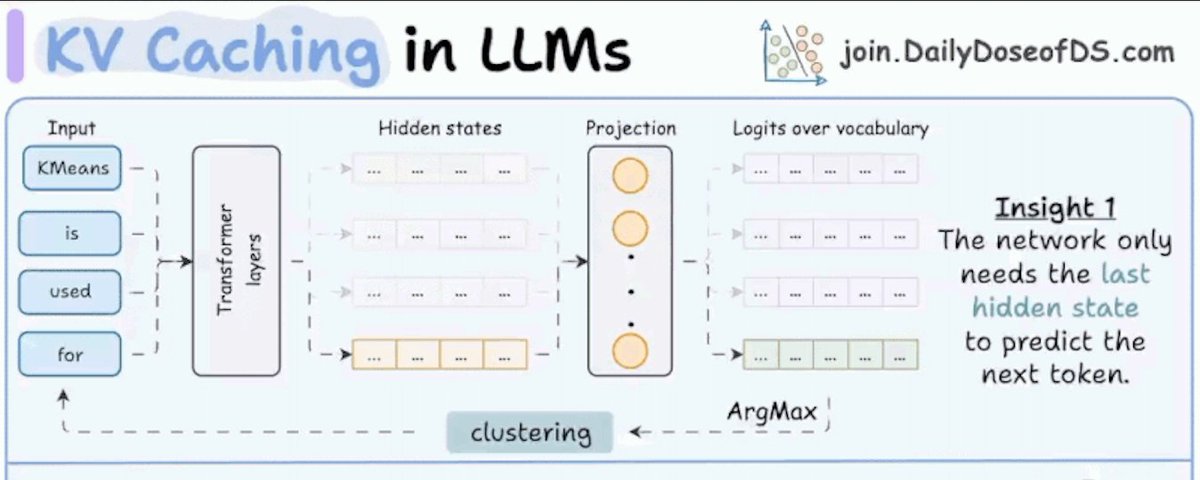
4 types of LLM caching, clearly explained.
(KV, prefix, prompt, and semantic caching)
An agent can send the same system instructions, tool definitions, and conversation history on every turn. Without reuse, the model processes that shared context again.
That initial prompt processing is called prefill. It contributes to the wait before the first token appears.
The four caches in the graphic reduce repeated work at different points in this process.
𝟭) 𝗞𝗩 𝗰𝗮𝗰𝗵𝗶𝗻𝗴 𝘀𝗮𝘃𝗲𝘀 𝘄𝗼𝗿𝗸 𝗯𝗲𝘁𝘄𝗲𝗲𝗻 𝗴𝗲𝗻𝗲𝗿𝗮𝘁𝗲𝗱 𝘁𝗼𝗸𝗲𝗻𝘀.
During generation, the model stores keys and values, the vectors attention uses to retrieve information from earlier tokens. Each new token reuses those vectors and adds its own, avoiding repeated computation at the cost of memory.
𝟮) 𝗣𝗿𝗲𝗳𝗶𝘅 𝗰𝗮𝗰𝗵𝗶𝗻𝗴 𝘀𝗮𝘃𝗲𝘀 𝘄𝗼𝗿𝗸 𝗮𝗰𝗿𝗼𝘀𝘀 𝗿𝗲𝗾𝘂𝗲𝘀𝘁𝘀.
When a request begins with an already processed sequence, the server can reuse its saved attention state and process the remaining suffix. This helps when requests share instructions, documents, or conversation history.
In vLLM, each cached block’s identifier incorporates the preceding prefix, so identical text after a changed prefix is insufficient for reuse.
𝟯) 𝗣𝗿𝗼𝗺𝗽𝘁 𝗰𝗮𝗰𝗵𝗶𝗻𝗴 𝗽𝘂𝘁𝘀 𝘁𝗵𝗲 𝗽𝗿𝗼𝘃𝗶𝗱𝗲𝗿 𝗶𝗻 𝗰𝗵𝗮𝗿𝗴𝗲.
A provider manages this prefix reuse through its API, including cache lifetimes and billing rules. Eligible repeated input receives discounted pricing, while the model still generates a fresh answer.
Put stable instructions and documents at the beginning, followed by the changing question, to preserve that reusable prefix.
𝟰) 𝗦𝗲𝗺𝗮𝗻𝘁𝗶𝗰 𝗰𝗮𝗰𝗵𝗶𝗻𝗴 𝗿𝗲𝘂𝘀𝗲𝘀 𝘁𝗵𝗲 𝗮𝗻𝘀𝘄𝗲𝗿 𝗶𝘁𝘀𝗲𝗹𝗳.
The system converts a prompt into an embedding, a numerical representation of its meaning, and searches for similar stored prompts. An accepted match returns the saved answer without calling the generation model, saving output tokens too.
This suits repeated questions with stable answers, but similarity alone cannot establish that an answer applies to the current user or situation.
These techniques can work together. A semantic cache miss can still benefit from a cached prompt prefix, then use KV caching during generation.
Prefix caching and provider prompt caching share the same underlying reuse. Semantic caching adds a different decision, whether a previous answer is still valid for this request.
That said, I also wrote a full breakdown of KV caching. The article is quoted below.
Hope you enjoyed reading.
Cheers! :)

Wal retweeted

A new agentic research model and harness called AREX checks its answers requirement by requirement, keeps what's verified, and researches only the gaps. 📰✅
📊 82.5% BrowseComp, 82.0 F1 WideSearch-en
📈 Harness alone: up to +10 pts
🧠 Fine tuned 4B beat untuned 35B on 5 of 6 benchmarks
hubs.la/Q04ztJKG0
#DeepLearningAI #AIAgents #LLMs

Wal retweeted

Figure 1-20 is the most important figure out of the 330+ in An Illustrated Guide to AI Agents.
1- It shows what today's LLM-based AI agents are composed of, including their user and environment loops.
2- It is also therefore a table of contents for Part 1: Agent Fundamentals, showing where each of the key components is explained in details.
Read it here:
Amazon: amazon.com/Illustrated-Guide…
O'Reilly: learning.oreilly.com/library…
PDF e-book: ebooks.com/en-ca/book/347578…

Wal retweeted

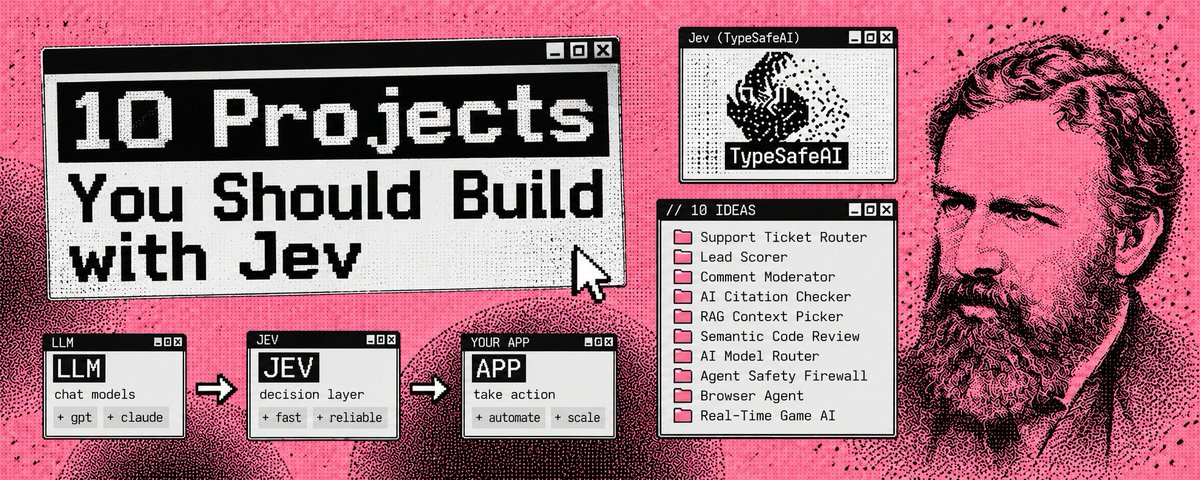
Someone gave Jev a crawler + one GPT agent and asked:
“Where is the online money right now?”
It read 5,137 open jobs and found 3 niches where clients are paying and almost nobody is bidding.
Everyone asks ChatGPT for side hustle ideas.
Everyone gets the same 10 answers.
This approach is different.
The crawler reads what clients are actually paying for. Jev analyzes thousands of jobs cheaply and GPT only gets called when something looks worth researching.
The result:
01. Chrome extensions → $545 median, 11 bids/job
02. TikTok Shop setup → $232 median, 6.5 bids/job
03. Notion setup → $181 median, 3 bids/job
Jev made 9,617 calls for $0.13.
GPT alone would have cost ~$58.66.
The whole run cost $6.53.
The interesting part isn’t even the 3 niches.
It’s the architecture:
Crawler → Jev filters → Jev ranks → GPT researches → real opportunities
Cheap model does the volume. Expensive model only handles the work that needs deeper reasoning.
That’s a much more interesting way to use AI for finding opportunities.

Wal retweeted

whoever built this realized we’ve been using our smartest AI for the dumbest possible jobs
your $20-$200/mo frontier model is researching, writing code, planning…
and then you’re paying the same brain to decide YES / NO.
Jev flips that.
it’s a tiny decision model that sits in front of the expensive stuff and handles the boring forks:
-> which agent goes next?
-> is this worth researching?
-> reply or ignore?
-> publish, wait or escalate?
-> BUY / SELL / HOLD?
-> click this or keep looking?
then I saw the numbers people are reporting and the whole architecture started making a lot more sense.
~1,000 papers classified for around $0.08
~500 emails sorted for around $0.035
browser-agent loops demonstrated around 7 seconds for ~$0.0039
and at the quoted pricing, roughly 10,000 ~1K-token decisions comes out around $0.42.
that’s not because Jev became smarter than Claude.
it’s because nobody asked it to be Claude.
the setup is stupidly simple:
-> big LLM gets the hard thinking, research and writing
-> Jev gets the thousands of tiny decisions between those steps
-> code actually clicks, saves, sends and executes
and suddenly you start noticing these little decisions everywhere.
> your inbox.
> X feed.
> support queue.
> meetings.
> leads.
> video clips.
> browser agents.
> even paper-trading loops.
that’s the part I think most agent builders are missing.
the expensive model doesn’t need to touch every step just because it’s capable of touching every step.
> let Claude think.
> let Jev decide what deserves Claude.
> let code do the actual work.
I broke down 12 places you can wire this into an agent today + the exact router setup in the article below


Wal retweeted

We turned Claude Code, Codex, Hermes, Pi, @opencode and other coding harnesses into RL environments. No changes to the harnesses, no changes to the training code. Any open model, any task set, fully open source my friends!
Same model, same weights: 62% under Mini-SWE-Agent, 33% under Claude Code. But training inside a real harness normally means reimplementing it as an environment, so most models get trained in a scaffold nobody actually ships.
The fix is a proxy, not a rewrite. The harness thinks it's talking to a model API. It's actually talking to a capture proxy that speaks the 4 formats coding agents use (OpenAI Chat Completions, OpenAI Responses, Anthropic Messages, Gemini), forwards to @vllm_project, records the exact token IDs and logprobs vLLM sampled, and hands TRL sequences it can train on. The harness becomes the environment. 10 harnesses run through it today, none modified.
And because you control the reward, you can shape behavior the harness never asked for. We added a small bonus for solving a task in fewer tool calls: on tasks it already solved, the model now uses 31% fewer calls, in every harness, and about half under Codex.
Tested on LFM2.5-2.6B from @liquidai:
→ Train in one harness: better mostly in that harness (OpenCode 34% → 58%).
→ Train in 4 at once: better in all 4 (42% → 54%).
→ SFT on 3,189 rollouts from Qwen3.8-27B instead: plateaus at 47.5%, below both RL runs.
Everything is open and reproducible: the capture proxy in OpenEnv, the trainer in TRL, the tasks, the SFT data, the training code and all 7 trained models. Bigger models and bigger runs next.
Full guide: huggingface.co/spaces/FineEn…


Wal retweeted

Handbook on Understanding Harness Engineering for AI Agents [48-page PDF]: drive.google.com/file/d/1PT-…

Wal retweeted

Industrial software doesn’t have to feel like industrial software
Manage warehouses like you’re playing a strategy game
Built with Opus 5.5
Wal retweeted

found this free Harness Engineering course on GitHub with 14 lectures + 8 hands-on projects. it covers:
> how Claude Code, Codex, DeepSeek build their harness
> loop & graph engineering
> automated agent loops
> observability, testing and verification
really good source for learning harness essentials by doing.
github.com/walkinglabs/learn…

Wal retweeted

We'll be spending a lot more time trying to understand the outputs of language models. A few thoughts, tips & tricks:
Writing. Something I've had success with: Ask your LLM to explain something in ASD-STE100, it's a controlled language specification originally developed for aerospace maintenance documentation. LLMs well-versed in this language and it comes with heavy constraints on clean writing style that I often find a lot more readable. Sometimes I've tried to soften it a bit e.g. ask for "80% of the way to ASD-STE100" because the spec is quite stringent. But even better:
Diagrams / images. Instead of writing, ask your LLM to create a diagram. These can be a lot easier to process, parse, and understand. But even better:
Web pages. Ask for output "in HTML" to get a beautiful, interactive webpage. LLMs are getting really good at frontend and can create beautiful experiences, animations, etc. But even better:
Explainer videos. The output format I am most bullish on is fully custom / bespoke explainer videos generated on any arbitrary topic. Experiment with things like "Create a 3b1b style video explainer on X. Use my ElevenLabs API key for audio narration". (you'd need an API key for the latter or you can ask your LLM to find you decent free alternatives that use your local compute). This is actually starting to work!
In summary:
- As LLMs get better, they will do more and more of the legwork autonomously, and a lot more of our work will rise up the abstractions into oversight and understanding.
- Luckily, LLMs can help here too because as intelligence and code are increasingly abundant, you can ask for large, custom, discardable software artifacts (e.g. web apps, video explainers) that would have never made sense to create before. Push the boundaries here and you'll be surprised.

Wal retweeted

What does it take to be a great FDE at OpenAI - we get this question alot, so I sat down with @gregorojstersek to talk about how we’ve built the team, what the work looks at, and the values we want the team to have - always make the thing exist (and work) first, then look for scale second.
We talk through a few of the recent focuses in how we operate - we've got a bigger focus on domain experts than we used to, and ultimately success for us revolves around working to replace ourselves in every customer problem we take on.
Check out the interview below, and if you're interested in the role then I've included the careers page too - look forward to seeing what you build!
Interview: newsletter.eng-leadership.co…
FDE careers: openai.com/careers/search/?c…



Wal retweeted

NVIDIA/Model-Optimizer: A unified library of SOTA model optimization techniques like quantization, distillation, pruning, neural architecture search, speculative decoding, etc.

Wal retweeted
Build an assistant that can store and search what it sees, hears, and is told, all without leaving the device.
In Building AI Assistants with On-Device Memory, you'll build a local memory system that recalls text, voice, and images, and teach it to recognize something new from a few photos.
Built in partnership with @qdrant_engine and taught by @DylanCouzon, Developer Experience Engineer at Qdrant.
This course also includes our new AI coding lab, so you can practice building with an AI coding agent from the DeepLearning.AI mobile app.
Enroll for free: hubs.la/Q04y3S0F0
Wal retweeted

介绍比Jev快50倍,在你设备上跑的laya-mlx!
只在你的设备上占用最高1G内存
Laya是一个开源的类似于Jev的,基于文本输出概率的分类系统
我将其移植到MLX,并且做了一些性能优化!
视频中就是这个模型在我的本地M3Max上玩贪吃蛇
这个模型能够以每秒决策60次的速度玩贪吃蛇!
github.com/mizorewww/laya-ml…
Wal retweeted

Local Laya moggs Jev at @grok 4.7-built Tetris 🧩
An open-weights System One model called Laya, beat cloud-based Jev at playing Tetris by making decisions 11 times faster, running locally on a 16GB MacBook Air!
Run AI models locally -> atomic.chat

介绍比Jev快50倍,在你设备上跑的laya-mlx!
只在你的设备上占用最高1G内存
Laya是一个开源的类似于Jev的,基于文本输出概率的分类系统
我将其移植到MLX,并且做了一些性能优化!
视频中就是这个模型在我的本地M3Max上玩贪吃蛇
这个模型能够以每秒决策60次的速度玩贪吃蛇!
github.com/mizorewww/laya-ml…


Wal retweeted
Over 300 original figures!
An Illustrated Guide to AI Agents is now OUT on Kindle and other Ebook stores! Presses are rolling, print copies ship in a few weeks.
@MaartenGr and I spent the last year and a half making the agent stack legible: memory, tools, planning, evaluation, multi-agent systems, and code agents. We're ecstatic to finally be able to share it with you!
Agents are being adopted faster than they're being understood. Our bet is that a small number of concepts will outlast everything else in this field, so we spent the time identifying them and explaining them properly.
Concepts and code. You build a working agent yourself along the way.
Order here:
Amazon: amazon.com/Illustrated-Guide…
O'Reilly: oreilly.com/library/view/an-…
