

On a tinkerer to doer journey. Join me as I work for wins, fight through failures & hopefully we all succeed in learning something new through it all.
New Orleans, LA
Joined January 2023
- Tweets8.7K
- Following7.5K
- Followers477
- Likes2.8K





Pinned Tweet
So I'm Rabbit-holing while heading towards a July Launch (me thinks / hopes)
I'm torn between Cooperative, Foundation, DAO and/or really adventurous Full BORG. This week articles have been popping up on all of em which is helpful and maddening😅
The articles I've found...
7thWardMadeMe retweeted

Imagine being chased by monsters on Halloween, but your only weapon turns them into giant jelly pumpkins. 🎃😂
The crazy action, realistic transformations, and those unexpected jelly effects make this look like a scene straight out of a movie.
Create crazy Halloween scenes with Seedance 2.5 on @frameo_ai.
Halloween just got a whole lot crazier. 👀
7thWardMadeMe retweeted

Andrej Karpathy:
"Prompting is going away. Delete everything, keep Graph."
In just 124 minutes, he breaks down how to build graphs and why they're the only layer that holds
Prompts → Agents → Loops → Graphs
a loop keeps one agent running until the job is done
a graph decides which agents exist and what each one hands to the next
most people stop at the agent layer and never reach the graph
watch it today, then save the full guide below ↓


7thWardMadeMe retweeted

🚨 BREAKING: Claude can now build your first side business from zero.
Here are 8 prompts that make every piece of it, from the idea to your first 20 customers:
7thWardMadeMe retweeted

Quant finance is hard to visualize through mathematical equations alone, so i turned MIT’s Quant Bible into an interactive website (100% FREE)
TRY IT → hft.md
It covers EVERYTHING from probability, statistics, market making all the way to CRACKING real interviews at TOP firms like Jane Street, Citadel, Two Sigma & more.
It breaks down complex HFT trading concepts into interactive 3D models, real-world scenarios and interactive problems.
Bookmark it before your timeline catches on:


7thWardMadeMe retweeted

If you’re a designer, bookmark this.
- inspora.design Design inspiration from X
- 60fps.design Mobile UI animations
- mobbin.com Real app UI screens
- land-book.com Website design inspiration
- Refero.design Real product UI
- brandguidelines.net Brand guideline inspiration
- backgrounds.supply Beautiful design
- originkit.dev Free animated components.
backgrounds What did I miss?
7thWardMadeMe retweeted

🔥 50 websites that will eat your evening.
One click… and suddenly 2 hours are gone. 👀
1. design.johnson7543.com — Discover powerful AI design tools
2. neal.fun — Weirdly addictive interactive experiments
3. window-swap.com — Look through a stranger’s window anywhere in the world
4. mapcrunch.com — Randomly teleport around the world
5. htwins.net/scale2 — Zoom from an atom to the entire universe
6. flightradar24.com — Track planes flying around the world live
7. thetruesize.com — See the true size of countries
8. zoom.earth — Explore live satellite and storm imagery
9. radiooooo.com — Discover music by country and decade
10. windy.com — Explore mesmerizing live weather maps
11. atlasobscura.com — Discover the world’s strangest hidden places
12. eyes.nasa.gov — Explore the solar system in 3D
13. lightningmaps.org — Watch lightning strikes happen worldwide
14. virtualvacation.us — Take random virtual walks around cities
15. marinetraffic.com — Track ships moving across the oceans
16. wikipedia.org — Go down endless random knowledge rabbit holes
17. stellarium-web.org — Explore the night sky interactively
18. pudding.cool — Beautiful interactive data stories
19. gapminder.org — See how the world changed over 200+ years
20. informationisbeautiful.net — Stunning visualizations of real-world data
21. earthquake.usgs.gov — Track earthquakes happening around the world
22. submarinecablemap.com — Explore the cables powering the internet
23. globalforestwatch.org — Monitor forests around the planet
24. worldometers.info — Watch live world statistics tick upward
25. internetlivestats.com — See the internet change in real time
26. listen.hatnote.com — Listen to Wikipedia edits as ambient sound
27. oldmapsonline.org — Explore maps from centuries ago
28. davidrumsey.com — Browse an incredible collection of rare maps
29. openstreetmap.org — Explore the world through an open map
30. apod.nasa.gov — Get a new space image every day
31. images.nasa.gov — Explore NASA’s massive free image archive
32. ourworldindata.org — Understand the world through data
33. data.worldbank.org — Explore global economic data
34. archive.org — Explore a massive free digital library
35. gutenberg.org — Read thousands of classic books for free
36. openlibrary.org — Browse millions of books online
37. loc.gov — Explore the Library of Congress digital archives
38. europeana.eu — Discover Europe’s digitized cultural collections
39. artsandculture.google.com — Visit museums from around the world
40. rijksmuseum.nl — Explore masterpieces in incredible detail
41. wikiart.org — Browse a huge collection of artworks
42. publicdomainreview.org — Discover forgotten and unusual treasures
43. openculture.com — Find free courses, books, films and more
44. metmuseum.org — Explore The Met’s collection online
45. musicmap.info — Explore the evolution of music genres visually
46. timeanddate.com — Time zones, calendars, astronomy & more
47. sciencedaily.com — Discover the latest science in simple language
48. arxiv.org — Explore cutting-edge research papers for free
49. observablehq.com — Play with interactive data visualizations
50. dp.la — Explore millions of items from U.S. libraries, archives & museums
The internet is way more interesting than social media.
Some of these can teach you something.
Some can completely waste your evening. 😂
And some… somehow do both.
Bookmark 🔖 this list before you lose it.
Follow @Arina_sharmi for more hidden websites, AI tools & useful finds. 🚀

7thWardMadeMe retweeted

3D ARTISTS ARE COOKED. 7 FREE REPOS JUST REPLACED THE WHOLE PIPELINE
film yourself, snap 3 photos, drop one image. claude code and these 7 handle the rest:
1. Motion2MixamoRig (1.8K stars)
film yourself moving, your rigged character moves the same way
2. image-blaster (12.2K stars)
one image becomes a 3D world you can walk through
3. UniForge3D (464 stars)
a few phone photos become a full 3D model
4. MCP for Blender (32.8K stars)
claude gets hands inside blender and builds scenes from a prompt
5. HyperFrames (76.2K stars)
write HTML, get a finished trailer without after effects
6. Impeccable (97.4K stars)
stops your game UI from looking like AI slop
7. claude-video-effects (463 stars)
/effects edits your devlog reel with one slash command
save this before you pay for another tool
all 7 links in the first reply


7thWardMadeMe retweeted

This is f*cking gold.
One repo from Obsidian’s CEO teaches agents how your vault works. 10 more give them memory, search and everything you save
01 obsidian-skills → teaches Claude Code, Codex and other agents to write notes, bases and canvases in your vault the way Obsidian expects
github.com/kepano/obsidian-s…
02 obsidian-copilot → runs Claude Code, Codex and OpenCode inside your vault, local models included
github.com/logancyang/obsidi…
03 supermemory → remembers facts about you, rewrites the ones you contradict and drops the ones that expire
github.com/supermemoryai/sup…
04 khoj → ask your notes, PDFs and the web one question, on your own server
github.com/khoj-ai/khoj
05 obsidian-smart-connections → finds the notes you forgot you wrote while you type, no API key needed
github.com/brianpetro/obsidi…
06 karakeep → saves anything, tags it with AI and finds it later, on your own server
github.com/karakeep-app/kara…
07 siyuan → you and your AI agents edit the same notes on your own server
github.com/siyuan-note/siyua…
08 zk → a plain-text wiki you run from the terminal
github.com/zk-org/zk
09 silverbullet → Markdown notes you can program with Lua
github.com/silverbulletmd/si…
10 memos → quick notes on a timeline, found by search, tag or date
github.com/usememos/memos
11 trilium → notes in a hierarchy big enough for a whole personal knowledge base
github.com/TriliumNext/Trili…

7thWardMadeMe retweeted

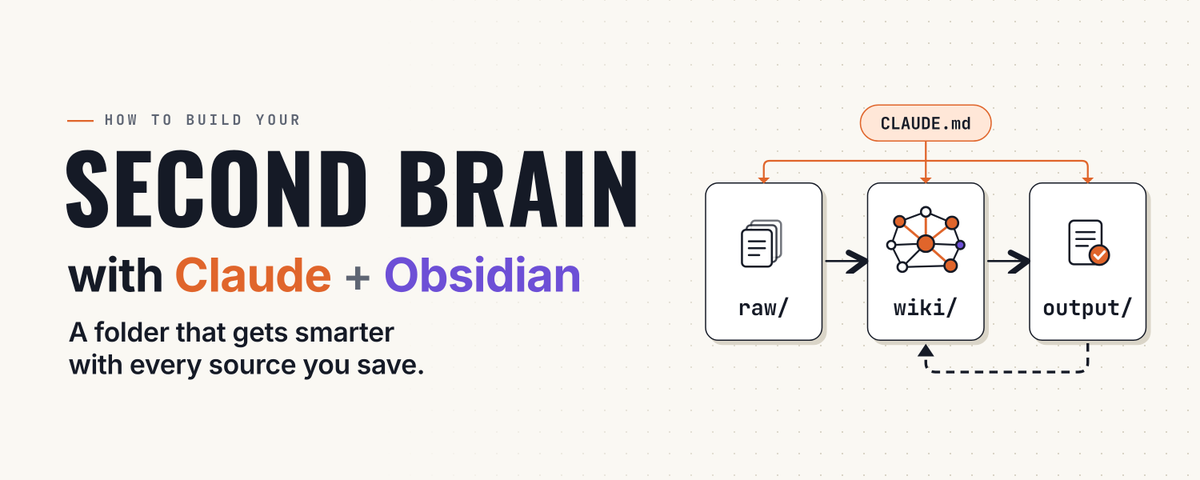
I still don't get why anyone builds a second brain for Claude Code from scratch when these 7 repos have over 75,000 stars combined
1. Teach Claude Obsidian's formats and tools with 6 skills from its CEO: github.com/kepano/obsidian-s…
2. Run wiki-ingest on text in inbox/, review the plan, get linked notes: github.com/AgriciDaniel/clau…
3. Save decisions and tasks with obsidian-save, load your current state next session with obsidian-world: github.com/eugeniughelbur/ob…
4. Run an unofficial Karpathy-style wiki with ingest, query and lint: github.com/Astro-Han/karpath…
5. Copy a starter vault plus 18 skills and 72 commands: github.com/undefined-ui/seco…
6. Turn your ChatGPT and Claude exports into linked notes, run only step 1 of its README: github.com/charlie947/ai-sec…
7. Split auto-loaded memory from wiki pages read on demand, ignore its tip to keep secrets in memory: github.com/MehmetGoekce/llm-…
Pick one, they overlap: all seven work with plain Markdown you can open in any editor
Full guide in the article below


7thWardMadeMe retweeted

50 legendary internet rabbit holes you can spend hours exploring👇
1. zoom.earth — Watch the world via live satellite imagery
2. flightradar24.com — See every plane currently in the sky
3. marinetraffic.com — Track all ships at sea in real time
4. windy.com — Live map of winds and storms
5. lightningmaps.org — Watch lightning strikes hitting Earth in real time
6. earthquake.usgs.gov — Live list of recent earthquakes
7. submarinecablemap.com — Ocean cables carrying the internet
8. globalforestwatch.org — Watch forests disappear from space
9. worldometers.info — The world's statistics, second by second
10. internetlivestats.com — Current number of tweets and searches being posted
11. thetruesize.com — Compare the true sizes of countries
12. oldmapsonline.org — Maps from centuries ago
13. davidrumsey.com — Archive of 150,000 historical maps
14. openstreetmap.org — World map drawn by volunteers
15. window-swap.com — Look out the window of a random person around the world
16. virtualvacation.us — Virtual walks through cities
17. mapcrunch.com — Teleport to a random spot on Earth
18. atlasobscura.com — Catalog of the world's strangest places
19. neal.fun — Interactive knowledge experiences
20. htwins.net/scale2 — Scale journey from atom to universe (Updated HTML5 link)
21. eyes.nasa.gov — Explore the solar system in 3D
22. stellarium-web.org — Real sky map in your browser
23. apod.nasa.gov — NASA's astronomy picture of the day
24. images.nasa.gov — NASA's entire visual archive, free
25. pudding.cool — Visual articles told through data
26. ourworldindata.org — The state of the world with real data
27. gapminder.org — What we mistakenly think we know about the world
28. informationisbeautiful.net — Visualizing complex data
29. data.worldbank.org — World Bank's open data
30. data.tuik.gov.tr — Turkey's official statistics database
31. archive.org — Archive of millions of books, films, and software
32. gutenberg.org — 70,000 free books whose copyrights have expired
33. openlibrary.org — Record of every book in the world
34. loc.gov — U.S. Library of Congress digital archive
35. europeana.eu — Europe's cultural heritage archive
36. dp.la — America's digital library collection
37. artsandculture.google.com — Tour museums from home
38. rijksmuseum.nl — Download artworks in high resolution
39. wikiart.org — Archive of 250,000 artworks
40. publicdomainreview.org — Forgotten visual treasures of history
41. openculture.com — Free archive of culture and education
42. metmuseum.org — Met Museum's open collection
43. musicmap.info — Family tree of music genres
44. radiooooo.com — Pick a country and decade to listen to that era
45. listen.hatnote.com — Turn Wikipedia edits into audio
46. wikipedia.org — Random knowledge well
47. timeanddate.com — Time, sunrises, and sky events
48. sciencedaily.com — Live stream of science news
49. arxiv.org — Free preprints of scientific papers
50. observablehq.com — Visualize data with live code
Save this. You’ll definitely need some of these later. 🔖
Follow @The_techAI for more useful websites, AI tools & tech resources.
7thWardMadeMe retweeted

HOLY F*CK, motion studio in 17 repos.
Free GitHub tools + Opus 5.5 for your startup.
After Effects is dead to me after this list.
Motion. Simulation. 3D. Voice. Export.
01 Remotion → React video engine.
github.com/remotion-dev/remo…
02 Anime.js → Animation timelines and easing.
github.com/juliangarnier/ani…
03 SVG.js → Animated vector graphics.
github.com/svgdotjs/svg.js
04 canvas-sketch → Generative visuals and animated loops.
github.com/mattdesl/canvas-s…
05 Synfig → 2D character animation.
github.com/synfig/synfig
06 Three.js → 3D scenes, lighting and materials.
github.com/mrdoob/three.js
07 Camera Controls → Smooth camera moves and transitions.
github.com/yomotsu/camera-co…
08 Troika → Sharp typography inside 3D scenes.
github.com/protectwise/troik…
09 MeshLine → Stylized 3D lines and trails.
github.com/pmndrs/meshline
10 gpu-io → GPU-powered physics and particles.
github.com/amandaghassaei/gp…
11 WebGL Fluid Simulation → Swirling fluid effects.
github.com/PavelDoGreat/WebG…
12 Rhubarb Lip Sync → Turn voice recordings into mouth animation.
github.com/DanielSWolf/rhuba…
13 Piper → Fast, local text-to-speech.
github.com/OHF-Voice/piper1-…
14 DeepFilterNet → Remove noise from voice recordings.
github.com/Rikorose/DeepFilt…
15 OBS Studio → Screen capture and recording.
github.com/obsproject/obs-st…
16 Kdenlive → Timeline editing and final assembly.
github.com/KDE/kdenlive
17 FFmpeg → Encoding, compression and delivery.
github.com/FFmpeg/FFmpeg
Concept → shots → code → motion → sound → publish.
Bookmark this. Go build something worth watching ↓


7thWardMadeMe retweeted

I absolutely hate AI emails. And I send emails every single day. So I keep a file of the new em dashes my email bot is never allowed to use:
Everyone can spot "I hope this email finds you well" by now.
The models learned that and mostly dropped it.
So the tells moved into the lines around it.
These are the ones my file catches:
1. The warm-up line
"I hope you're having a great week!"
Fix: open with why you're writing.
2. The circle back
"Just circling back on this..."
Fix: say what you need. "Did the contract reach you? I can resend it."
3. Thanking them for nothing
"Thanks so much for reaching out!"
Fix: thank them for the actual thing, or skip it.
4. The vague call
"I'd love to hop on a quick call to explore synergies."
Fix: say what you want and offer one time.
5. Their email, read back to them
"So, to make sure I understand, you're asking..."
Fix: just answer it.
6. Headers in a two-line reply
Bold titles and bullet points for something you'd say in one breath.
Fix: write it like a text.
7. The open door
"Let me know if you have any questions."
Fix: end on the next step.
8. The cheerleader
"Absolutely! Great question!"
Fix: lead with the answer.
9. The sign-off pile
"Best regards, warmly, cheers"
Fix: pick one, or just your name.
Now you know what my file looks for. Here's how to stop your AI from writing all nine:
Step 1: Make email-banned.md. Each tell gets one example and one fix. A list beats "write like a human" because Claude can check a draft against a list. It can't check it against a vibe.
Step 2: Build it from 20 of your own sent emails. Mark every line you'd cringe at if someone else sent it to you.
Step 3: Give Claude the check. "Before you show me a reply, check it against email-banned.md. Rewrite any line that breaks a rule and tell me which rules you hit."
Step 4: Fix a line by saying the actual thing. A nicer phrase is just a new tell.
Step 5: Add a line every time you catch a new one. The file only works if it grows.
Step 6: Read every reply as the person getting it. If you'd skim it, they will too.
How I set Claude up for everything else I write:


7thWardMadeMe retweeted

the best 20 accounts to follow in AI:
@karpathy = learn LLMs
@steipete = learn openclaw
@gregisenberg = learn startup ideas
@rileybrown = learn vibecoding
@corbin_braun = learn cursor
@jackfriks = learn solo apps
@levelsio = learn solo startups
@marclou = learn solo startups
@EXM7777 = learn AI ops + systems
@eptwts = learn AI money
@ai_explorer25 = learn about ai tools
@mardehaym = learn enterprise AI
@vasuman = learn AI agents
@AmirMushich = learn AI ads
@0xROAS = learn AI UGC
@AndrewYNg = learn AI engineering
@kloss_xyz = learn systems architecture
@emollick = learn AI science
@Hesamation = learn AI/ML
@claudeskills101 = learn Claude
follow them all and learn.
7thWardMadeMe retweeted

They built an AI agent in 20 minutes and sold it to Anthropic for $100k - and at Stanford showed how to repeat it from scratch:
02:00 - how to build your first agent with Opus 5 in 20 minutes
22:34 - one agent replaces an Anthropic engineering team worth $200k a year
49:47 - how to make $1.2M a year selling agents to Anthropic and Google
after watching I spent 20 minutes in Claude Code - the agent replaced 10 Anthropic engineers and they paid $100k and asked for more.
save & watch - the article below shows how to build an agent in Claude Code in 20 minutes and reach $1.2M a year.
7thWardMadeMe retweeted

6 awesome web development resources
github.com/bradAGI/awesome-c… - 130+ CLI coding agents
sevalla.com - Full-stack hosting for PHP, NodeJs, Python, Go...
byosui.vercel.app - 1,105 free Shadcn components
animateicons.in - 1,500 open-source animated icons
jolyui.dev - 50+ free Shadcn components
refs.gallery - 2,387 curated website designs
7thWardMadeMe retweeted

I've already read this three times today
no exaggeration, it's one of the most valuable articles I've read on building agents
this is how DeepSeek runs their fully autonomous AI agent setup, and you can apply almost all of it to your own
their starting point is that the bottleneck has moved, in their words "a single task is limited by model capability, but multi-tasking is limited by human attention", and they say a person can usually follow only 3 to 5 active sessions at once
so this is what they do:
1. split the agent into two layers
a router that talks to you and hands out tasks, and workers that do the work
the router "only interacts with humans and dispatches tasks, and it can run without a Bash tool at all", so they say "a lighter model can usually provide both speed and quality"
each worker gets one task, an isolated context, a full set of tools and the most capable model, and it reports back to the router instead of messaging you
their take on sessions: "Sessions should be an implementation detail of the system, not a mental burden on its users"
2. let the router batch work when things get busy
events that arrive while the router is thinking get queued and handled together in its next turn
when they pushed it from about 1 to 40 events a minute, time per request only went from 2.5s to 3.9s, and the time per decision dropped from 6.4s to 1.6s
so one router session was enough for their whole team, no need to split it up early
3. filter events with code before any model sees them
they borrow the "Fast Path / Slow Path" idea from computer systems
fast path is plain code checking the source, the group, and user or bot allowlists, with each source set to "respond only to explicit requests", "treat as candidate events", or "ignore"
slow path is the LLM, which only sees what's left and judges it against policies written as prompts, so you can add or turn off a rule by editing a prompt
4. send follow-ups straight to the worker that owns them
consecutive events on the same PR, chat topic or email chain form what they call a Thread
the first event goes through the router, which creates a worker that subscribes to that Thread, and every follow-up skips the router and goes straight to that worker
two workers on the same PR both get the same events, so they can spot conflicts without talking to each other
without this, their router made about 30% more decisions and total tokens went from 23.2M to 31.8M per run
5. treat the context window like a cache
"Wasting the context window is wasting the model's intelligence"
they call it Inline & Spill: start with just an object's ID and a summary, then inline what it'll likely need soon, like the first 50 characters, the messages around it, and the message it replied to
anything too long gets truncated with a pointer, so the model can read the rest only when it needs it
every object carries the IDs of related ones, so the model can follow them hop by hop to dig up old context, which they call Chain of Recall
6. make slow tools async
in a normal loop, a long tool call blocks everything until it finishes
they swap that for start() and stop(), where "a call to start() returns "Started" immediately" and the result shows up later as a new event
so new messages get handled "as soon as the current inference step ends, rather than after background tools finish"
DeepSeek Harness already has this, it's just not on by default yet
7. match the channel
in group chats the agent should "notify people only when a decision or sign-off is needed, ask only direct questions, and give short conclusions"
and their one hard rule: "a cap of 100 words per reply"
on GitHub and email it does the opposite, full structured writeups, like a PR with the problem background, the change description and the verification results
8. keep the agent loop in the cloud and your machine as a tool
"The compute that runs the Agent Loop can be stateless, and only the session state has to persist"
so the loop runs in cloud containers, sessions live in a database, and your computer just runs a lightweight daemon that "does nothing but execute commands and return results"
your laptop going to sleep doesn't stop the agent, and when it reconnects the agent picks up the tasks that needed it
9. run a watchdog session on a schedule
"Many anomalies are not crashes: the process is still running, but the model is stuck in an unproductive loop or has drifted from its goal"
so a separate watchdog session checks whether each worker is making real progress, fixes failures, and keeps retrying until they're resolved
and since it's an agent too, you can ask it in plain English why something failed
10. do the work before anyone asks
they run a "silently reproduce and fix" policy in their own team chat
when someone reports an issue, the agent tries to reproduce it and find a fix in the background, and "it delivers a result only after it has confirmed the issue and found a simple fix. Otherwise, it stays quiet the whole time"
11. don't count on prompts to make it delegate
with a neutral prompt, a single session never handed work to a subagent once in 5 runs
with a delegation-first prompt it delegated in 4 of 5, and in the last run it decided the work was "small" and did it itself
so the delegation has to be built into the architecture, not left to the model's judgment
12. what they haven't solved yet
an always-on agent reads a lot of untrusted input, and if a prompt injection compromises the cloud loop, every device connected to it is exposed
their conclusion: "The agent therefore needs a way to use credentials without ever seeing them"
in their test, the full setup finished tasks in 12.4 minutes at p50 vs 20.4 for a single session with subagents



7thWardMadeMe retweeted

🚀 4 GitHub repos for AI Engineers:
1. LangGraph: github.com/langchain-ai/lang…
2. Qdrant: github.com/qdrant/qdrant
3. AI Agents: github.com/microsoft/ai-agen…
4. System Design: github.com/donnemartin/syste…


7thWardMadeMe retweeted

Every time I have an idea, I throw it into Claude Code and let the Brainstorming skill kick in
We start iterating through questions, exploring different approaches, discussing trade-offs, and refining the idea
The skill helps me clarify requirements, break down the design, and validate each part before documenting the final approach
By the end, I have a much clearer picture of what I actually want to build, before writing a single line of code
Install:
npx claude-code-templates@latest --skill development/brainstorming
aitmpl.com/component/skill/d…

7thWardMadeMe retweeted

50 legendary websites that feel like the internet’s hidden toolbox 🧰
1. unpaywall.org — free research papers
2. sci-hub.se — papers when unpaywall misses
3. openlibrary.org — borrow books
4. gutenberg.org — 70k+ free books
5. coursera.org — audit university courses free
6. wolframalpha.com — step-by-step math
7. remove.bg — background removal
8. cleanup.pictures — object removal
9. tinywow.com — quick file tools
10. ilovepdf.com — PDF merge/split
11. photopea.com — free Photoshop alternative
12. squoosh.app — image compression
13. excalidraw.com — fast diagrams
14. carbon.now.sh — beautiful code screenshots
15. regex101.com — test regex
16. jsonformatter.org — clean JSON
17. explainshell.com — terminal commands explained
18. alternativeto.net — software alternatives
19. haveibeenpwned.com — breach check
20. 10minutemail.com — temp email
21. privnote.com — self-destruct notes
22. radio.garden — live global radio
23. endel.io — focus sound
24. mynoise.net — custom ambient
25. justwatch.com — where to stream
26. archive.org — digital library
27. web.archive.org — old web pages
28. similarweb.com — site traffic
29. downtimerobot — uptime check
30. pagespeed.web.dev — speed test
31. tinypng.com — compress images
32. cloudconvert.com — file conversion
33. diffchecker.com — compare text
34. temp-mail.org — disposable inbox
35. obfuscator.io — JS obfuscate
36. keybr.com — typing practice
37. monkeytype.com — typing test
38. ankiweb.net — spaced repetition
39. notion.so — all-in-one notes
40. obsidian.md — local knowledge base
41. raindrop.io — bookmark manager
42. todoist.com — task list
43. trello.com — boards
44. miro.com — whiteboard
45. figma.com — design
46. canva.com — quick graphics
47. remove.bg — again because it's that good
48. yt-dlp — video download (open source)
49. handbrake.fr — video compress
50. localsend.org — local file transfer
Save this. You’ll definitely need some of these later. 🔖
Follow @jara2426for more useful websites, AI tools & tech resources.
7thWardMadeMe retweeted

i'm about to go full-time on Grok Bot
it's the closest thing I've found to hiring a real Jarvis. I basically run a one-person company now
62 agents. 36 routines, 18 of them on a clock
they write my newsletter, pull market news and audit their own team for duplicate work
[ every bot I run on @bot and its job ]
the lean start: 7 bots, one clock ↓
