
Boost focus by blocking apps on iPhone! Download on the App Store by clicking link in bio ❤️
App Store (search "Refocus")
Joined December 2022
- Tweets148
- Following15
- Followers26
- Likes3.2K

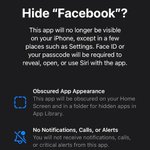

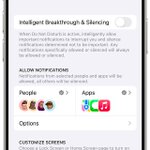
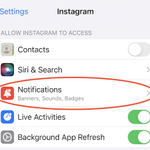
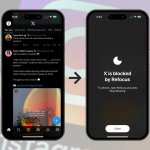




Hello 👋 Refocus is an application that allows you to block apps & websites. It uses Apple's Screen Time technology. Please check it out, and send feedback! apps.apple.com/app/block-app…
Refocus App - Block Apps & Websites on iPhone retweeted

yall i'm actually leaving fr this time this is my literal setup for my phone. unfortunately i cannot delete the apps (x and the refocus app) nor edit the restriction time and will eventually get lazy to find a way.
all for u zkzgd HAUFHANSGKSHG SEE YOU ALL LATER


📲 What's The Best App Blocker?
I recommend searching "website blocker" or "app blocker" on your App Store to find what works best for you. Refocus is an app blocker that's designed with these principles in mind: apps.apple.com/us/app/apple-…
202
📉 Friction: How To Lose A Billion Dollars
Still doubt that app blockers reduce engagement? Try asking the CEO of TikTok to block the app every 5 minutes, requiring users to open a separate app ("The TikTok Unblocker") to continue. They’d never do it—it would cost them billions because people would stop using TikTok so much.
1
260
Social media apps work hard to eliminate friction. The less friction, the longer you stay. Apps like TikTok have mastered this: they’re so seamless, you easily lose track of time.
App blockers do the opposite—they add friction. The blocking disrupts the seamless experience of social media. The extra 5 seconds to unblock adds up, and over time, it will reduce your screen time. That’s the power of friction.
1
14
📵 The Key Concept: Friction
Have you ever abandoned a web page because it loaded too slowly? That’s friction. Any friction, like a delay in loading, can make you stop using an app. Even a 0.1-second delay in search results, repeated millions of times, can cost companies like Google billions.
1
29
Once the app is blocked again, you get to choose what to do next. You might unblock repeatedly—that’s okay. The extra step of unblocking makes the apps less appealing, reducing your urge to use them over time.
Your first goal is to keep the app blocker installed. Once comfortable with the current restrictions, gradually increase them. Repeat until you’re back in control of your screen time.
1
22
Try this approach instead:
1) Block distracting apps all day
2) Unblock them for a short duration when needed
3) Repeat
This method flips how you use your phone. Instead of mindlessly opening apps and losing track of time, you consciously decide how long to use them.
1
32
🧵Tired of Mindless Scrolling? Add 5 Seconds of ‘Friction’
Most people don’t use app blockers effectively. They start with heavy restrictions, then quickly delete the blocker because it’s too frustrating. The cold turkey approach rarely works. Fortunately, there’s a better way.

1
5
1,042
For more:
- Download Refocus (an app blocker): apps.apple.com/app/apple-sto…
- Learn how to use app blockers: refocusapp.co/articles/how-t…
- Same information in an article form: refocusapp.co/articles/how-t…
136
🌄 Tip 7: Explore offline activities
This might sound obvious, but if you have nothing better to do than to check the phone, of course you will check the phone! The phone offers excellent entertainment, so you need to consciously choose to replace it with other activities.
Consider these suggestions to start with:
• Sports
• Nature walks (e.g., hiking)
• Reading books
1
158
📴 Tip 6: Create phone-free zones
Your surroundings play a big role in your phone habits. If your phone is always within reach—like on your bedside table—it’s easier to fall into the habit of mindlessly checking it. By creating physical barriers, you’ll make it easier to break the habit of constantly reaching for your device.
Try making these changes to your environment:
- Keep your phone out of the bedroom; use a physical alarm clock instead.
- Store your phone in a drawer or another room when focusing on tasks.
- Place your phone out of reach during meals to encourage mindful eating and conversation.
- Set up a charging station away from common areas to discourage casual use.
- Avoid bringing the phone into the bathroom.
1
13
🙈 Tip 5: Hide apps
Hiding distracting or time-consuming apps can reduce the temptation to open them impulsively.
Here are a few ways to increase the friction of accessing these apps:
- Move the app to a different Home Screen page.
- Place the app inside a folder, then drag it to a different page within the folder.
- Remove the app from your Home Screen: press and hold the app > select "Remove App" > choose "Remove from Home Screen."
- Remove the app from Siri & Search: open the "Settings" app > find the specific app's settings (e.g., "Instagram") > tap "Siri & Search" > toggle everything off.

1
60